Start with the controller and platform you already use: supported system settings may be enough if you only need to swap existing button assignments. Choose rear controls and stored profiles when you need more commands within reach, or consider an adaptive setup when the physical arrangement needs to change; check the intended game, device and connection mode before buying.
Who needs custom controls?
Players who need simple button swaps
If familiar controls are in the wrong places, check your existing platform settings before replacing the controller. Nintendo documents button mapping for specified Switch controllers, while Xbox supports remapping on compatible controllers through Xbox Accessories.
Players who need more commands within reach
Rear buttons or paddles may suit you when exchanging face-button assignments is not enough. PlayStation documents mappable back buttons on DualSense Edge; Xbox documents paddles and stored profiles on Elite Series 2.
Players who need a different physical arrangement
If a conventional handheld layout does not fit your preferred arrangement, consider configurable placement or compatible external inputs. PlayStation Access and Xbox Adaptive Controller offer different ways to build such a setup within their respective platforms.
What matters when choosing?
Decide whether you need to reassign existing inputs, add reachable controls or change where the controls sit. These are different purchases, even when each controller is described as customisable.
Remap a supported controller
Choose when: Swapping existing inputs would solve the layout problem on your platform.
Trade-off: System mapping does not add physical controls; Nintendo Switch presets stay on the console.
Add rear controls and profiles
Choose when: You want reachable rear inputs or quick changes between layouts while retaining a handheld controller.
Trade-off: PlayStation DualSense Edge and Xbox Elite Series 2 remain conventional handheld designs, and features can vary outside their primary platforms.
Build an adaptive layout
Choose when: Control placement or compatible external switches and joysticks matter more than a standard handheld shape.
Trade-off: An Access or Xbox Adaptive Controller setup may also need compatible external controls or mounting equipment.
| Concern | What to check | Who this matters to |
|---|
| Existing remapping |
Check whether your controller and platform permit the button swaps you need, including any excluded inputs and where presets are saved. |
If I only need familiar buttons in different places, I would rather check my current setup before changing hardware; around 36% of consumers put simple reassignment first. |
| Reachable controls |
Check which rear buttons or paddles can be assigned and whether the controller can switch between your required profiles. |
Moving commands to the back matters when swapping face buttons still leaves them awkward to reach; roughly 29% of consumers prioritise extra reachable controls or profile changes. |
| Physical layout |
Check placement, mounting and the port types required by any compatible external controls. |
A handheld controller may not suit the arrangement I want, even after remapping; around 21% of consumers primarily need a different layout or external inputs. |
| Use across devices |
Check the exact operating system, connection mode and configuration software for each device you plan to use. |
Connecting to another device is not enough if I cannot configure the controls there; roughly 14% of consumers put cross-device configuration first. |
Common buying mistakes
-
Assuming customisable means more physical buttons
Basic remapping may only exchange or disable existing inputs, which will not solve a need for another reachable control.
List the commands you want to move, then decide whether reassignment, rear controls or external inputs provide the arrangement you need.
-
Checking pairing but not configuration
A Bluetooth connection does not necessarily make configuration features available. Xbox says most Xbox Accessories app features are not supported over Bluetooth on Windows; 8BitDo specifies a wired or 2.4 GHz connection for configuring its Ultimate Bluetooth Controller on PC.
Check the exact model, device and connection method needed both to set up and to use your chosen layout.
-
Planning an adaptive setup around the controller alone
The arrangement you want may depend on compatible external controls or mounting hardware.
Plan each input and its position, then check port types, mounts and whether another controller is needed for particular functions.
Compatible switches, buttons, joysticks and mounts may be sold separately.
-
Assuming profiles follow the controller everywhere
Nintendo says Switch button-mapping presets are saved on the console, whereas Xbox documents controller-stored profiles for Elite Series 2.
If you move between devices, check where your particular controller stores its profiles and how you switch between them.
Relevant brands to consider
PlayStation
Two PS5-focused approaches: DualSense Edge retains a handheld layout with rear controls, while Access supports a configurable physical arrangement.
- PlayStation documents mappable back buttons and switchable profiles for DualSense Edge, and configurable buttons, up to 30 PS5 profiles and four 3.5 mm expansion ports for Access.
- Features on other devices may vary; check the intended game and device rather than assuming every PS5 feature transfers.
Xbox
Options range from remapping supported standard controllers to Elite Series 2 paddles and the external-input-focused Xbox Adaptive Controller.
- Xbox documents remapping through Xbox Accessories, stored profiles on Elite Series 2 and compatible external inputs for the Adaptive Controller.
- On Windows, most Xbox Accessories app features are not supported over Bluetooth; an adaptive arrangement may require separately sold controls.
Nintendo
A Switch system-settings route for players who need supported button reassignment rather than additional controller inputs.
- Nintendo supports button mapping and saved presets for specified Joy-Con and Nintendo Switch Pro Controller types.
- Some buttons cannot be remapped, and Switch mapping presets stay on the console rather than the controller.
8BitDo
A software-led option to assess model by model when mappings and sensitivity settings matter.
- 8BitDo lists button mapping and stick and trigger adjustment for its Ultimate Bluetooth Controller.
- That model cannot be configured on a Windows PC over Bluetooth; its documented configuration modes are wired and 2.4 GHz wireless.
Joybuy controller choices
These controllers cover handheld routes to changing controls, from button reassignment to rear inputs or a modular layout. Decide what needs to change in your setup before comparing their platform and configuration requirements.
 No image available
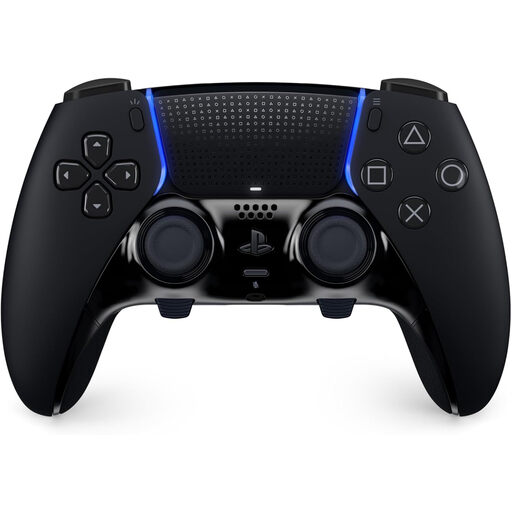
Sony DualSense Edge PS5 Wireless Controller – Midnight Black
Consider this PS5 handheld controller if you need commands on rear buttons rather than only swapping existing assignments.
PlayStation documents mappable back buttons, adjustable controls and switchable profiles for DualSense Edge. Check feature support for your game or any other device; replaceable stick modules are sold separately.
View on Joybuy
 No image available
Microsoft Xbox Elite Wireless Controller Series 2 – Xbox and PC
Consider this Xbox and Windows handheld option when paddles and changes between stored layouts matter to you.
Xbox documents interchangeable paddles and storage for up to three custom profiles plus a default profile. For Windows configuration, check whether USB or an Xbox Wireless Adapter is needed instead of Bluetooth.
View on Joybuy
 No image available
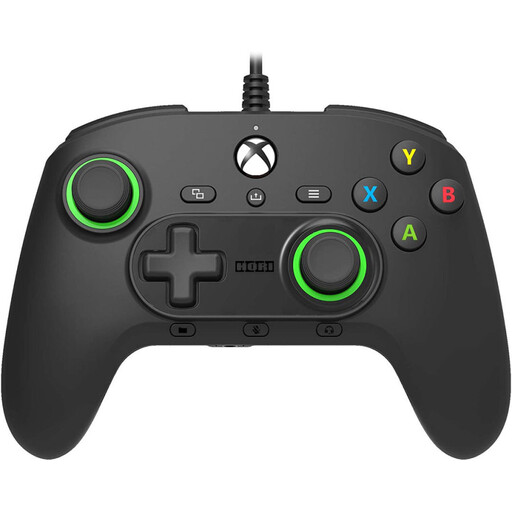
HORI Horipad Pro Controller – Xbox Series X and Xbox One S
Consider it if selected shoulder-button assignments are the controls you want to change.
Check that its available mappings cover your intended buttons. Confirm the connection method for this variant before buying.
View on Joybuy
 No image available
Turtle Beach Victrix Pro BFG Reloaded Wireless Modular PlayStation Controller – White
Consider this modular handheld design if changing the position of controller components is part of your preferred layout.
Check that the included modules, configuration software and connection mode provide the arrangement you need on your intended device.
View on Joybuy
 No image available
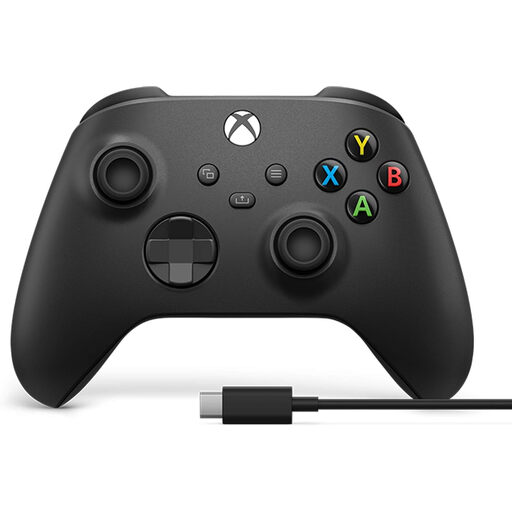
Xbox Wireless Controller with USB-C Cable – Series X|S, One and Windows
Consider a supported standard controller if changing existing button assignments is sufficient and you do not need extra physical controls.
The product name specifies an included USB-C cable. Xbox documents remapping through Xbox Accessories on supported controllers; check your game and Windows connection method before relying on a particular configuration.
View on Joybuy
Questions about custom controls
Will remapping let me customise every control in every game?
No: platform-level remapping changes supported controller inputs, but it does not establish support for every game feature or input. Check the game’s controller options alongside the exact controller, platform and connection mode you intend to use.
Can I use Xbox Accessories over Bluetooth on a Windows PC?
Do not rely on Bluetooth for the app’s full configuration feature set: Xbox says most Xbox Accessories app features are not supported that way on Windows. Check whether your controller needs a USB connection or Xbox Wireless Adapter for setup.
Will my Switch button mappings follow my controller to another console?
No. Nintendo says Switch button-mapping presets are stored on the console, not the controller, so pairing that controller with another Switch does not carry its presets across.
Must a PlayStation Access controller replace my regular controller?
No. PlayStation says an Access controller can be combined with a DualSense or DualSense Edge controller, or used with another Access controller as one virtual controller. Plan which controller will provide each function your intended setup requires.


