Shared-home voice-chat players
If other household activity makes conversation difficult, start with how you will hear friends and speak to them. The headset connection and the game or platform’s chat method both matter.


Prioritise the equipment that addresses the problem you actually encounter at home: voice chat, controls, game storage, display output or the local Wi-Fi connection. Check the exact platform, product variant and connection method before buying; a wireless or multi-platform label does not establish that every feature will work in your setup.
If other household activity makes conversation difficult, start with how you will hear friends and speak to them. The headset connection and the game or platform’s chat method both matter.
Moving between console, PC and mobile makes the exact controller or headset variant important. A device may connect in more than one way without offering the same audio or accessory functions through each connection.
If game storage, the display or a busy home connection is the main obstacle, choose equipment for that particular constraint. Check whether added storage can launch your games, which output mode your display can accept, or whether Wi-Fi is the source of a connection problem.
Identify the problem that most often interrupts your online play, then check the platform-specific conditions before choosing an accessory. A headset, storage upgrade and Ethernet cable address different problems and may all be useful in the same home.
| Concern | What to check | Who this matters to |
|---|---|---|
| Voice chat | Match the headset variant and connection to your device; check the game or platform’s chat method. | If I play with friends while others are active at home, I need a way to hear and be heard that works in my game. Around 25% of consumers would put working voice chat first. |
| Controls across devices | Check the controller’s exact device and connection support, especially if you need audio through the controller. | Switching between console and PC matters more to me than using the same control layout on just one device. Around 25% of consumers would make controller compatibility their primary concern. |
| Playable storage | Check whether your console can launch the relevant games from the added storage, not just store them there. | When install space runs short, I want added capacity that lets me play the games I keep installed without repeatedly moving them. Around 19% of consumers would prioritise direct-play storage. |
| Display output | Match the console and game mode to the display input and cable, including resolution and refresh rate. | If my current screen limits the output mode I want to use, display compatibility becomes the reason to upgrade. Around 19% of consumers would put that concern first. |
| Home connection | Check whether the trouble is on Wi-Fi and whether a practical Ethernet connection is possible. | During busy household use, I want to address interruptions on my local connection before replacing gaming peripherals. Around 12% of consumers would prioritise that connection issue. |
Logitech G lists different primary console compatibility for its A30 Xbox and PlayStation variants. The family name alone does not tell you which version or transmitter arrangement your devices need.
Check the exact variant, the transmitter supplied and the required connection for each console before ordering.
PlayStation says PS5 games stored on USB extended storage must be moved back to console or M.2 SSD storage before play. Xbox Support says Optimised Xbox Series X|S games must be installed on the internal SSD or a Storage Expansion Card to play.
Choose added storage according to the games you need to launch directly, rather than capacity alone.
For 4K gaming at 120 fps on Xbox Series X, Xbox Support specifies an Ultra High Speed HDMI cable and an HDMI 2.1-capable display. PlayStation also ties PS5 120 Hz output to a compatible display and supported game.
Check the console model, game mode, display input and cable as one setup.
A wired connection bypasses the device-to-router Wi-Fi link, but it does not resolve a provider fault or outage. Ofcom advises checking other household Wi-Fi activity, including large game downloads, when investigating connection problems.
Find out whether the issue occurs on Wi-Fi during household use, then check the router and device ports and the cable route.
PlayStation’s PS5 guidance is useful when choosing console storage or checking a planned display mode.
Xbox Support documents controller connections, playable storage expansion and display requirements for its consoles and supported Windows setups.
Nintendo’s chat guidance helps Switch players check how a particular game handles conversation before choosing a headset.
Logitech G offers headset models positioned for different gaming-device arrangements; compatibility needs checking by model and variant.
Razer is relevant to Xbox and PC players considering a controller with a specifically stated platform scope.
These options cover gaming audio, a PS5 controller and a display. Match one to the problem in your home setup rather than treating the products as interchangeable upgrades.
 No image available
A wired headset to consider when voice communication is your main priority at home. Check that its connection fits your device and that your game’s chat method supports the setup you plan to use.
Gen 2 wired model; white finish.
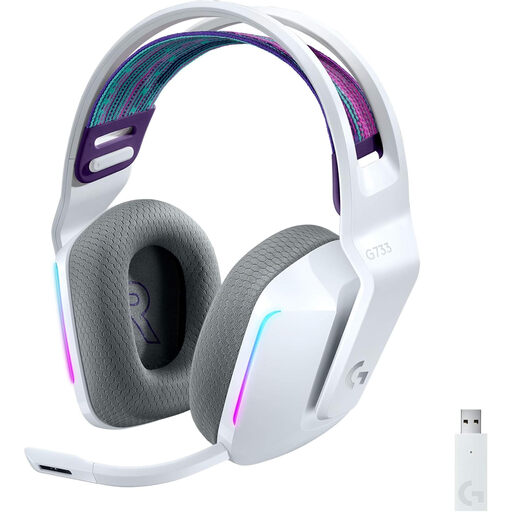 No image available
A wireless audio option if you would rather avoid a headset cable in your home setup. Check the connection required by your device and confirm the voice-chat method for your particular game.
G733 LIGHTSPEED wireless model; white finish. For Switch use, check whether the docked connection described for this product meets your needs.
 No image available
An additional or replacement controller for a PS5-focused setup. If you also plan to use it with a PC, check the connection and game features you require rather than assuming they work identically across devices.
DualSense PS5 wireless controller; Midnight Black V3 variant.
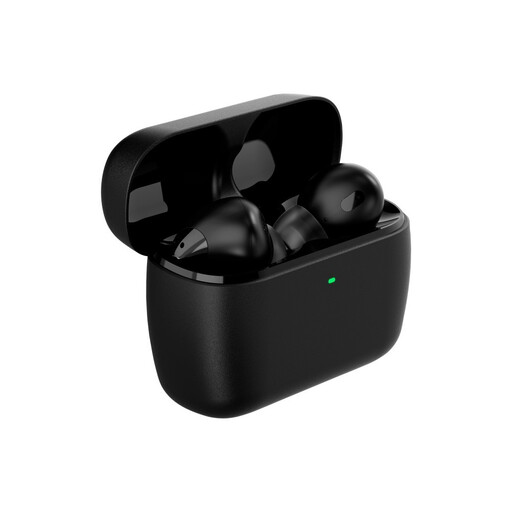 No image available
An in-ear gaming-audio option for consumers who prefer earbuds to an over-ear headset. Check the connection for your exact device, your game’s voice-chat method and whether the ear tips suit you.
Cloud MIX Buds 2 in-ear design with a microphone.
 No image available
A display option if your current screen is the main constraint. Its listed 2560 × 1440 resolution and 165 Hz refresh rate do not establish which modes your console can use through a particular input; check the console, input and cable together.
32-inch, 1500R curved model in black. Confirm the colour-gamut figure if it matters to your use, as the product information gives conflicting figures.
No: a microphone alone does not establish that the game’s chat route will work. For voice chat through the Nintendo Switch App, Nintendo specifies Nintendo Switch Online, a Nintendo Account, compatible multiplayer software and the same account on the console and smart device. Check the game’s chat method before choosing a headset connection.
No, not through that connection according to Xbox Support’s Windows controller table. It lists Bluetooth for controller connection but not for audio or accessories attached to the controller; check the listed USB and Xbox Wireless Adapter routes if controller-connected audio is essential.
No. PlayStation says PS5 game data stored on USB extended storage must be moved back to console storage or compatible M.2 SSD storage before play. Check PlayStation’s interface, size and cooling requirements when choosing an internal M.2 SSD.
Xbox Support says those games must be installed on the console’s internal SSD or a Storage Expansion Card to play. An ordinary external drive can serve a storage role, but it is not the equivalent direct-play expansion for Optimised Xbox Series X|S games.
No; the requirements depend on the console and the resolution you want. Xbox Support specifies an HDMI 2.1-capable display and Ultra High Speed HDMI cable for 4K gaming at 120 fps on Xbox Series X, while lower-resolution 120 Hz setups have different conditions. For PS5, PlayStation ties 120 Hz output to a compatible display and supported game.