What matters when choosing
Check the games you intend to play before paying for hardware features you may not need. Then measure the space for the complete setup and decide how much built-in screen room you want.
Compact 14-inch laptop
Consider it when: Desk space and portability take priority over a larger built-in screen.
Trade-off: Check upgrade options on the exact model; ASUS lists onboard memory without expansion for its cited ROG Zephyrus G14 (2025) configurations.
Larger gaming laptop
Consider it when: You want more built-in viewing space for decorating menus and have room for the laptop and its accessories.
Trade-off: The larger screen does not settle desk fit; allow for the chassis, mouse and charger before choosing a configuration.
| Concern |
What to check |
Who this matters to |
| Games and storage |
Compare each game’s current requirements with the exact CPU, GPU, RAM and available SSD space. Plan for installed content as well as the base game. |
If my decorating library keeps growing, I need room for the games and content I actually use, not just a laptop that meets one minimum requirement. Around 42% of consumers put game and library fit first. |
| Desk fit |
Measure usable width and depth against chassis dimensions, leaving space for a mouse, charger and cables. |
With a crowded desk, I need to arrange objects comfortably without giving up the space my mouse needs. For around 33% of consumers, fitting the full setup is the primary concern. |
| Screen and configuration |
Check the exact screen size, resolution and panel specifications. If you plan to use an external display, check the laptop’s display-output ports too. |
I want menus and room details to be comfortable to view, but I would rather choose the screen features I will use than rely on a product-family headline. Screen and configuration balance comes first for around 25% of consumers. |
Joybuy laptops and a portable display
These choices include gaming laptops with different screen sizes and a portable second monitor for a laptop. The monitor is a display accessory, not a gaming laptop. For any laptop here, check your games’ requirements and the space needed for the complete desk setup.
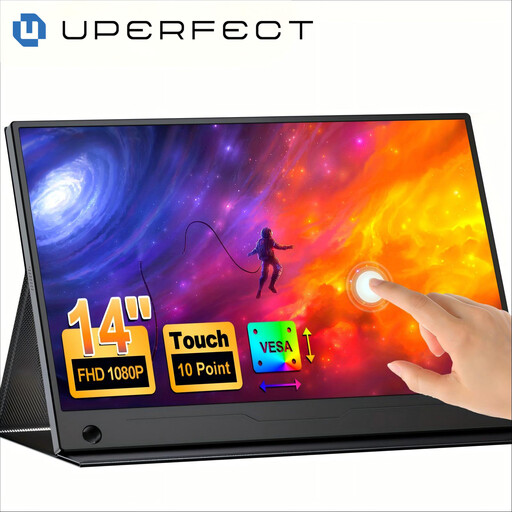 Image unavailable
UPERFECT 14-inch touchscreen portable monitor
Consider this as a second display alongside a laptop, rather than as the computer on which to play. Its title lists a 14-inch touchscreen, 60Hz refresh rate, 100% sRGB coverage, VESA mounting and an adjustable stand. Check its connection requirements and the room needed for both screens.
View on Joybuy
 Image unavailable
Lenovo LOQ Essential 15ARP11 gaming laptop
Consider its larger built-in screen if you can allocate enough desk space for a mouse and charger. The title lists a 15.6-inch Full HD 144Hz display, AMD Ryzen 7 170, GeForce RTX 5050, 16GB RAM and a 1TB SSD. Check the exact games you play against this configuration.
View on Joybuy
 Image unavailable
Lenovo Legion Pro 7 16IAX10H, 83F5000UUK
This is a 16-inch option to consider only if the complete setup fits your desk and its configuration suits your games. The title lists an Intel Core Ultra 9, GeForce RTX 5090, 64GB RAM and a 2TB SSD. Check chassis and charger dimensions before committing desk space to it.
View on Joybuy
 Image unavailable
MSI Pulse 16 AI gaming laptop
Consider the 16-inch screen if you want a larger on-laptop workspace and have room for the setup. The title lists a QHD+ 240Hz display, Intel Core Ultra 7 155H, GeForce RTX 4060, 16GB DDR5 RAM and a 1TB SSD. Confirm the exact part number and configuration before comparing it with other 16-inch models.
View on Joybuy
 Image unavailable
THUNDEROBOT Radiant S16 gaming laptop
Consider this 16-inch configuration if its footprint and your games’ requirements make sense for your desk. The title lists a QHD+ 240Hz display, AMD Ryzen 7 7745HX, GeForce RTX 5060, 16GB DDR5 RAM and a 1TB SSD. Check chassis and charger dimensions, along with the UK configuration and support terms, before buying.
View on Joybuy
Frequently asked questions
Do I need a high-end gaming laptop just to decorate in The Sims 4?
Not necessarily: start with Electronic Arts’ requirements for The Sims 4 rather than the laptop’s gaming label. EA’s recommended PC specification includes 8GB RAM and 50GB of free space, plus at least 1GB for custom content and saved games; check the requirements of other games separately.
Is a 14-inch or larger laptop easier to use at a small desk?
A 14-inch laptop is the more compact screen-size route when desk fit is the priority, while a larger built-in screen may suit you if there is room for the whole setup. Compare actual chassis dimensions and leave space for the mouse, charger and cables.
How much storage should I allow for The Sims 4 custom content?
Electronic Arts recommends 50GB of free space for The Sims 4 plus at least 1GB additional space for custom content and saved games. That is not a whole-laptop storage target: allow for your other games and files, and check the free space available on the configuration you choose.
What should I do if my new laptop is faulty?
Contact the seller and keep your order confirmation and the advertised specification. GOV.UK explains that the Consumer Rights Act 2015 addresses faulty goods, so do not treat a manufacturer warranty as your only route for raising a fault.


