Players with limited sockets
If you want fewer separately powered items on your desk, a laptop’s integrated screen makes it a practical starting point. You still need to account for its adapter and anything else sharing the socket.


Start with a gaming laptop if reducing separately powered items matters most: its built-in screen, keyboard and trackpad avoid the separate monitor needed for a typical desktop setup. For Minecraft Java Edition’s recommended 1080p, 60 FPS Fancy target, check the exact configuration against Minecraft’s 16 GB RAM and 6 GB graphics-memory requirements; choose a desktop if expansion or a separate display matters more than socket simplicity. Whichever route you take, Electrical Safety First advises keeping the combined load within an extension device’s marked rating.
If you want fewer separately powered items on your desk, a laptop’s integrated screen makes it a practical starting point. You still need to account for its adapter and anything else sharing the socket.
If your goal is Minecraft Java Edition’s recommended 1080p, 60 FPS Fancy target, use Minecraft’s published requirements to check the exact PC configuration rather than relying on a gaming label.
If a separate monitor and configurable desktop hardware matter more to you than a compact powered setup, a desktop remains an option. Plan for the display and other connected equipment as part of the whole setup.
Choose the form factor around your socket and desk constraints, then check the exact configuration against the game and settings you intend to use. The priorities below describe consumers whose primary deciding need differs, even when they share other concerns.
Choose when: You want the display and controls integrated into the computer.
Accept: Sustained gaming still calls for the mains adapter, and adding an external monitor adds another powered item.
Choose when: A separate display or configurable desktop hardware outweighs the need to minimise powered items.
Accept: The PC and monitor normally need separate power connections.
| Concern | What to check | Who this matters to |
|---|---|---|
| Socket load and setup | List the computer, display and other powered items; compare their combined load with any extension device’s marked rating. | I want to build my world without filling the desk with separately powered equipment, but I also need to know the shared socket can handle the load. Around 36% of consumers put this compact, safely planned setup first. |
| Minecraft Java target | For Minecraft Java Edition’s published 1080p, 60 FPS Fancy target, check for 16 GB RAM, a suitable processor and a graphics card with 6 GB VRAM. | I care about reaching the recommended Minecraft Java settings, not simply launching the game at its lower minimum target. That is the primary need for around 29% of consumers. |
| Mods and other workloads | Check the intended modpack, shaders, resolution and any server-hosting requirements separately. | If I plan to use mods or host a server, I need to choose for those specific demands rather than assume the standard game target covers them. Around 21% of consumers make this extra headroom their first priority. |
| Desktop expansion | Check the chosen desktop configuration and include the monitor and other equipment in the power plan. | I would accept a more involved powered setup to use a separate display or configurable desktop hardware. For around 14% of consumers, that flexibility comes first. |
An extension lead can have empty outlets yet still be overloaded by the appliances already connected, creating an overheating and fire risk.
Follow Electrical Safety First’s advice: check the device’s marked current rating and the combined load of everything connected. An unused outlet is not proof of spare capacity.
Daisy-chaining extension devices can increase the risk of overloading and overheating. A cable reel can also overheat if used while wound.
Electrical Safety First advises using only one extension device per wall socket and fully unwinding a cable reel for its rated current. If extension leads are a permanent necessity, consider additional sockets installed by a registered electrician.
Minecraft distinguishes its lower 1080p, 30 FPS Fast minimum target from its recommended 1080p, 60 FPS Fancy target. Meeting one does not establish that you meet the other.
For the recommended Minecraft Java Edition target, check the exact PC for 16 GB RAM, a suitable processor and a graphics card with at least 6 GB VRAM. Check mods, shaders and server hosting separately.
A family name or an “up to” specification does not identify the processor, graphics, memory or adapter of the particular configuration you will receive.
Compare the full model or part number, RAM, graphics memory, storage, display and supplied adapter before ordering.
The LOQ laptop line is relevant to a setup that uses a built-in display.
The Nitro V 15 is a gaming-laptop family for buyers considering an integrated display.
Katana 15 HX is relevant if you are considering a 15.6-inch laptop with higher-resolution display options.
Dell’s Alienware Aurora and Area-51 desktop lines are relevant when a separately powered monitor and a configurable desktop setup are acceptable.
These laptops have built-in displays, making them relevant if you want to create a sandbox world without a separately powered monitor in the basic setup. Compare the exact configuration with your game’s requirements and check the adapter and shared electrical load before buying.
 Image unavailable
Consider this built-in-display laptop if keeping the basic desk setup to one computer matters most.
The named configuration has 16 GB RAM, a 1 TB SSD and a 15.6-inch 144 Hz Full HD display. Check the exact graphics memory against your game target, and confirm the supplied adapter’s UK plug and rating before sharing an extension device.
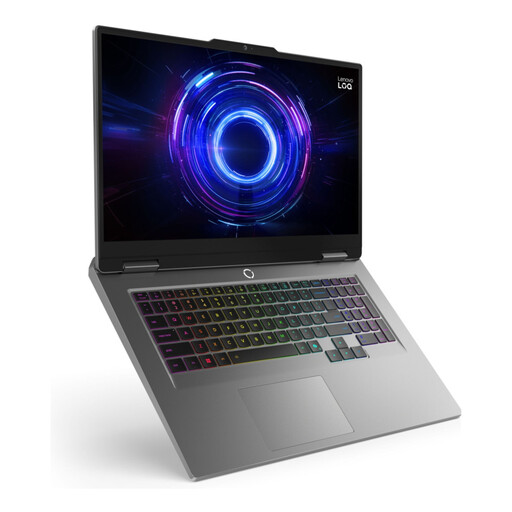 Image unavailable
Consider this laptop if you want an integrated display while giving memory capacity particular attention.
The name identifies an i7-13650H configuration with 24 GB RAM, 1 TB storage and W11H. Check the exact graphics specification for your game, and confirm the adapter rating and UK plug for your socket plan.
 Image unavailable
Consider this integrated-display laptop if your planned applications make memory and storage important.
Its name specifies a 16-inch QHD+ model with 32 GB memory and 4 TB storage. Confirm the exact GPU rather than assuming the 5080 designation fixes the supplied graphics configuration; also check which adapter applies, whether it is supplied and its UK plug details.
 Image unavailable
Consider this built-in-display laptop if your specified workload calls for the named memory and graphics configuration.
Model 83F5000UUK is named with an Intel Core Ultra 9, 64 GB RAM, a 2 TB SSD, NVIDIA GeForce RTX 5090 and Windows 11 Home. Confirm the supplied adapter, its rating and UK plug details before planning a shared connection.
 Image unavailable
Consider this laptop if you want an integrated display and the named 16 GB memory configuration.
The product name specifies a 17-inch Full HD model with 16 GB RAM, a 1 TB SSD and Windows 11 Home. Check its exact graphics memory against your game target, and confirm the adapter rating and UK plug details for your setup.
A gaming laptop is usually the simpler starting point because its screen and controls are built in, rather than requiring a separately powered monitor for basic use. Count any speakers, chargers, lighting or external display too, and keep their combined load within the extension device’s marked rating, as Electrical Safety First advises.
For Minecraft Java Edition’s recommended 1080p, 60 FPS Fancy target, Minecraft specifies 16 GB RAM and a graphics card with 6 GB VRAM alongside a suitable processor. Its lower minimum targets 1080p at 30 FPS on Fast settings, so check the target you actually want against the exact PC configuration.
They can share one only when the combined appliance load stays within the extension device’s marked maximum current rating. Electrical Safety First advises against plugging extension leads into each other and says a cable reel must be fully unwound to achieve its rated current.
Minecraft’s recommendation is a target for the stated Java Edition settings, not a specification for every modpack, shader or server-hosting workload. Check the requirements of the particular additions you plan to use before deciding how much memory, storage or graphics capability you need.
Confirm the exact configuration’s supplied adapter, cable, rating and suitability for a UK socket before planning where it will plug in. If you use an extension device, Electrical Safety First advises checking its marked rating against the combined load of everything connected.