Built-in large-screen strategists
If maps, toolbars and information panels must fit on the laptop display without a separate monitor, start by comparing 18-inch configurations and their actual panels.


Choose an 18-inch laptop if the built-in display needs to give you more physical room for maps, menus and information panels. A high-resolution 16-inch model is a smaller-screen alternative if that room is less important; whichever size you choose, check the exact panel, memory and storage configuration. Paradox Interactive recommends 16 GB RAM and an SSD or NVMe drive for Crusader Kings III, but that game-specific guidance does not establish what every grand strategy game or mod setup needs.
If maps, toolbars and information panels must fit on the laptop display without a separate monitor, start by comparing 18-inch configurations and their actual panels.
If long campaigns, expansions or other open applications shape your choice, check memory and storage alongside the screen. Paradox Interactive recommends 16 GB RAM and an SSD or NVMe drive for Crusader Kings III; those recommendations are not a performance guarantee for mods.
If a 16-inch display gives you enough room, a high-resolution configuration may be worth comparing with 18-inch models. Check the complete specification rather than assuming the smaller panel comes with the same components.
For grand strategy games played on the laptop's own screen, decide whether 18 inches is important for the interface before comparing game requirements and the components in a particular configuration.
| Concern | What to check | Who this matters to |
|---|---|---|
| Built-in screen area | Check the configured panel's diagonal size and native resolution; a high-resolution 16-inch panel is still physically smaller than an 18-inch panel. | I want maps and menus to have more room on the laptop screen without adding a monitor; around 30% of consumers put built-in screen area first. |
| Memory and storage | For Crusader Kings III, compare the installed RAM and drive with Paradox Interactive's recommendation of 16 GB RAM and an SSD or NVMe drive. | Long campaigns, expansions or other open applications make me pay close attention to the components I'm choosing; roughly 40% of consumers prioritise memory and storage. |
| Exact configuration | Check the full model or part number, selected CPU and GPU, panel, warranty terms and whether the laptop fits where you intend to use it. | I can accept a smaller screen, but I need to know precisely which components and support terms come with my choice; about 30% of consumers make configuration clarity their primary concern. |
Dell UK notes that changing selections for the Alienware 18 Area-51 can change specifications. A review of one configuration may not describe the components you select.
Check the complete model or part number and final panel, CPU, GPU, RAM and storage configuration before ordering.
A GPU name does not establish the installed memory or storage. For Crusader Kings III, Paradox Interactive recommends 16 GB RAM and an SSD or NVMe drive.
Compare the precise listing with the requirements of the games you intend to play, including its RAM amount and drive type.
The Lenovo UK Legion Pro 7i configuration described here has a 16-inch 2560 × 1600 display; the ASUS ROG UK Strix SCAR 18 configuration has an 18-inch 4K display. Resolution does not make their physical panel sizes equal.
Decide how much built-in screen area you want, then compare the configured resolution and other panel details.
Lenovo's Legion Pro 7i Gen 10 configuration and the Joybuy Legion Pro 7 16IAX10H listing have different stated model identities and components. A shared range name is not enough to treat them as the same product.
Match the complete model or part number, display, CPU, GPU, RAM and storage before applying information from one listing to another.
A reference point for an 18-inch integrated-display configuration.
A reference point for comparing component selections within an 18-inch laptop range.
A reference point if a high-resolution 16-inch screen is acceptable instead of an 18-inch panel.
These choices include an 18-inch laptop for playing on a larger built-in screen and 16-inch alternatives for consumers comfortable with a smaller panel. Compare each listing's exact configuration with your games and desk setup.
 No image available
Consider this model if an 18-inch built-in screen is central to your desk setup.
The listed configuration names an Intel Core Ultra 9 processor, 32 GB RAM, a 2 TB SSD and an NVIDIA GeForce RTX 4070. At a listed 2.89 kg, its weight is worth considering if you will move it often.
 No image available
Consider this configuration if a 16-inch built-in screen gives you enough room for your strategy-game interface.
Its title specifies an Intel Core Ultra 9 processor, 64 GB RAM, a 2 TB SSD and an NVIDIA GeForce RTX 5090. The screen remains physically smaller than an 18-inch panel.
 No image available
This is a 16-inch option if you can accept less physical screen area than an 18-inch laptop.
The title specifies QHD+, an Ultra 9 processor, 32 GB RAM and 4 TB storage. Its GPU description qualifies the 5080 designation with “or equivalent”, so confirm the installed GPU before choosing this configuration.
 No image available
Consider this 16-inch configuration if its smaller built-in display meets your needs.
The title identifies an AMD Ryzen 9 processor, 32 GB RAM, 2 TB storage and a 5060 GPU designation. Confirm the precise Ryzen 9 processor model if it matters to your comparison.
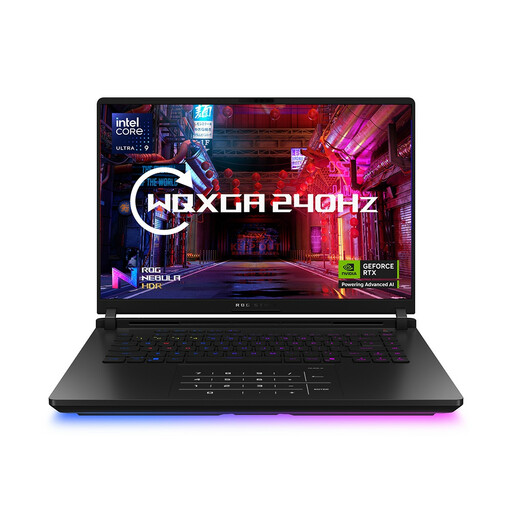 No image available
This is another 16-inch choice if a smaller built-in display is acceptable for your maps and menus.
The title specifies an Intel Core Ultra 9 processor, 64 GB RAM and a 2 TB SSD. GPU information for this listing conflicts, so confirm the exact installed graphics component before buying.
Choose 18 inches if more physical space on the laptop's own display is a priority, not because the genre requires that screen size. A high-resolution 16-inch model is an alternative when its smaller panel gives you enough room; check the panel fitted to the exact configuration.
Start with Paradox Interactive's recommended 16 GB RAM and SSD or NVMe drive, then check the components in the laptop you intend to buy. Those game-specific recommendations do not guarantee late-game performance with mods or establish requirements for other titles.
Read the seller's fault-claim information and the manufacturer's warranty terms, and keep proof of purchase. Citizens Advice states that warranties and guarantees add to legal rights; a voluntary warranty does not replace your rights when goods are faulty.
Check local-authority or retailer arrangements for electrical-equipment collection or recycling rather than treating the old laptop as ordinary household waste. GOV.UK identifies the UK's Waste Electrical and Electronic Equipment regulations as the framework for managing this type of equipment.