For tile-set work beside a bright window, check the exact laptop’s screen finish and normal-use brightness before choosing by its gaming GPU. An anti-glare specification is particularly useful when window reflections are the problem, but you still need enough memory, storage and graphics support for your own art software and games. For Photoshop on Windows, Adobe recommends at least 16 GB of RAM and a fast internal SSD; a higher GPU tier is a conditional choice, not a requirement for every 2D tile workflow.
Who this choice affects
Bright-window tile-set creators
If daylight falls across your screen while you draw tiles or review colours, assess reflections as well as stated brightness and colour coverage. The Health and Safety Executive also advises adjusting screen brightness and contrast to suit the room lighting.
Game-and-art workflow switchers
If you move between tile artwork, game testing and other applications, check memory, SSD space and the requirements of the tools you actually use. Adobe recommends 16 GB or more RAM and a fast internal SSD for Photoshop, while specific Photoshop features use the graphics processor.
Desk-first heavy-project creators
If you expect larger files or several creative applications and rarely carry the laptop, an 18-inch format may suit your workspace. Razer lists Blade 18 configurations with different memory and graphics options, so assess the particular configuration rather than the model family alone.
What to check before choosing
Start with how the screen behaves at your window-side desk, then check whether the laptop fits your tile editor, games and working space.
| Concern |
What to check |
Who this matters to |
| Daylight readability |
Check the exact panel finish and distinguish normal-use brightness from peak HDR brightness. |
When the window reflects in my screen, I need to see the artwork without relying on a brightness figure alone. Around 36% of consumers would put reflection control and daylight readability first. |
| Art and game performance |
Match RAM, SSD space and GPU support to your software and games; Adobe recommends at least 16 GB RAM and a fast internal SSD for Photoshop. |
I switch between making tiles and testing games, so I need a configuration that fits both workloads. Around 29% of consumers would make that balance their primary concern. |
| Colour and workspace |
Compare resolution, canvas space and stated colour coverage for the exact panel; coverage alone does not establish calibration quality. |
If my canvas and editing panels compete for space, I want room to inspect assets and judge colour. For around 21% of consumers, that workspace and colour need would come first. |
| Portability and desk fit |
Check chassis size and weight against how often you will move the laptop and the space available at your desk. |
I may move away from the window as the light changes, so carrying size matters more to me than a larger screen. Around 14% of consumers would prioritise portability and desk fit. |
Buying pitfalls
-
Treating peak HDR brightness as everyday bright-room brightness
ASUS specifies 1,100 nits peak brightness for the 2026 ROG Zephyrus G16, while Lenovo lists 500 nits and an anti-glare finish for configuration 83LT004XUK. Those brightness figures do not, by themselves, establish a like-for-like result beside your window.
For the exact model you intend to buy, compare panel finish and brightness figures measured under the same stated conditions. Do not infer an anti-glare finish from a peak-brightness claim.
-
Choosing by the GPU name alone
A gaming GPU does not replace sufficient memory and storage for art work. Adobe’s Photoshop recommendations include at least 16 GB RAM and a fast internal SSD, and its GPU-dependent features have their own support requirements.
Check your tile editor’s requirements, your games and the exact laptop’s RAM and SSD configuration before deciding how much GPU capacity you need.
-
Assuming every model in a family has the same screen
Lenovo lists an anti-glare IPS panel for Legion Pro 5 Gen 10 AMD part 83LT004XUK, but a glare OLED panel for Legion Pro 5i Gen 10 part 83LU0004UK. Both listings state 500 nits, yet their finishes differ.
Keep the exact part number alongside the screen specification when comparing listings or checking out.
-
Overlooking the seller and return process
A familiar model-family name does not establish the configuration being offered. For online orders, GOV.UK also distinguishes the limited period for cancelling a change-of-mind purchase from protections for faulty or misdescribed goods.
Before ordering, check the seller, exact model, current listing status, warranty terms and return process. Keep the order confirmation and the configuration details you purchased.
Brands and product lines to consider
Lenovo Legion
The Legion Pro 5 Gen 10 AMD configuration 83LT004XUK is a useful reference when an explicitly anti-glare screen is your starting point.
- Lenovo lists a 16-inch 2560 × 1600 IPS anti-glare display, 500 nits, 100% DCI-P3 coverage, 32 GB RAM and a 1 TB SSD for that part number.
- Panel specifications vary within the family: Lenovo lists a glare OLED display for Legion Pro 5i configuration 83LU0004UK.
ASUS ROG Zephyrus
The 2026 ROG Zephyrus G16 GU606 is a 16-inch option to examine if moving the laptop between workspaces matters.
- ASUS specifies a weight of 1.85 kg, a 2.5K OLED display and 1,100 nits peak brightness for this model.
- Peak brightness does not establish sustained normal-use brightness or an anti-glare finish. Confirm the panel specification of the exact SKU before choosing it for a reflective desk.
Razer Blade
The Blade 18 is an 18-inch, desk-oriented format to examine when screen size and configuration options take precedence over carrying size.
- Razer lists a 600-nit dual-mode IPS display and configurations with up to 128 GB RAM.
- Razer’s product page covers multiple configurations; confirm the display, memory and graphics of the one you intend to buy.
Joybuy product choices
These laptops offer different screen sizes and art-and-gaming configurations. For a desk beside a bright window, compare each exact listing’s panel finish and brightness before deciding whether its display suits the position.
 Image unavailable
Stormforce Exobook 16 QHD+, Ultra 9, 32GB, 4TB, 5080
Consider this 16-inch configuration if screen reflections are your main obstacle: its listing describes an anti-glare display. Check the exact panel’s brightness and colour coverage before relying on it for window-side colour work.
The product title specifies 32 GB memory and 4 TB storage.
Joybuy
 Image unavailable
MSI Stealth 18 AI Studio A1VGG-001UK, 32GB, 2TB
Consider the 18-inch format if the laptop will usually stay at your desk and you want a larger workspace for tile art. Check its panel finish and brightness against your window position.
The product title specifies an Intel Core Ultra 9 processor, 32 GB RAM, a 2 TB SSD and NVIDIA GeForce RTX 4070 graphics.
Joybuy
 Image unavailable
ASUS ROG Zephyrus G14 GA403WR-QS088W, 32GB, 2TB
Consider this 14-inch model if a smaller screen format suits how you move between workspaces. Confirm the exact panel finish and brightness before choosing it for the bright-window desk.
The product title specifies a WQXGA+ display, AMD Ryzen AI 9 HX 370 processor, 32 GB RAM, a 2 TB SSD and NVIDIA GeForce RTX 5070 Ti graphics.
Joybuy
 Image unavailable
Lenovo Legion Pro 5 LEG P5 R9, 32GB, 2TB, 5060
Consider this configuration for gaming alongside tile work, but check its own panel finish and brightness for the window-side desk. Do not assume it has the anti-glare display specified for a different Legion Pro 5 part number.
The product title specifies 32 GB memory and 2 TB storage.
Joybuy
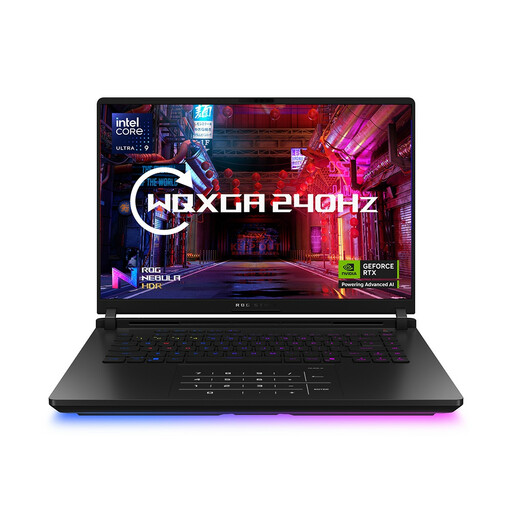 Image unavailable
ASUS ROG Strix SCAR 16 G635LW, 64GB, 2TB
Consider this 16-inch model if your software and multitasking justify its stated memory. Confirm the shipped GPU before ordering because the listing’s GPU information conflicts; also check the panel finish and brightness for your desk.
The product title specifies 64 GB RAM, a 2 TB SSD and a WQXGA display.
Joybuy
Common questions
Is a 500-nit laptop automatically suitable beside a bright window?
No. A 500-nit specification does not tell you how much light will reflect off the screen at your desk. If reflections are the main problem, check whether the exact panel is anti-glare; the Health and Safety Executive also advises adjusting brightness and contrast to suit room lighting.
Do I need 32 GB RAM and a high-end GPU to make tile sets?
Not for every tile workflow. Adobe recommends 16 GB or more RAM and a fast internal SSD for Photoshop on Windows, while GPU support matters for particular features. Choose more memory or graphics capacity when your own file sizes, software, 3D work or games call for it.
How should I use a laptop at a bright-window desk?
Position the screen to reduce reflections, keep it clean and adjust brightness and contrast to the room lighting, as the Health and Safety Executive advises. During gaming or rendering, keep the laptop’s air intakes and exhausts unobstructed.
What should I check about returns and product marking before ordering?
Check the seller, exact configuration and return process before paying. GOV.UK says online customers generally have 14 days from receiving an item to tell the trader they wish to cancel; remedies for faulty or misdescribed goods are a separate matter. For relevant product regimes in Great Britain, government guidance recognises CE marking alongside or in place of UKCA marking. Northern Ireland follows different processes, so check the rules applicable to your delivery location.


