Players short of plug sockets
If your PC card-game setup is beside a crowded extension lead, you may prefer a wired mouse or one with a replaceable battery to avoid a separate mouse-charging routine.


Choose a wired mouse if avoiding both charging and battery changes matters more than keeping a cable off the desk. A replaceable-AA wireless mouse removes the desk cable but needs spare batteries; a rechargeable wireless mouse suits you if its connections or controls justify planning when and how to charge it. For PC card games, check shape, scrolling and buttons you can actually use before prioritising a high sensor-DPI figure.
If your PC card-game setup is beside a crowded extension lead, you may prefer a wired mouse or one with a replaceable battery to avoid a separate mouse-charging routine.
If you move between compatible computers, a mouse offering both Bluetooth and receiver-based wireless use gives you connection options without a mouse cable on the desk. Check each computer before relying on either mode.
If you regularly navigate menus or assign secondary game actions, reachable buttons and a scroll wheel that feels right to you may matter more than the advertised maximum DPI.
Choose it when: You mainly play at one computer and do not want to charge or replace a mouse battery.
Trade-off: The cable remains on the desk and needs a suitable computer connection.
Choose it when: You want a cable-free desk without regularly connecting the mouse to charge it; Logitech G says its G309 uses one AA battery and offers LIGHTSPEED and Bluetooth.
Trade-off: Keep a compatible spare battery available, and check whether each computer supports your intended connection.
Choose it when: Wireless connections or configurable controls are worth managing a charging routine.
Trade-off: Check how the exact mouse charges and what the bundle includes; Razer lists a compatible dock and charging puck separately for its Basilisk V3 Pro 35K.
| Concern | What to check | Who this matters to |
|---|---|---|
| Avoiding a charging routine | Check whether the exact mouse is wired, rechargeable or uses a replaceable battery; confirm the computer connection or battery type. | If I want the mouse ready whenever I sit down to play, I would rather accept a cable or keep a spare battery than plan a charging session. Around 40% of consumers put freedom from a separate charging routine first. |
| A cable-free, flexible setup | Confirm Bluetooth support on each computer or a free USB port for the mouse's receiver; check which mode any battery-life claim covers. | When I switch computers or have little desk space, I want wireless connection options, even if I still have to manage mouse power. For around 30% of consumers, that flexibility is the primary need. |
| Comfort and useful controls | Assess grip, scrolling and button placement, then check whether the game allows your intended shortcuts. | Long sessions of clicking through menus make reachable controls and a comfortable fit more important to me than a sensor maximum. Roughly 30% of consumers prioritise those controls and comfort. |
Wireless mice still need either replacement batteries or charging. Logitech G specifies one AA battery for the G309, while the rechargeable Razer Basilisk V3 Pro 35K has compatible charging accessories listed separately.
Choose between keeping spare batteries and arranging charging before comparing wireless features. Check the exact bundle and charging method.
The ongoing task may be replacing batteries or making time to charge the mouse; a compatible charging accessory may also be a separate purchase.
A high sensor-DPI specification does not establish whether a mouse feels comfortable or makes card-game menus easier to navigate.
Check the shape, scroll-wheel behaviour and location of buttons you would use, rather than treating the maximum DPI as a substitute for those checks.
Bluetooth use requires a Bluetooth-capable computer. Receiver-based wireless use instead needs a compatible receiver and an available computer port.
Check the connections on every computer you intend to use and confirm what receiver, if any, comes with the exact mouse.
A mouse is an electrical product. GOV.UK says unwanted electrical products can be taken to a local household waste recycling centre.
Check your local electrical-waste and battery-collection options, and follow the device instructions before removing a battery.
The G309 is relevant if you want wireless use without a built-in mouse-charging routine.
The Basilisk V3 Pro 35K is relevant if you want several connection modes and configurable controls.
The M65 RGB ULTRA represents a wired route for a computer setup where a mouse cable is acceptable.
These mice cover wired choices for avoiding a mouse-charging routine and one rechargeable wireless choice for a cable-free desk. Compare their power arrangements before deciding which controls suit your card games.
 No image available
Consider this wired model if avoiding a mouse-charging routine matters more than keeping your desk cable-free.
The product name lists programmable buttons and RGB lighting. Check the cable length, computer connection, hand fit and scroll-wheel behaviour against your setup.
 No image available
This wired variant suits a fixed computer setup if a desk cable is acceptable and you do not want to manage mouse charging.
Check the cable connection and length, as well as the button layout and scroll wheel, if you plan to use shortcuts or navigate long menus.
 No image available
Its wired USB connection suits a computer setup where avoiding a separate mouse-charging routine is the priority.
Check the cable length, mouse shape and scroll-wheel feel if you expect to use it for extended card-game sessions.
 No image available
Consider this rechargeable mouse if a cable-free desk and assignable controls matter enough to plan for charging.
The product name specifies 53 g and ten programmable buttons. Its advertised battery life of up to 750 hours at 1000 Hz depends on a driver update that enables low-power mode; do not treat that maximum as a charging interval for every setup. Check that your computer has a suitable port for its wireless receiver.
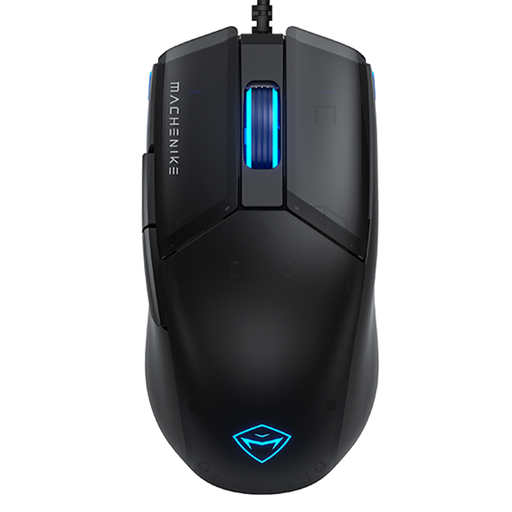 No image available
This wired model is relevant if you play at a fixed computer and are comfortable keeping a mouse cable on the desk.
Confirm the connection type and cable length for your computer. If shortcut access or scrolling matters, check the button layout and wheel before choosing it.
Not necessarily: a replaceable-battery mouse does not need charging, while a rechargeable mouse may be charged through a suitable computer USB connection or another compatible arrangement. Logitech G specifies one AA battery for the G309; check the power method and included accessories of the exact model you choose.
Bluetooth can keep a USB port free if your computer supports it; receiver use needs an available port and the appropriate receiver. For the G309, Logitech G presents LIGHTSPEED as its gaming-oriented wireless mode and Bluetooth as a flexible alternative, rather than establishing that one connection is preferable for every card game.
Only if you have actions to assign and can comfortably reach the buttons you would use. Razer lists 11 programmable buttons for the Basilisk V3 Pro 35K, but check your game's bindings and the mouse's layout before making button count a deciding factor.
Take it through an electrical-waste collection route rather than putting it in general household waste. GOV.UK says unwanted electrical products can be taken to a local household waste recycling centre; check local instructions for any removable battery.