What matters when choosing
RTINGS explains that brightness and direct reflections both affect viewing in a well-lit room. Check those before choosing how much map detail you want, then confirm the display mode available from your own device.
| Concern |
What to check |
Who this matters to |
| Glare and visibility |
Compare typical brightness, screen finish and reflection handling for the exact model. Consider whether a window or lamp will face the screen. |
If light falls across my screen, I want to read unit icons and menus without reflections obscuring them. Around 56% of consumers put glare control first. |
| Map and interface detail |
Compare QHD and 4K at the screen size you want, and check that your device supports the chosen resolution. |
When a battlefield is crowded with small labels, I want enough on-screen detail to follow a turn comfortably. Map detail is the primary concern for around 33% of consumers. |
| Connections and flexibility |
Check resolution and refresh-rate limits for the port you will use, alongside the stand adjustments you need. |
I also use the monitor for faster games or other PC tasks, so I need its display modes to work with my setup. Around 11% of consumers prioritise that flexibility. |
Joybuy product choices
These monitors offer different ways to approach bright-room tactical play, from smaller Full HD screens to larger, higher-resolution displays. For any screen that may face a window or lamp, weigh its surface finish and brightness alongside the map detail and gaming modes you need.
 No image available
Gawfolk 24.5-inch FHD curved monitor, 100 Hz
Consider this smaller screen if an anti-glare surface matters more to you than fitting fine map detail onto a higher-resolution display.
The product name specifies a 3000R curve, 100 Hz refresh rate, AMD FreeSync, HDMI, built-in speakers and a 75 × 75 mm VESA mount. Check whether its Full HD resolution gives you enough room for the maps and interface you use.
View on Joybuy
 No image available
iiyama ProLite XUB2792UHSU-B6 27-inch 4K monitor
Consider this 4K display if fitting detailed maps and interfaces on a 27-inch screen is your priority.
Its product name identifies a 4K UHD monitor. For a bright room, check its screen-surface treatment and reflection handling; also confirm the refresh-rate mode you want for any faster games.
View on Joybuy
 No image available
ASUS EYE CARE VY27UQ 4K UHD, 60 Hz
Consider this model if 4K map detail is more important to you than a refresh rate above 60 Hz.
The product name specifies 4K UHD and 60 Hz. Check the screen finish and reflection handling for your lighting, and decide whether 60 Hz also suits the other games you play.
View on Joybuy
 No image available
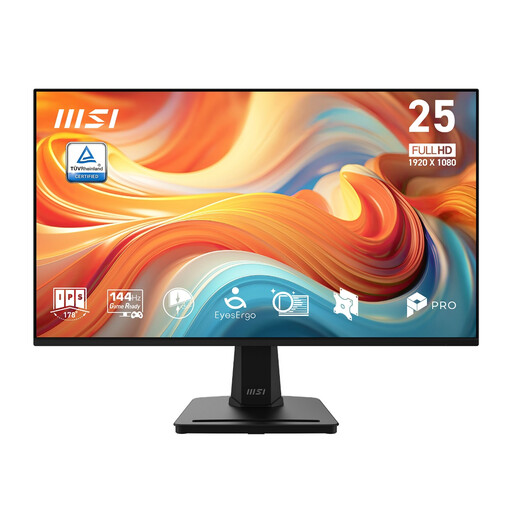
MSI PRO MP251 E14L 24.5-inch FHD, 144 Hz
Consider this smaller Full HD screen if you also want a 144 Hz mode for other games and can accept less map detail than on a higher-resolution display.
The product name specifies an IPS panel and Adaptive-Sync. Check reflection handling for your room and confirm that your chosen connection supports the mode you intend to use.
View on Joybuy
 No image available
AOC Q32V4 31.5-inch IPS monitor
Consider this larger screen if physical display size matters for your maps, while checking whether its resolution gives you the interface detail you want.
The product name identifies Adaptive-Sync and built-in speakers. Check its typical brightness and reflection handling before choosing a position near strong light.
View on Joybuy
Questions and answers
Is a high HDR brightness figure enough for a bright room?
No: check typical brightness and reflections as separate factors. RTINGS identifies brightness and reflection handling as influences on visibility in a well-lit room, while BenQ lists the EX2710U’s 300-nit typical brightness separately from its 600-nit HDR peak.
Do I need 4K to play turn-based tactics?
Not necessarily: choose between QHD and 4K according to the map and interface detail you want at your preferred screen size. If you choose a 4K model, check that your device supports the resolution and refresh-rate mode you intend to use; neither resolution removes the need to assess glare.
How can I check whether 4K at 144 Hz will work?
Match the exact monitor’s input requirements to your source device and connection. For the LG 27GR93U-B, LG states that enabling 144 Hz requires a graphics card supporting DisplayPort 1.4 with DSC or HDMI 2.1.
What should I check when replacing an old monitor?
Check the seller’s current recycling or collection arrangements for your old monitor. GOV.UK identifies the Waste Electrical and Electronic Equipment Regulations 2013, as amended, as underpinning the UK framework for waste electrical and electronic equipment; that guidance does not establish which collection service a particular seller offers.


