Compact-rig rally drivers
If you practise at a desk or in a narrow cockpit, a conventional QHD screen gives you a high-refresh option without requiring the width of an ultrawide. Check how your PC runs the sim at QHD before choosing a refresh rate.


For seated virtual rally practice, a 27-inch QHD monitor suits a compact setup if your PC can deliver the frame rate you want at 2560 × 1440. Consider a 34-inch ultrawide when a wider single-screen view matters more and your rig has room for it, but account for its greater GPU workload. OLED and a higher advertised refresh rate are separate decisions: judge them against your rally sim’s performance and the exact monitor’s features.
If you practise at a desk or in a narrow cockpit, a conventional QHD screen gives you a high-refresh option without requiring the width of an ultrawide. Check how your PC runs the sim at QHD before choosing a refresh rate.
If following fast-moving scenery is your priority, compare the refresh rate your PC can use, variable-refresh compatibility and the exact model’s response-time specification before deciding on screen width.
If you want a wider view on one screen, a 34-inch ultrawide is worth considering when your seated position, mounting space and GPU can accommodate it.
Check your rally sim’s frame rate at the resolution you intend to use, then decide how much screen width fits your seated setup. Assess variable refresh and HDR on the exact model rather than treating either label as a complete performance measure.
| Concern | What to check | Who this matters to |
|---|---|---|
| Smooth motion | Compare in-game frame rates with the monitor’s refresh rate. Check variable-refresh support for your GPU and intended connection. | If rapid scenery movement makes tearing or uneven motion distracting, I would put usable refresh and compatible variable refresh ahead of screen width. Around 36% of consumers put smooth motion first. |
| Detail and GPU workload | Test your sim at 2560 × 1440 and compare its frame rate with any wider resolution you are considering. | For a compact single-screen rig, I want clear track detail without choosing more pixels than my PC can comfortably render. Around 29% of consumers make that balance their primary concern. |
| Wider cockpit view | Measure desk or rig width and check game performance at 3440 × 1440. Confirm how your sim displays its field of view and HUD. | If seeing more to the sides on one screen matters most, I can allow for a wider panel and its greater rendering workload. A wider cockpit view comes first for around 21% of consumers. |
| Dark scenes and HDR | Look up any named VESA DisplayHDR or DisplayHDR True Black tier for the exact model; compare its panel specifications too. | For night or high-contrast stages, I care most about how a particular screen handles dark areas and highlights, not just an HDR label. Around 14% of consumers put those characteristics first. |
Refresh rate is how often the display can update; frame rate is what the PC renders. They are different measures, so a high-refresh screen cannot create frames the GPU has not produced.
Check your intended rally sim at the monitor’s native resolution, using the graphics settings and stage conditions you normally use.
VESA’s DisplayHDR and DisplayHDR True Black names identify certification tiers. An unqualified HDR label does not tell you which tier, if any, applies to a monitor.
Check the precise model for a named certification tier, then compare its panel specifications rather than relying on the listing title.
A 3440 × 1440 screen has more pixels to render than a 2560 × 1440 screen and needs more physical width. Sim Racing Setup describes an ultrawide as a wider single-screen option, not the same arrangement as triple screens.
Measure the mounting area and check game performance at the proposed resolution before changing formats.
A wider panel may also require a different arm or changes to the rig if your current mounting arrangement cannot accommodate it.
Variable-refresh operation depends on the monitor, graphics hardware and connection. AMD and NVIDIA describe their respective technologies in terms of compatible equipment and settings.
Check the exact display’s FreeSync or G-SYNC support alongside the port, cable and GPU you plan to use.
LG UK lists the 27GS95QE-B as a 27-inch, 2560 × 1440 OLED monitor with 240Hz refresh, quoted 0.03ms GtG response time and DisplayHDR True Black 400.
Dell UK lists the AW2725D as a flat 26.7-inch QD-OLED monitor at 2560 × 1440 and 280Hz, with quoted 0.03ms GtG response time.
AGON by AOC UK specifies a 27-inch, 2560 × 1440 Fast VA panel, 180Hz refresh and Adaptive Sync for the Q27G3XMN/BK.
Samsung UK lists the Odyssey G5 LC34G55TWWPXXU as a 34-inch, 3440 × 1440, 21:9 curved monitor with 165Hz refresh and FreeSync Premium.
These options cover ultrawide and conventional QHD screens for seated rally setups, including a larger curved QHD format. Compare their size and stated refresh capability with your available space, connection and in-game frame rate.
 No image available
Consider this 34-inch option if a wider seated view is your priority and your rig has room for it.
The product name specifies an OLED WQHD screen and 240Hz refresh. Check your rally sim’s frame rate and the refresh and variable-refresh modes available through your intended connection.
The listing warns that the OLED screen is susceptible to burn-in; use its screen-protection features and avoid leaving static images displayed for extended periods.
 No image available
This 34-inch UWQHD option is relevant if you want a wider single-screen setup and have measured the space available around your wheel and seating position.
Check the frame rate your PC can sustain at the monitor’s native resolution, along with the refresh and variable-refresh modes supported by your chosen input.
 No image available
Consider this conventional-sized screen if your seated setup has limited width and you want to compare an OLED option.
The product name specifies QHD, 240Hz and a quoted 0.03ms response time. Check whether your PC can make use of that refresh capability and confirm the modes available through your intended port and cable.
If HDR certification matters to you, check for a named tier for this exact model rather than inferring one from its panel type.
 No image available
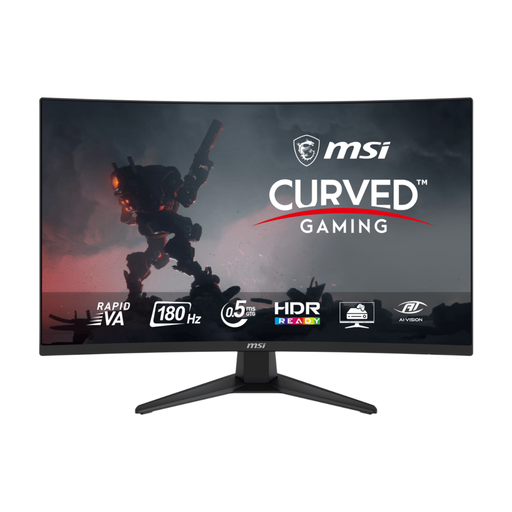
This larger curved QHD screen is an option if you want a single monitor for seated practice without moving to an ultrawide resolution.
The product name specifies 180Hz and a quoted 0.5ms response time. Check the refresh rate available through the connection you will use: the listing distinguishes its DisplayPort and HDMI modes.
Check the stand’s positioning range against your seated eye-line, and look for an exact-model certification if HDR is a priority.
 No image available
This conventional-sized QHD option suits a compact seated setup if its screen position works with your desk or rig.
The product name specifies 2560 × 1440 and 220Hz. Check your sim’s achievable frame rate and confirm the refresh and variable-refresh modes for your intended connection.
If stand adjustment or HDR performance will affect your choice, check the supplied stand’s range and any exact-model certification.
No: choose refresh capability in light of the frame rate your PC can produce in your rally sim at the resolution and settings you use. Monitor refresh rate and rendered frame rate are different measures; a 240Hz display cannot make a game render 240 frames per second.
Look for variable-refresh support that works with your graphics hardware and planned connection. AMD and NVIDIA describe compatibility requirements for their respective technologies, so check the exact monitor model, GPU, port and cable rather than relying on a generic variable-refresh label.
Choose the ultrawide route when a wider single-screen view is a priority and your rig and PC can accommodate it. Samsung UK’s 34-inch Odyssey G5 example uses 3440 × 1440, which requires more pixels to be rendered than the 2560 × 1440 used by the cited 27-inch QHD models; measure your space and check performance before switching formats.
Look for a named VESA DisplayHDR or DisplayHDR True Black tier for the exact model. VESA sets specifications for displays carrying those certifications, whereas an unqualified HDR label alone does not identify a certified tier.
Ask the retailer how to use its electrical-waste take-back arrangements for a monitor. GOV.UK describes take-back of waste equipment of the same type as a purchased item; check the applicable hand-in or collection arrangements before ordering rather than assuming your old monitor will be collected.