What matters when choosing?
Start with the space available on the desk, then decide how much screen detail you want. Check that your device, connections and audio arrangement suit the monitor you choose.
| Concern |
What to check |
Who this matters to |
| Desk fit and positioning |
Measure clear desk width and depth, including the stand. If you plan to use an arm, check the monitor’s VESA pattern and the arm’s capacity. |
If my bedroom desk has to serve other purposes, I need a screen I can position without crowding it. Around 29% of consumers put desk fit and positioning first. |
| Garden detail and colour |
Compare Full HD with 2560 × 1440 QHD for the space available to scenes and menus. Check which colour-gamut standard a specification names; coverage alone does not establish colour accuracy. |
When I arrange small features and judge planting colours, I want the layout to be easy to see. Visual detail and colour are the primary concern for around 36% of consumers. |
| Smooth play and connections |
Check the resolution and refresh-rate combinations your PC or console can send through its HDMI or DisplayPort connection. Compare response-time figures only when their measurement labels are clear. |
I want camera movement to feel smooth, but I also need my device to deliver the display mode I intend to use. For around 21% of consumers, smooth play and connection compatibility come first. |
| Quiet audio use |
Check for a headphone output or another suitable audio path from your device. Do not assume that a monitor has speakers or that built-in speakers will be appropriate in the room. |
If someone else is sleeping or studying, I need to hear the game without disturbing them. Quiet audio use comes first for around 14% of consumers. |
Joybuy monitor choices for a shared-bedroom setup
These 27-inch gaming monitors offer QHD or 4K UHD options for garden layouts. Check each stand against your desk and each display mode and audio connection against the devices you use; the screen size alone cannot settle those questions.
 No image available
LG UltraGear G8 27G850A 27-inch 4K UHD gaming monitor
Consider this 27-inch option if high resolution matters for your garden scenes and the screen fits your desk.
The product title specifies a Nano IPS panel, dual-mode 240 Hz/480 Hz operation, HDMI 2.1 and DisplayPort 2.1. Check which resolution applies to the mode you want and whether your device and cable support it.
Measure the stand footprint and confirm how you will route audio for quiet play.
View on Joybuy
 No image available
Samsung Odyssey G6 S27DG612 27-inch QHD OLED monitor
This 27-inch QHD option is relevant if you want more pixels for garden layouts than a Full HD screen provides.
The product title specifies an OLED panel and a 240 Hz refresh rate. Confirm that your device and cable can provide the QHD refresh-rate mode you intend to use.
Check the stand footprint and the audio connections needed for quiet play.
View on Joybuy
 No image available
HKC G27H2DPro 27-inch QHD Fast IPS monitor
Consider this QHD screen if garden-scene detail is important and a 27-inch display fits the shared desk.
The product title specifies 2560 × 1440 resolution, a Fast IPS panel and a 220 Hz refresh rate. Check whether your device and cable support the display mode you want.
Confirm the stand’s positioning options and footprint, plus the audio connections your setup requires.
View on Joybuy
 No image available
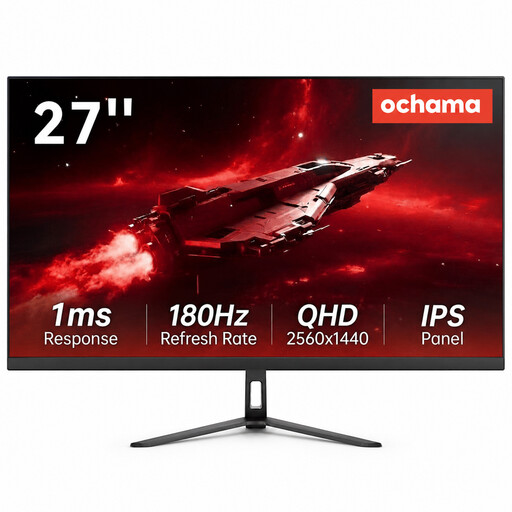
Ochama 27-inch QHD IPS 180 Hz monitor with gift keyboard
This 27-inch QHD option suits a garden-layout setup if its physical size works on your desk.
The product title specifies an IPS panel and a 180 Hz refresh rate. Check the available inputs and supported resolution and refresh-rate combinations for your device.
Confirm the stand adjustment and footprint, and plan how you will listen without disturbing someone else in the room.
View on Joybuy
Common questions
Should I choose 24-inch Full HD or 27-inch QHD for a virtual garden?
Choose 24-inch Full HD when desk space is the limiting factor; choose 27-inch QHD when the desk and your gaming device can accommodate it and you want more pixels for layouts and menus. LG UK describes 24 to 27 inches as a typical single-monitor range, while its 27GR75Q-B and BenQ UK’s EX2710Q are examples of QHD models.
Do I need a 165 Hz or 180 Hz monitor for a garden-building game?
Not necessarily: a higher refresh rate can matter for motion, but it should not take priority over desk fit, resolution and usable connections for this setup. Check which resolution and refresh-rate combination your PC or console can send through its available connection before choosing a monitor by its maximum quoted rate.
Will built-in speakers work in a shared bedroom?
They may be convenient when you are alone, but headphones are more suitable when sound would disturb someone else. BenQ UK lists both speakers and a headphone jack on the EX2710Q; the AOC 24G4X listing specifies no speakers, so check the audio path for the particular monitor and device you choose.
What should I do with an old monitor if I replace it?
Use an appropriate reuse or electrical-equipment recycling route rather than putting it in general waste. Check your council’s or retailer’s current collection arrangements for the old display.


