
24/7 Customer Support

Free returns

Same-day & Next-day Delivery

Quality Guaranteed

Unlock Your Welcome Offers: FREE Delivery | Up to 80% OFF | Free 30-day JoyPlus trial
Download the APP
A gaming mouse can change how comfortably and consistently you play, but a higher price or larger specification list does not automatically make it suitable for your setup. UK shoppers commonly compare DPI, polling rate and RGB lighting first, while overlooking shape, connection type and software support.
Before choosing a gaming mouse, watch for three common traps:
A lightweight gaming mouse is useful for players who make broad, fast movements, particularly in FPS games. Current options in the Joybuy range include models weighing approximately 49g to 63g, while larger MMO designs can be considerably heavier because they include additional buttons and a wider shell.
Weight is only one part of comfort. Check:
A low weight does not compensate for a shape that causes pressure around your thumb or wrist. If you play for several hours, comfort and natural button access should take priority over a few grams.
A high DPI gaming mouse allows sensitivity adjustment, but DPI is not a direct measure of gaming quality. For FPS and esports gaming, look for a sensor with stable tracking at the sensitivity you actually use, rather than simply selecting the largest number.
For example, the ASUS ROG Keris II Ace lists a 42,000 DPI ROG AimPoint Pro optical sensor, while the ASUS TUF Gaming M4 Wireless lists 12,000 DPI. Both figures are more than sufficient for many players. The practical questions are whether the mouse tracks reliably on your mouse mat, whether DPI can be adjusted in sensible steps and whether your profiles can be saved.
Use a dedicated mouse pad where possible. Reflective, glass or highly polished surfaces can cause inconsistent tracking on some optical mice, so check the product guidance before using one on a desk surface.
A wired gaming mouse offers continuous power and avoids battery management. Flexible cables and PTFE feet can help reduce drag, making wired models suitable for competitive play at a lower purchase cost.
A wireless gaming mouse is more convenient for a tidy desk and flexible positioning. For gaming, 2.4GHz RF is generally the connection to prioritise when low latency is important. Bluetooth gaming mouse connectivity is useful for laptops, office work and switching between devices, but check whether the mouse supports Bluetooth gaming features or uses it mainly as a secondary mode.
Polling rate describes how often the mouse reports its position to the computer. A 1,000Hz rate reports every 1 millisecond, while 8,000Hz reports more frequently. Higher rates may appear smoother on high-refresh displays, but they are not essential for every player. Confirm the required receiver, cable, software and battery conditions before paying extra for an 8K polling rate mouse.
The following Our Top Recommendations focus on distinct needs rather than one universal choice.

Why This Fits Their Persona: A straightforward wired option for first-time PC gamers who want adjustable sensitivity and extra buttons without charging or wireless pairing.
Its stated DPI levels are clearly listed from 800 to 6,400, so buyers are not paying for an unclear maximum figure. A dedicated mouse mat is recommended for consistent tracking.
Seven buttons, plug-and-play USB operation, seven RGB modes and a symmetrical ergonomic shape.
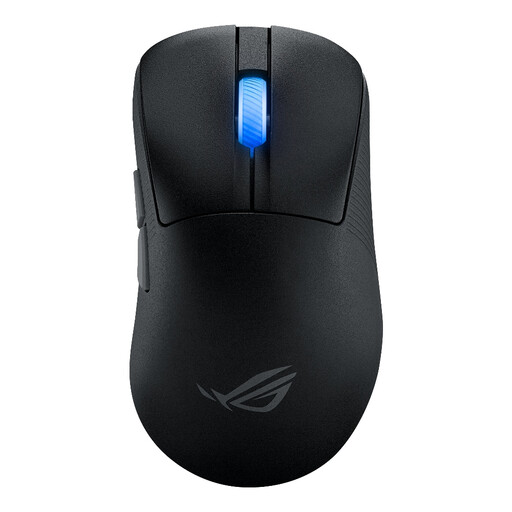
Why This Fits Their Persona: Suits competitive FPS players seeking a light, multi-connection mouse for a UK gaming desk, laptop or tournament-style setup.
The connection specifications distinguish 4,000Hz wireless and up to 8,000Hz wired operation with the Polling Rate Booster, rather than presenting 8K as an unrestricted wireless default.
54g weight, tri-mode connectivity, 42,000 DPI sensor, onboard controls and 100-million-click optical switches.

Why This Fits Their Persona: Designed for MMO players, streamers and users who need many accessible commands during long sessions.
The 12 programmable buttons and six side buttons are stated clearly, while the 1,000Hz polling rate sets a realistic expectation instead of focusing on an unnecessary headline figure.
Dual-mode wireless and USB-C connectivity, hot-swappable switches, charging dock and up to 67 hours of battery life with RGB off.

Why This Fits Their Persona: A practical fit for FPS and MOBA players who want native high-speed wireless reporting and extensive software customisation on Windows or Mac.
Its specification identifies native 8K wireless operation and notes that the latest driver is needed for low-power mode, making the battery-life condition easier to assess.
53g weight, 30,000 DPI independent X/Y adjustment, 120-million optical switches, 10 programmable buttons and up to 750 hours at 1,000Hz.
We have compiled a complete, real-time list of products that fully satisfy these strict selection criteria and UK safety regulations.
After purchase, place the wireless receiver close to the mouse and away from crowded USB hubs where possible. Update the manufacturer’s software only from an official source, then save a sensible DPI profile for each game. Disable operating-system pointer acceleration if your game settings and playing style require consistent raw input.
For rechargeable models, use the supplied or approved cable and stop using the mouse if the battery becomes unusually hot, swollen or damaged. Do not open the battery compartment of an integrated rechargeable model. Keep the sensor and feet free from dust, and clean the exterior with a soft, slightly damp cloth without allowing moisture into openings.
A 2.4GHz wireless gaming mouse can suit competitive FPS play when the receiver, polling rate and software are configured correctly. Players who prefer zero battery concerns may still prefer a wired gaming mouse.
Not necessarily. An 8K polling rate may be useful with a high-refresh monitor and a computer capable of handling the additional reporting load, but a reliable 1,000Hz mouse remains suitable for many players.
Lifespan depends on switch type, usage, cleaning and handling. Product specifications may list switch ratings such as 70 million, 100 million or 120 million clicks, but these figures are component ratings rather than a guarantee of total product life. Check the retailer’s warranty and returns information before buying.