Shortcut-heavy city builders
If you repeatedly open build tools or use camera commands, reachable programmable buttons and a scroll wheel suited to your navigation habits may matter more than an extensive sensor specification.


Start with a shape that suits your grip and controls you can reach reliably, rather than choosing by maximum DPI. For city-building games, a wired mouse can offer programmable controls without battery management if its cable fits your desk setup; wireless is worth considering when clearing the mouse area matters more, provided you are comfortable managing its power and connection.
If you repeatedly open build tools or use camera commands, reachable programmable buttons and a scroll wheel suited to your navigation habits may matter more than an extensive sensor specification.
If study and gaming share a small desk, removing the mouse cable may free up the active mouse area. A wireless model also brings a receiver or pairing setup and battery or charging upkeep.
If you spend extended sessions building and navigating, check how the shell fits your usual grip and whether your thumb reaches the controls comfortably. SCAN UK identifies comfort as a particularly important consideration when choosing a gaming mouse.
Check shape and button reach first, then decide which recurring commands deserve mouse controls. Let your desk layout determine whether a cable is acceptable.
| Concern | What to check | Who this matters to |
|---|---|---|
| Shape and weight | Compare shell dimensions, your usual grip and thumb reach; consider listed weight alongside fit. | During long building sessions, I need a mouse I can hold comfortably without stretching for its side buttons. Around 42% of consumers would put fit and manageable weight first. |
| Shortcuts and scrolling | Check which buttons can be reassigned and whether the wheel offers the scrolling behaviour you want. | When I keep returning to build tools and navigating menus, I want commands I can trigger without accidental presses. Reachable controls and scrolling are the main concern for around 33% of consumers. |
| Desk and connection | Check cable routing or, for wireless models, the connection mode, receiver placement and power arrangement. | If my study desk also holds my gaming setup, I want the mouse area to stay clear enough to use. Cable and connection practicalities come first for around 25% of consumers. |
A sensor figure cannot tell you whether the shell suits your grip or whether its side buttons are within comfortable reach.
Compare the dimensions and button positions with your current mouse. If you cannot try it first, check the seller’s applicable returns terms before ordering.
A crowded side layout can make commands harder to distinguish and increase accidental presses.
Begin with frequent, low-risk actions. Leave commands with irreversible effects on the keyboard until you know you can trigger the intended mouse button reliably.
Removing a cable from the mouse area does not remove the need to arrange a connection and keep the mouse powered.
Confirm the model’s connection modes, available USB ports, receiver position and battery or charging arrangement.
Depending on the model, wireless use also means allowing time for charging or keeping replacement batteries available.
Logitech G documents differences between G502 HERO or LIGHTSPEED and G502 X variants, so a family name alone does not identify the weight, switches or connection you will get.
Check the complete model name against the particular product’s specifications before choosing.
The G502 family is relevant if you want configurable controls and a choice of wired and wireless variants.
The Basilisk V3 models offer distinct wired and wireless ways to prioritise controls or a cable-free mouse area.
The wired Rival 5 is relevant if a listed weight of 85 g and several thumb-side controls appeal to you.
These wireless gaming mice are options for keeping a student-room mouse area free of a cable. Compare their reachable controls, shape and connection requirements against the way you play city-building games.
 No image available
Consider this for a cable-free desk if you want to assign recurring game commands to mouse buttons. Its listed features include a 53 g weight, 10 programmable buttons and mechanical switches.
The stated battery life of up to 750 hours depends on a driver update and operation at 1000 Hz. Check the shell dimensions, button reach and scroll-wheel behaviour for your setup.
 No image available
Consider this for a cable-free desk and recurring shortcuts. Its listed features include a 53 g weight, 10 programmable buttons and optical switches, distinguishing it from the VT2 variant above.
The stated battery life of up to 750 hours depends on a driver update and operation at 1000 Hz. Check its shape, button reach and wheel behaviour before deciding between the variants.
 No image available
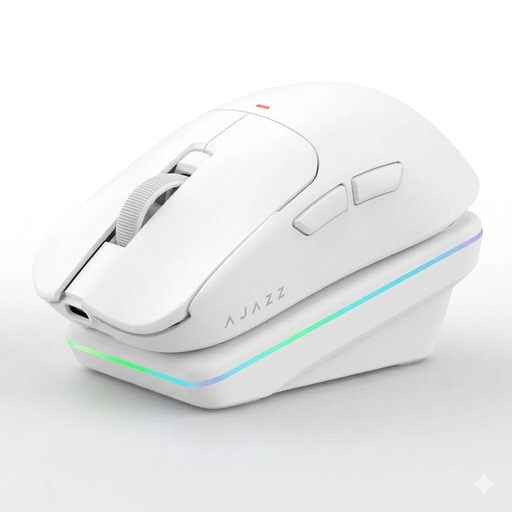
Consider this if a charging dock and remappable commands suit your desk setup. The product name identifies a PAW3311 sensor and USB-C among its connection options.
Confirm the exact SKU’s wireless modes: its title and descriptions differ. Check its weight, dimensions, programmable-button placement and wheel behaviour before relying on them for your choice.
 No image available
Consider this if wireless use and remapping recurring commands are your priorities. The product information identifies 2.4 GHz wireless use with a USB receiver and a rechargeable battery.
Plan where the receiver will sit and how you will charge the mouse. Check the button layout, scroll-wheel behaviour and right-handed shape against your grip.
Maximum DPI need not decide the purchase. Check grip fit, reachable controls and the scrolling behaviour you will use for build menus and map navigation before comparing sensor figures.
Wireless is worth considering if removing the mouse cable makes your shared study and gaming desk easier to use. Check receiver placement, available ports and battery or charging needs; a wired mouse remains a practical choice when you can route its cable comfortably.
Choose by the number of recurring commands you can assign and press reliably, not button count alone. Razer lists nine programmable controls for the Basilisk V3 X HyperSpeed and 11 for the wired Basilisk V3, while SteelSeries lists nine for the Rival 5; the placement of those controls matters as much as the total.
Check your local authority or retailer for an electrical-equipment collection option. The Office for Product Safety and Standards and the Department for Environment, Food & Rural Affairs describe UK waste electrical and electronic equipment rules as intended to reduce electrical equipment going to landfill or incineration.