Low-sensitivity FPS movement practisers
If you make broad arm swipes and lift the mouse to reset its position, low stated weight matters alongside a shell you can control during each lift.


Choose a mouse shape that lets you repeat swipes, stops and lifts comfortably before choosing by its maximum DPI or polling rate. A lighter wireless mouse may suit frequent repositioning, while a contoured right-handed shape or extra buttons may matter more for other players; check grip fit, receiver requirements and battery conditions for the settings you intend to use.
If you make broad arm swipes and lift the mouse to reset its position, low stated weight matters alongside a shell you can control during each lift.
If palm support and reachable side buttons affect your grip, compare contoured right-handed shells with more neutral shapes rather than choosing by sensor specifications alone.
If movement practice shares time with games that need more commands on the mouse, consider whether extra buttons justify a different layout and stated weight.
For repeated movement drills, settle the grip and lift question first. Then compare weight, connection settings and buttons against the actions you actually practise.
| Concern | What to check | Who this matters to |
|---|---|---|
| Shape and grip | Try your usual grip through swipes and lifts; check palm contact and whether you can reach the side buttons without shifting your hand. | If a shell moves in my hand when I lift it, I need a shape that stays controllable throughout the drill. Roughly 36% of consumers put grip and lift control first. |
| Weight and movement | Compare stated weights, then assess how the mouse feels when stopping and repositioning; weight alone cannot establish fit. | Repeated wide swipes make me attentive to how much mouse I am moving, especially when I reset its position. For roughly 36% of consumers, low mass is the primary concern. |
| Wireless and polling | Confirm the connection mode, receiver arrangements and battery conditions at your intended polling rate. | I want a connection I can set up reliably, and I would only prioritise higher polling if it suits my display and settings. Wireless connection and polling come first for roughly 21% of consumers. |
| Buttons and endurance | Count the controls you will bind and check their placement; read battery claims alongside their operating conditions. | When I switch between games, accessible commands or longer gaps between charges may matter more than a stripped-back layout. Roughly 7% of consumers prioritise extra controls or endurance. |
A high DPI ceiling is a configuration specification, not a measure of how well a shell suits your grip or sensitivity. Razer lists DPI-step and lift-off adjustments for the Viper V3 Pro, but those settings do not settle the fit question.
Choose a sensitivity you can reproduce, then check whether the shape lets you make stable swipes, stops and lifts.
Razer describes higher polling as more relevant with a high-refresh monitor. Battery conditions also matter: its Viper V2 Pro example is around 17 hours with constant motion at 8,000 Hz, not a battery rating for the Viper V3 Pro.
Check the exact mouse’s receiver requirements and battery figures at the polling setting you plan to use.
A higher setting may mean charging more often; the effect depends on the model and its operating conditions.
SteelSeries specifies nine programmable buttons and a 66 g weight for the Aerox 5 Wireless. More controls can serve additional binds, but their placement needs to work with your grip during quick lifts.
List the commands you want on the mouse and check whether you can reach the relevant buttons without accidental presses.
A familiar model name alone does not establish which receiver, accessories or colour variant a listing includes.
Compare the full model identifier and included items on the product page before ordering.
The Viper V3 Pro is a right-handed-symmetrical wireless option that Razer specifies at 54 g, with up to 8,000 Hz polling.
The researched PRO X SUPERLIGHT 2 has a neutral shape, while the 60 g PRO X SUPERLIGHT 2 DEX takes an asymmetrical right-handed approach.
ZOWIE organises its mouse lines around different shapes and grips; it describes the U2-DW as a claw-grip option for multi-angle movement.
The 66 g Aerox 5 Wireless represents a multi-button option, with nine programmable buttons specified by SteelSeries.
These mice cover lightweight wireless choices, a wired right-handed ergonomic shape and designs with additional controls. Compare each one against your grip and connection needs rather than treating their stated weights or polling rates as a fit test.
 No image available
Consider this model if a lightweight, right-handed-symmetrical shape suits your repeated swipes and lifts; check grip comfort and button reach for yourself.
Its listed configuration includes a Focus Pro 35K Sensor Gen-2 and up to 8 kHz HyperPolling. Check battery endurance at the setting you intend to use.
 No image available
The stated 56 g weight makes this a model to consider for frequent repositioning, subject to how its shell fits your grip.
The title lists 8 kHz polling, a magnetic charging base and a colour screen. Confirm the exact connection modes and maximum DPI for this variant before relying on either specification.
 No image available
Consider the right-handed ergonomic shape if a more contoured grip suits your movement practice, but check how it fits your hand.
This is a wired choice, so plan the cable route around your usual swipes and lifts.
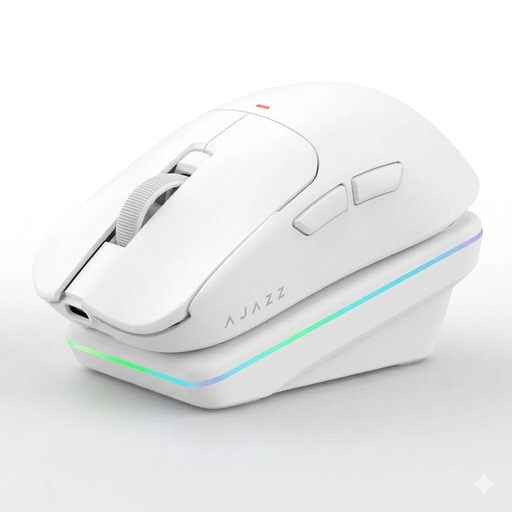 No image available
This model is described for medium-to-large hands using a claw or palm grip; check that those fit conditions match yours.
Its title lists Bluetooth, 2.4 GHz and USB-C connection modes, plus a charging dock. If precise mouse weight matters to your drills, confirm it for this variant before ordering.
 No image available
Its stated low weight and additional controls may appeal if your movement drills share time with games that need more binds; check the shell shape and button reach.
The title lists 8 kHz wireless polling and 10 programmable buttons. The claimed battery life of up to 750 hours applies at 1,000 Hz and requires a driver update to unlock low-power mode.
No: choose a shape and grip that work for your movements before prioritising 8,000 Hz polling. Razer explains that higher polling shortens the interval between reports to the PC and is more relevant alongside a high-refresh monitor; that does not establish an improvement in every player’s results.
It can, so compare battery figures at the polling rate you intend to use. Razer gives around 17 hours with constant motion at 8,000 Hz for the Viper V2 Pro; that figure is not a rating for the Viper V3 Pro or another model.
Follow the guidance for your particular receiver and keep its placement practical for your desk. Razer advises line of sight for its HyperPolling dongle and avoiding proximity to USB 3.0 ports; ZOWIE describes its enhanced receiver as intended to reduce interference.
Confirm the exact model and variant, included receiver or accessories, connection modes and current seller terms. Read any change-of-mind return policy separately from information about remedies for faulty, damaged or misdescribed goods; a statement on one listing should not be assumed to apply to another.
A take-back route may apply when you buy a replacement of the same type. GOV.UK says retailers covered by the relevant electrical-waste requirement must offer to take back waste of the same type as the item bought; check the retailer’s arrangements for your purchase.