For long zoo-building sessions, choose a mouse whose shape feels manageable and whose buttons you can reach reliably before focusing on maximum DPI. Extra controls are worthwhile if you will configure shortcuts; wireless suits a desk where the cable gets in the way, but brings battery or charging decisions. In a dark room, treat mouse lighting as a preference rather than a substitute for comfortable screen and room lighting.
Who is this for?
Shortcut-heavy zoo builders
If you repeatedly switch between building, management and camera actions, reachable mouse buttons and a scroll wheel you can control may matter more than another sensor headline. Steam describes Planet Zoo as a construction and management game; whether extra mouse inputs help depends on the commands you choose to bind.
Long-session comfort seekers
If you spend extended sessions placing objects and navigating menus, consider your usual grip and whether you can reach the controls without shifting your hand. PCMag UK identifies comfort, accuracy and extra controls as useful distinctions between gaming mice; no shape fits every player.
Dark-room desk users
If you play with the lights low, adjustable mouse lighting may be useful, but it cannot address an uncomfortable display or glare. Moorfields advises paying attention to room lighting and screen settings, while the NHS recommends breaks from computer use.
What matters when choosing?
Start with grip and the shortcuts you would actually assign, then decide whether a cable obstructs your desk. Consider lighting separately: it is a setting to control, not a reason to overlook fit.
| Concern |
What to check |
Who this matters to |
| Reachable controls |
Check which buttons you can reach in your normal grip and whether the commands you want can be remapped on your PC. |
If I use the same building and camera commands repeatedly, I want shortcuts that do not disrupt my grip. Around 33% of consumers put reachable controls first. |
| Long-session comfort |
Compare shape, available dimensions and weight with your grip; consider trying the mouse before committing where possible. |
During a lengthy building session, I need the mouse to remain controllable without awkward finger movements. Comfort is the primary concern for around 33% of consumers. |
| Cable-free use |
Confirm the connection you intend to use and how the mouse is powered or charged. |
If a cable catches on my desk or limits where I place the mouse, I would rather manage charging than keep the cable. Around 17% of consumers prioritise cable-free use. |
| Dark-room setup |
Check whether mouse lighting can be adjusted, and set the room and display lighting to a comfortable level. |
When I play with the room lights low, I want visible controls without distracting lighting or an uncomfortable screen. Dark-room setup comes first for around 17% of consumers. |
Buying pitfalls
-
Choosing by maximum DPI alone
A sensitivity figure does not tell you whether a shape suits your grip or whether its buttons are easy to reach during construction and navigation.
Choose a controllable sensitivity setting, then assess grip, scroll behaviour and the bindings you would use.
-
Expecting mouse RGB to fix a dark-room setup
Mouse lighting can help you see the device or distinguish a setting, but it does not control display glare or room lighting.
Adjust the screen and ambient lighting first. If you want RGB, check whether you can set it to a level that does not distract you.
-
Overlooking the wireless charging routine
Wireless mice differ in connection and charging options, and stated battery life can depend on the mode used.
Check the connection, charging method and battery conditions for the exact model you intend to buy.
Using Qi charging with the Corsair DARK CORE RGB PRO SE requires a compatible charger or charging mouse pad.
-
Assuming a product page means the model is available
Availability can change independently of whether a manufacturer continues to describe a model on its website.
Confirm the exact model and current retailer availability before making it part of your setup plan.
Brands to consider
Razer
The Basilisk range is relevant if you want a contoured mouse with programmable controls; the wired Basilisk V3 and wireless Basilisk V3 X HyperSpeed serve different cable preferences.
- Razer lists 10+1 programmable buttons and multiple scroll behaviours for the Basilisk V3.
- The Basilisk V3 X HyperSpeed has a different control layout, and its stated battery life depends on connection mode. Neither model's shape is assured to suit your hand.
Logitech G
The G502 HERO and G502 X LIGHTSPEED are relevant to players considering multiple mouse bindings, with wired and wireless options respectively.
- Logitech G specifies 11 programmable buttons for the G502 HERO and 13 customisable controls for the G502 X LIGHTSPEED.
- A higher control count helps only if the buttons suit your grip and you will configure useful commands.
Corsair
The DARK CORE RGB PRO SE is relevant if you want a contoured mouse with a choice of wireless connections and a wired option.
- Corsair lists eight programmable buttons, interchangeable side grips, USB-C charging and Qi charging compatibility for this model.
- Check whether the grips suit your hand and whether the model is currently available from your chosen retailer.
Joybuy product choices
These mice offer wired and wireless ways to approach zoo-building controls. Compare their stated buttons, connections and grip information against the shortcuts and desk layout that matter to you.
 Image unavailable
Rapoo VT7 MAX Wireless Gaming Mouse, White
Consider this wireless mouse if you plan to assign several recurring game commands to mouse buttons.
The product title specifies 10 programmable buttons, macro support and a weight of 53g. Its stated battery life of up to 750 hours applies with the latest driver at 1000Hz; check the settings and charging arrangement you would use.
View on Joybuy
 Image unavailable
AJAZZ AJ200 AI MC Wireless Gaming Mouse with Charging Dock
Consider the dock-equipped design if you want a regular place to charge a mouse used for recurring shortcuts.
The product title lists Bluetooth, 2.4G and USB-C connection options. Check the actual mouse weight before relying on it for grip decisions, and do not assume the dock's RGB description also applies to the mouse.
View on Joybuy
 Image unavailable
ONIKUMA CW905 Wired Gaming Mouse
This wired option suits a desk where a cable is acceptable and you want to explore programmable inputs for repeated actions.
Its product name identifies programmable buttons and RGB lighting modes. If you play in a dark room, check whether the lighting can be dimmed or switched off.
View on Joybuy
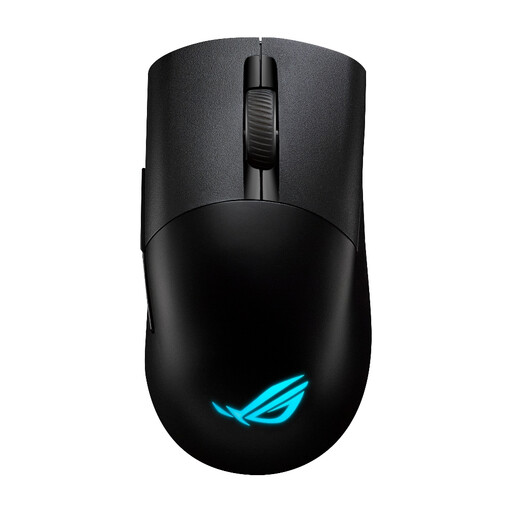 Image unavailable
ASUS ROG Keris Wireless AimPoint Gaming Mouse, Black
Consider this wireless model if its shape and available controls suit the way you hold a mouse during longer building sessions.
Before relying on a particular weight, sensor setting or battery runtime, confirm those details for this exact variant and the connection mode you intend to use.
View on Joybuy
Common questions
Do I need a very high-DPI mouse to build a virtual zoo?
No particular maximum DPI should take priority over controllable cursor movement, a comfortable grip and reachable controls for this task. Set sensitivity to a level you can use accurately when placing objects and navigating the game.
Are extra mouse buttons useful for zoo-building?
They can be useful when you repeatedly call up building, camera or management commands and are willing to set up bindings. Choose buttons you can reach without changing your grip; an unused button adds little to the way you play.
Will an RGB mouse make a dark room more comfortable?
Mouse RGB alone will not address screen glare or uncomfortable room lighting. Moorfields advises adjusting lighting and the display for screen use, so choose controllable mouse lighting only if you also find it useful at your desk.
Should I choose wireless for this setup?
Choose wireless if a cable interferes with movement or desk placement enough to make charging or battery management worthwhile. If the cable does not bother you, a wired mouse can provide the controls you need without that routine.
What if my eyes feel dry during long sessions?
Take breaks from screen use rather than relying on a change of mouse. The NHS also advises keeping the screen just below eye level and seeking advice from an optician or GP if dry-eye symptoms persist despite self-care.


