Desk-space-first simulator learners
You need to fit the PC, screen, keyboard and mouse into a limited workspace. The space left for using the controls matters as much as the computer’s footprint.


Choose a compact desktop if you want a permanent monitor-and-keyboard setup and its exact dimensions leave enough room for cables and ventilation. A larger tower is worth considering if expansion matters more than minimising its footprint; choose a laptop when portability matters, while allowing space for a comfortable desk setup. Before selecting any configuration, identify the orbital simulator and version, then compare its requirements with the PC you intend to buy.
You need to fit the PC, screen, keyboard and mouse into a limited workspace. The space left for using the controls matters as much as the computer’s footprint.
You want to build or fly increasingly complex virtual spacecraft and need to assess a PC against a named simulator. Steam lists Kerbal Space Program and Kerbal Space Program 2 separately, so requirements for one should not stand in for the other.
You can make room for a larger tower if accessible memory and storage expansion matter to your long-term setup. Check those provisions on the exact configuration you are considering.
Choose when: A separate monitor and controls suit you, but the computer itself needs a small footprint. MSI describes its MPG Trident AS as a 10-litre desktop.
Allow for: The exact chassis dimensions, cable access and ventilation space still need to fit your desk; Corsair says dimensions within its ONE range vary by configuration.
Choose when: You have room for a tower and value stated upgrade access. Lenovo lists a tool-less side panel and expandable memory and storage for the Legion Tower 5i Gen 10 line.
Allow for: Lenovo identifies it as a 30-litre-class tower, so plan the full desk arrangement before choosing this route over a smaller desktop.
Choose when: You need to move the computer between locations or cannot keep a tower in place.
Allow for: Prolonged desk use may call for separate input devices and an elevated or separate screen, as the Health and Safety Executive advises for laptop use.
| Concern | What to check | Who this matters to |
|---|---|---|
| Desk and control space | Measure the usable desk area; check the exact chassis dimensions and the space needed for cables, ventilation, screen and controls. | If my desk is cramped, I need room to position the display and use the mouse comfortably, not just somewhere to put the PC. Around 42% of consumers put practical desk fit first. |
| Simulator requirements | Identify the game and version, then compare its official requirements with the exact CPU, graphics, memory, storage and operating system. | Before committing to a configuration, I want to know whether it meets the requirements of the simulator I will actually use. Roughly 33% of consumers make that their primary concern. |
| Future expansion | Check the exact model’s memory and storage expansion provisions, upgrade access and support terms. | If my dedicated setup may grow, I would give up some desk space for a tower with stated upgrade options. About 25% of consumers prioritise that flexibility. |
A category label cannot establish suitability for an unnamed orbital simulator. Steam lists Kerbal Space Program and Kerbal Space Program 2 as separate products, with the latter presented as Early Access.
Write down the exact title and version, then compare its official requirements with the listed configuration and your intended display setup.
A chassis can fit its allotted spot yet leave too little room for the screen, mouse, cables or required ventilation. Corsair notes that dimensions vary across CORSAIR ONE configurations.
Measure usable width and depth, then check the particular model’s dimensions, port placement and clearance instructions.
A laptop removes the separate tower but may make screen and input positioning awkward during prolonged use. The Health and Safety Executive advises separate keyboard and mouse use, with the laptop screen elevated or a separate display.
Plan where those devices will sit before choosing the laptop route.
A riser or separate display can add equipment to the workspace alongside the keyboard and mouse.
A retailer’s take-back route and collection arrangements are different questions. GOV.UK describes take-back obligations for waste equipment of the same type and function as a new purchase; home collection may carry transport costs.
Ask the seller how to return the old PC and whether collection from your home carries a charge.
CORSAIR ONE is a small-form-factor prebuilt desktop line to consider when the computer must occupy less desk space than a conventional tower.
The MPG Trident AS is a compact-desktop reference point when a documented chassis volume helps narrow the choice.
Legion Tower 5i Gen 10 represents a larger tower route for a setup with room for expansion.
These choices cover laptops that avoid a separate tower, mini PCs for a separate-screen setup and a desktop bundle. Match any option to your measured workspace and the requirements of your chosen simulator; the bundle’s tower and included peripherals need room together.
 No image available
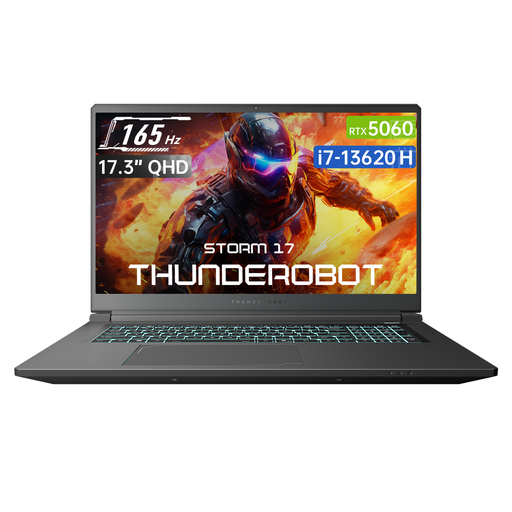
Consider this laptop if you need a built-in screen and keyboard rather than a separate tower; measure the space it will occupy during use.
Listed configuration: Core i7-13620H, GeForce RTX 5060, 16 GB DDR5 RAM and 1 TB SSD. The 17.3-inch QHD display is listed at 165 Hz; HDMI is named for an external display connection.
Check the chosen simulator’s requirements and allow room for separate input devices if you plan prolonged desk use.
 No image available
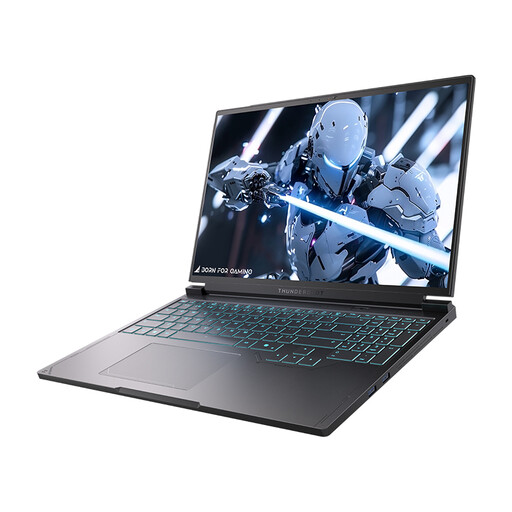
This laptop keeps the screen and keyboard in one unit; check its physical fit if you also intend to use external controls or a monitor.
Listed configuration: Core i7-13650HX, GeForce RTX 5060, 16 GB DDR5 RAM and 1 TB SSD. Its 16-inch QHD+ display is listed at 240 Hz.
Compare the exact simulator’s requirements before treating these specifications as sufficient for your intended settings.
 No image available
Consider this mini PC if you prefer a separate desktop computer while reserving desk space for a monitor and controls.
The product name specifies Ryzen AI 9 365, Radeon 880M graphics, 24 GB DDR5, a 1 TB PCIe 4.0 SSD, USB4 and OCuLink.
Check its exact dimensions and ventilation requirements, what equipment your display setup needs, and the requirements of your chosen simulator.
 No image available
This is another mini-PC route for a desk setup with a separate screen, keyboard and mouse.
The product name specifies Ryzen 5 7640HS, Radeon 760M graphics, 24 GB LPDDR5 RAM and a 512 GB PCIe 4.0 SSD. It also lists USB 4.0 and HDMI 2.1.
Measure for the complete setup and check the named simulator’s requirements; the compact label alone establishes neither desk fit nor game performance.
 No image available
Consider this desktop bundle if you want a monitor and input devices with the PC and can allocate room for the entire arrangement.
The product name lists a Ryzen 5 7500F, GeForce RTX 5060 8 GB, 16 GB DDR5 RAM, 1 TB NVMe SSD and Windows 11 Home, plus a monitor, keyboard, mouse, headset and mousepad.
Confirm the monitor’s size and connections, the tower’s dimensions and clearance, and whether this configuration meets your chosen simulator’s requirements.
Choose a compact desktop if the setup will stay in place and you can fit its separate screen and controls; choose a laptop when portability matters. For prolonged laptop use, the Health and Safety Executive advises a separate keyboard and mouse and an elevated or separate screen, so account for those on the desk too.
Do not assume so: compare the requirements of your exact simulator and version with the PC’s exact configuration. Steam lists Kerbal Space Program and Kerbal Space Program 2 separately and presents the latter as Early Access; the requirements of one are not proof of suitability for the other.
Arrange the screen and controls so you can use them comfortably without giving all the desk space to the computer. The Health and Safety Executive’s display-screen guidance advises placing the top of the screen around eye level, keeping the screen about an arm’s length away and using a separate keyboard and mouse for prolonged laptop use.
Ask the retailer which take-back route applies to an old PC and whether home collection has a transport charge. GOV.UK describes retailer take-back for waste electrical equipment of the same type and function as the newly purchased item; confirm the arrangements before completing your purchase.