Choose a 4K TV with a low-latency game mode, the HDMI capability required by your console and games, and a screen size that suits your measured viewing distance. A TV with 120Hz and VRR support is most relevant for supported fast-paced games, while picture quality, room brightness, size and usable HDMI connections can matter more for films, casual play and shared living rooms.
Who this suits
Competitive PS5 and Xbox players
Players of shooters, racing, sports and online multiplayer can benefit most from low input lag, supported 120Hz output and VRR. Check the exact TV input and game mode rather than relying on a panel refresh-rate claim alone. PlayStation, Xbox Support, PCMag UK and RTINGS provide the relevant guidance.
Shared living-room console households
One screen for games, films and several viewers calls for a considered balance of sofa distance, screen size, picture quality and enough usable HDMI connections. Which? recommends measuring the distance from the usual sofa position to the planned TV location.
Nintendo Switch 2 and mixed-console owners
Households connecting more than one HDMI console should match the TV to the actual output limits of each console and game. Nintendo UK states that Switch 2 4K output is capped at 60fps, even where compatible conditions allow up to 120fps at other resolutions.
Buying priorities
Gaming-focused TV
Choose it when: Fast multiplayer, racing or sports games make supported 4K/120Hz, VRR and responsive game mode settings worthwhile.
Trade-off: A high refresh-rate claim does not confirm that every HDMI input, game or console mode will run at that rate.
General TV with gaming features
Choose it when: Console sessions share the screen with films, broadcast TV or slower single-player games.
Trade-off: Confirm the exact input, game mode, HDR and refresh options instead of assuming an HDMI 2.1 label covers every feature together.
Desk gaming monitor
Choose it when: Your console is used from a desk or close seating position and a smaller screen suits the space.
Trade-off: PC refresh-rate specifications alone do not confirm the monitor’s console HDMI modes, and a smaller display is less suited to shared sofa viewing.
| Priority |
What to check |
Your needs |
| Responsive controls and fast motion |
Check an independent Game Mode input-lag measurement at your intended resolution and refresh rate. Confirm whether 120Hz needs a particular HDMI input, cable or console setting. Enable ALLM or Game Mode where supported. |
I play reaction-sensitive games and want the screen to keep pace with supported high-frame-rate output rather than adding avoidable delay. |
| VRR support |
Verify console-compatible VRR for the chosen TV and selected HDMI input. Check whether an Enhanced Format or VRR setting must be enabled, and whether the game supports the feature. |
Uneven frame delivery is a concern, so I want to confirm the whole console, game, cable and TV connection supports VRR. |
| HDMI connections |
Check the capability of each HDMI input, not only the TV series. For 4K/120Hz setups, confirm the required cable and test a direct console-to-TV connection before adding a soundbar or receiver. |
I need to connect more than one console or keep a soundbar in the setup without losing the picture modes I plan to use. |
| Screen size in the room |
Measure from the normal seat to the proposed TV position. Consider furniture space, placement and typical room lighting alongside screen size. |
I want a screen that is comfortable from the sofa and fits the room, rather than choosing only by wall space or the largest available size. |
Common buying mistakes
-
Assuming every HDMI port provides the same gaming features
VRR and high-bandwidth modes may work only on specified inputs or after the required HDMI format is enabled. A compatible TV may not offer the expected mode on the port currently in use.
Before buying, check the exact UK model manual for the HDMI inputs that support the required 4K/120Hz, VRR and eARC combination. After setup, inspect the console’s connected-display information and use the intended port.
-
Paying for a high panel refresh rate that the console or game will not use
High refresh-rate marketing is not the same as a supported console mode. Xbox Support lists a compatible TV and Ultra High Speed HDMI cable among the requirements for Series X 4K/120Hz, while Nintendo UK limits Switch 2 4K output to 60fps.
Start with the consoles and games you actually play. Confirm the resolution, frame-rate mode and VRR support you expect to use, then verify that the chosen TV input accepts that format.
-
Choosing screen size from price or wall space rather than seating distance
A screen that is too small can make detail harder to appreciate, while one that is too large can dominate the room or feel uncomfortable from the normal seat.
Measure from the usual sofa position to the planned screen location before selecting a size. Use generic size charts only as a starting point and account for the room layout and regular viewing positions.
-
Diagnosing a display problem through a soundbar or receiver first
An intermediary device can restrict video features or picture quality, making the TV appear to be the cause of a connection problem.
Connect the console directly to the TV with the appropriate HDMI cable, confirm the desired mode, then reconnect the soundbar or receiver and check its documented pass-through support.
An unsuitable cable, soundbar or receiver may need replacing if it cannot pass the console mode you intend to use.
Relevant brand references
LG
A UK option for comparing OLED gaming TVs across smaller and larger living-room sizes, including G-series and C/B-series routes.
- LG UK states maximum gaming refresh rates of up to 165Hz for G series, 144Hz for M and C series, and 120Hz for B series.
- These are line-level brand specifications; check the exact UK model, HDMI input and supported console mode.
Samsung
An OLED, Mini LED and QLED comparison option for households that may need several HDMI gaming connections.
- Samsung UK markets gaming TVs with four HDMI 2.1 ports, low-input-lag functions and adaptive-sync technologies on relevant models.
- Port counts and supported formats vary by model, so verify the chosen set’s exact connections and modes.
Hisense
A value-led and bright-room comparison brand with gaming-oriented TV ranges that include higher-refresh and VRR features on selected models.
- PCMag UK described the U6SF Pro as its budget-friendly gaming pick, citing ultra-low input lag and a 144Hz VRR and FreeSync Premium Pro feature set.
- Those findings concern that model; they do not establish identical capabilities across every Hisense TV.
TCL
A comparison brand for LED and Mini LED gaming TVs, including models marketed with higher refresh rates.
- PCMag UK lists the TCL QM8L as its LED TV pick in its gaming-TV roundup.
- Terms such as Game Accelerator can have model-specific conditions; verify native refresh rate, supported 4K input rate and VRR on the exact model.
Sony
A comparison option for PlayStation households looking for BRAVIA gaming settings alongside conventional living-room TV use.
- Sony UK says ALLM can activate Game Mode with compatible consoles to reduce input lag.
- Sony’s VRR guidance notes that VRR can require particular HDMI ports and an Enhanced Format setting.
Joybuy product options
Joybuy TV options for console-focused living-room gaming, covering compact to very large screens with stated HDMI gaming features.
 No image available
TCL 55P8K QLED 4K HDR PRO Smart TV-55P8K-UK
A 55-inch option for mixed films and console play in a shared living room.
Stated features include 4K QLED, four HDMI 2.1 inputs, ALLM, VRR, FreeSync Premium, Google TV and 2.1 audio.
Check the UK manual for the HDMI inputs that can provide your planned 4K/120Hz, VRR and eARC arrangement, and confirm the supported resolution behind the Game Accelerator wording.
Joybuy
 No image available
TCL 75Q6C QD-Mini LED 4K HDR Smart Google TV-75Q6C
A large-screen route for console games and films where the room has suitable seating distance.
Stated specifications include a 75-inch QD-Mini LED display, 4K, 144Hz native refresh rate, HDMI 2.1, ALLM, 120/144Hz VRR, FreeSync Premium Pro and 2.1 Onkyo audio.
Verify the port-by-port 4K/120Hz, VRR and eARC allocation for the exact UK model, and measure the room before choosing this size.
Joybuy
 No image available
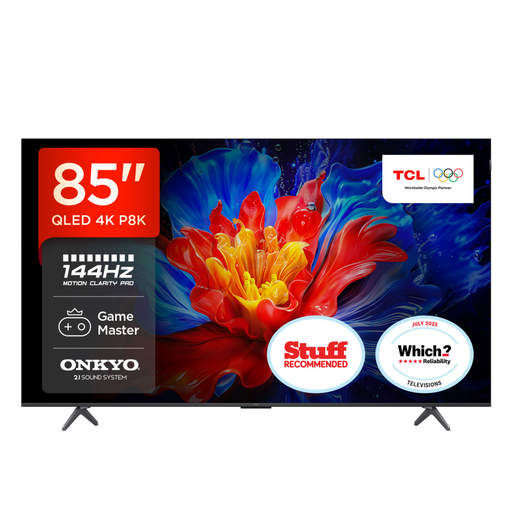
TCL 85P8K QLED 4K HDR PRO Smart TV-85P8K-UK
An 85-inch option for multi-console gaming and cinema-style viewing in a spacious room.
Stated features include 4K QLED, 144Hz native refresh rate, four HDMI 2.1 ports, ALLM, VRR, FreeSync Premium and 2.1 Onkyo audio.
Confirm which ports retain 4K/120Hz, VRR and eARC together with your planned soundbar or receiver path. Check wall, stand and sofa-space measurements before buying.
Joybuy
 No image available
TCL 98Q6C QD-Mini LED 4K HDR Smart Google TV-98Q6C-UK
A specialist very-large-screen option for rooms that can accommodate a 98-inch display.
Stated specifications include 4K QD-Mini LED, 144Hz native refresh rate, four HDMI 2.1 inputs, ALLM, VRR, FreeSync Premium Pro and 2.1 audio.
Check the exact UK specification sheet for the HDMI modes available on each input. The stated 2180mm width and stand footprint need suitable furniture, wall space and viewing distance.
Joybuy
 No image available
Sony 42-inch BRAVIA A90 OLED 4K HDR Smart Google TV-XR42A90K
A compact console-TV route for smaller rooms or closer seating, including PS5-focused setups.
Stated features include a 42-inch 4K OLED display, 120Hz input, HDMI 2.1, VRR, ALLM, HDR10, HLG, Dolby Vision, Google TV and Acoustic Surface Audio+.
Verify the number and allocation of HDMI inputs for your intended 4K/120Hz, VRR and eARC setup, and measure sofa distance to ensure 42 inches suits the room.
Joybuy
Frequently asked questions
Do I need a TV with HDMI 2.1 for PS5 or Xbox Series X gaming?
Not for every console game. Xbox Support says Series X 4K at 120Hz requires a TV that supports HDMI 2.1 and an Ultra High Speed HDMI cable, while PlayStation supports HDMI 2.1 and 4K/120Hz output when the connected display supports the mode. Choose HDMI 2.1 capability when you specifically want compatible high-bandwidth modes, not as a requirement for all console play.
Why does my PS5, Xbox or Switch 2 not show 120Hz after connection?
Check the game or software first, then the selected HDMI input and the TV’s gaming or Enhanced Format setting. Nintendo UK says Switch 2 120Hz output can depend on the software, TV, TV setting and HDMI port, while Sony UK notes that VRR may require an Enhanced Format setting on particular inputs.
Will a soundbar or AV receiver stop 4K/120Hz, HDR or VRR from working?
It can. Xbox Support advises connecting the console directly to the TV for the strongest video connection and notes that an AV receiver, soundbar or other intermediary can affect video features and picture quality. Test the console directly with the TV before deciding that the TV lacks the feature.
Does buying a television mean I need a TV Licence in the UK?
No. The requirement depends on how you use the device, not simply on buying a TV. TV Licensing states that a licence is needed to watch live TV on any channel or streaming service, or to use BBC iPlayer; on-demand programmes on services such as Netflix, ITVX or YouTube do not by themselves require a licence.


