For a garage or garden dead spot, a cable-fed access point is a practical route when Ethernet can reach the workspace; without a cable, mesh or an extender needs a usable wireless connection at its placement point, while powerline depends on the electrical setup. Before buying, check the route, compatibility, outdoor exposure and where devices will connect: sharing a Wi-Fi name does not guarantee seamless roaming.
Who this guide is for
Garage workers needing a dependable link
If the router signal already drops out in a separate workspace, check whether a suitable cable can reach it before relying on another wireless hop. A household question on MoneySavingExpert Forum describes a dead spot between a home and garage.
Households covering several weak areas
Think about where each node can connect back to the network and whether an exposed garden position needs equipment specified for outdoor use. Ofcom notes that materials such as water, metal and glass can affect Wi-Fi signals.
Households avoiding a new cable run
Compare a wireless placement point with the actual sockets and wiring available for powerline networking. The right choice depends on whether either route can provide a usable connection where it is needed.
What to prioritise when extending Wi-Fi
Start with the path between the router and the dead spot, then compare device modes and compatibility against that route.
| Concern |
What to check when buying |
Who this matters to |
| A dependable workspace link |
Check service near the router, inspect the cable route and establish whether the unit will be sheltered or exposed outdoors. |
If my work depends on a connection in a separate garage, I want to know whether cable can reach it before relying on another wireless hop. Around 38% of consumers put a dependable workspace link first. |
| Coverage across several areas |
Check exact node compatibility and backhaul options, and place a wireless node where it can still connect to the upstream network. |
When I need to move between several weak areas, I care about node placement and device handover rather than fixing one isolated spot. Around 23% of consumers prioritise coverage across several areas. |
| Avoiding a new data-cable route |
Check the proposed sockets and the kit’s circuit requirements. TP-Link says its cited powerline kit needs adapters on the same electrical circuit; check adapter standards too, as G.hn and HomePlug AV/AV2 are not interchangeable. |
If a new data cable is impractical, I would check the sockets before choosing a powerline route. Around 16% of consumers put avoiding a new data-cable run first. |
| Fixing one reachable weak spot |
Test Wi-Fi at the proposed intermediate socket, not just at the dead spot; check whether the device offers repeater mode, access point mode or both. |
For one weak area, I would prefer a simple setup if an intermediate position still receives usable Wi-Fi. Around 15% of consumers prioritise a straightforward fix for one reachable spot. |
| Reusing a spare router |
Check that the exact model supports access point mode, follow its port instructions and leave DHCP on the primary router as the maker directs. |
If I already own a suitable router, I would check its access point settings and whether Ethernet can reach the workspace before replacing it. Around 8% of consumers put reusing a spare router first. |
Buying pitfalls to avoid
-
Putting a wireless node inside the dead spot
A mesh node or extender still needs a usable connection back to the home network; placing it where the signal already fails may leave the extended connection unreliable.
Test the proposed position before buying. If no usable wireless position exists, consider whether a cable-fed access point is practical.
-
Assuming a garage socket guarantees powerline will work
Powerline performance depends on the electrical arrangement and adapter compatibility. TP-Link specifies at least two adapters on the same circuit for its cited kit, and its guidance distinguishes G.hn from HomePlug AV/AV2 equipment.
Check the proposed sockets, the kit’s requirements and the standards of any adapters already in use.
-
Treating weather-rated equipment and outdoor cable as the same decision
An enclosure rating does not establish that a cable is suitable for direct burial, and an outdoor device can have model-specific mounting conditions. Belden distinguishes cable types for outdoor use, conduit and direct burial.
Check the entire exposed or buried route, the device’s installation instructions and any power requirements. If excavation is planned, follow the Health and Safety Executive’s precautions for locating and avoiding buried services.
Suitable cable, conduit, power equipment or professional installation may add planning and installation work.
-
Assuming every mesh node works with every router
Compatibility and wired-backhaul support depend on the exact equipment. NETGEAR says Orbi add-on satellites need a compatible Orbi system, while TP-Link sets separate requirements for EasyMesh Ethernet backhaul.
Match the exact models, hardware versions, firmware and intended backhaul before buying.
Brands to consider for specific Wi-Fi extension routes
TP-Link
Its documented product lines include mesh, range extenders, powerline kits and outdoor access points. Compare the exact model and operating mode rather than treating them as interchangeable.
- TP-Link specifies outdoor ratings for models including the Deco X50-Outdoor and EAP610-Outdoor V1, and documents access point mode for the RE705X.
- Installation, backhaul and compatibility conditions vary by model. An outdoor rating does not establish coverage at a particular property.
ASUS
A possible route for a compatible spare router connected by Ethernet and configured as an access point.
- ASUS provides setup guidance for access point mode on supported router models.
- Check support for the exact model and follow its setup instructions. In ASUS’s documented mode, NAT and other routing functions are disabled by default.
devolo
Its Magic-series powerline products include Wi-Fi endpoints for locations reached through suitable electrical wiring.
- devolo specifies two Gigabit LAN ports on Magic 2 WiFi next and compatibility with other Magic-series adapters.
- devolo says its dLAN-series adapters are not supported by Magic-series products; check the adapter family before adding to an existing setup.
NETGEAR
Orbi add-on satellites are a potential expansion route for households with a compatible Orbi system.
- NETGEAR describes compatible satellites as an expansion option for its Orbi systems.
- NETGEAR says an add-on satellite requires a compatible Orbi router or system and is not a standalone extender.
Ubiquiti
Its UniFi access points include outdoor-capable options for buyers planning mounting, power and network management.
- Ubiquiti describes the U6 Mesh as suitable for indoor and outdoor use.
- The stated weatherproofing condition depends on installing it LED-side up with the included mount; its name alone does not establish compatibility with an existing household mesh system.
Related Joybuy products for extending a home network
These Joybuy product choices cover mesh, range-extender and powerline options for extending a household network.
 No image available
TP-Link Deco BE22 (3-Pack) BE3600 Whole Home Mesh Wi-Fi 7 System
The three-unit mesh system is relevant when several areas need coverage and a node can use a wired or wireless backhaul.
The product description identifies a 3-pack with wired and wireless backhaul options.
View on Joybuy
 No image available
NETGEAR Orbi 370 RBE373 WiFi 7 Mesh System, 3-Pack, Dual-Band BE3600
This mesh set may suit a household extending coverage across several locations with a router and two satellites.
The product description lists 2.5Gbps Ethernet ports on the router and each satellite.
View on Joybuy
 No image available
TP-Link RE220BE BE3600 Wi-Fi 7 Range Extender
Consider this extender when an intermediate position receives usable Wi-Fi from the existing router; a wired connection can offer a different access point route.
Its product description lists range-extender and access point modes, a Gigabit Ethernet port and EasyMesh compatibility with a compatible router. In extender mode, placement must remain within range of the existing router.
View on Joybuy
 No image available
TP-Link TL-WPA8631P KIT AV1300 Gigabit Powerline Wi-Fi Extender Kit
This route may suit a workspace where running data cable is undesirable and the electrical path meets the kit’s requirements.
The product description lists dual-band Wi-Fi, three Gigabit Ethernet ports and OneMesh compatibility with a compatible router. TP-Link says its powerline network requires adapters on the same electrical circuit.
View on Joybuy
 No image available
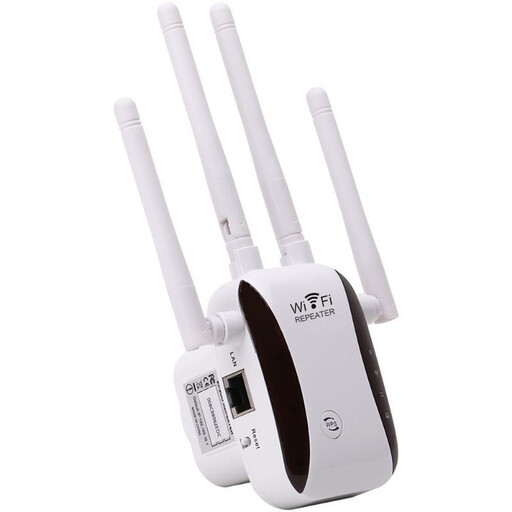
WiFi Signal Extender
A repeater may suit one weak area if it can be placed where the existing Wi-Fi signal is still usable.
The product description lists access point, relay, router and client modes; check the mode and setup requirements for your intended arrangement.
View on Joybuy
Frequently asked questions
What should I check before buying Wi-Fi extension equipment?
Check whether broadband and Wi-Fi work near the router, then note obstructions, possible device positions, cable access and the sockets available at both ends. Ofcom advises that a slow Wi-Fi result does not by itself establish a fault with the incoming broadband service.
Does an Ethernet port on an extender mean it supports wired backhaul or access point mode?
No; check the exact model’s supported modes, hardware version and firmware. TP-Link documents access point mode for the RE705X, while its EasyMesh Ethernet backhaul guidance requires support from both the main router and satellite.
Will the same Wi-Fi name make devices switch seamlessly between the house and garage?
Not necessarily. Apple explains that connected devices play a role in deciding when to roam, so check compatibility for any advertised coordinated roaming and test your own devices along the route.
Can ordinary outdoor Ethernet cable be buried to reach a garage?
Do not assume so: Belden distinguishes outdoor cable from cable intended for underground conduit or direct burial. If excavation is planned, the Health and Safety Executive advises precautions to locate and avoid buried electrical services.
Can any Wi-Fi access point be installed outdoors in the UK without further checks?
An outdoor enclosure rating alone does not settle whether a particular radio configuration is permitted. Check the exact equipment, settings and intended installation against current UK conditions; Ofcom describes Automated Frequency Coordination controls for higher-power outdoor 6 GHz Wi-Fi devices.


