What to check before choosing
Start with the obstacle between the network and the proposed camera position, then check how the chosen connection point will receive power and connect back to the router.
| Concern |
What to check |
Who this matters to |
| Coverage near the camera |
Check where an outdoor-rated unit can be mounted and whether its wired or wireless connection back to the router is viable. Plan its power and protected cable connections. |
If my camera is beyond several walls, I want a Wi-Fi source closer to it rather than depending on the indoor router’s reach. About 37% of consumers put camera-zone coverage first. |
| Minimal installation work |
Find an indoor socket between the router and camera area that still has a usable router signal. Check how the chosen extender handles network names. |
For a camera just outside current coverage, I would rather try a plug-in option before arranging exterior work. Around 27% of consumers make a low-disruption approach their primary need. |
| Using existing wiring |
Check for suitable sockets at both ends and test the powerline connection at those exact outlets. Confirm whether the camera-side connection needs Wi-Fi or Ethernet. |
With a socket nearer the outbuilding camera, I want to assess that wiring route instead of relying on a signal through thick walls. Roughly 18% of consumers prioritise using the available electrical route. |
| Camera-side connectivity |
Confirm the exact camera’s supported Wi-Fi bands and any Ethernet option. For a mobile-data camera, check coverage at its position and its SIM and data-plan requirements. |
If the camera cannot maintain the intended Wi-Fi connection, changing the network equipment alone may not settle my choice. About 18% of consumers put the camera’s connection options first. |
Joybuy products for these routes
These selections cover powerline equipment for a camera-side connection and an outdoor Wi-Fi camera. Which route is useful depends on the sockets, cable path and signal at your proposed camera position.
 Image unavailable
TP-Link TL-WPA8631P KIT AV1300 Powerline Wi-Fi
Consider this Wi-Fi powerline kit if a suitable socket can bring the connection nearer the camera. Its AV1300 and Gigabit designations are product specifications, not promised speeds at your outlets. Test the intended sockets, and do not place the adapters where they would be exposed to outdoor conditions.
View on Joybuy
 Image unavailable
TP-Link TL-PA8010P KIT AV1300 Gigabit Passthrough
This powerline adapter kit is worth assessing where a wired connection can reach the camera from a nearby socket. Confirm the camera’s Ethernet support and cable route, and test the intended outlets. If the camera needs Wi-Fi instead, check for a suitable camera-side Wi-Fi endpoint rather than assuming this kit supplies one.
View on Joybuy
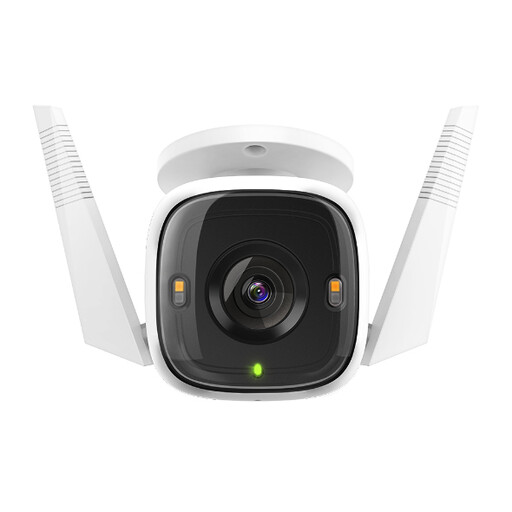 Image unavailable
tapo C320WS Outdoor Security Wi-Fi Camera
Consider this outdoor camera only after checking the connection at its intended position; an outdoor designation does not establish Wi-Fi reach. Confirm the exact supported Wi-Fi bands. If you plan a wired connection instead, check the camera variant’s connection and whether a protected cable route is feasible.
View on Joybuy
Common questions
When should I use an outdoor access point rather than an indoor extender?
Consider an outdoor-rated access point when you can provide a suitable cable and power route to a position nearer the camera. An indoor extender is a simpler option only where it can receive a usable router signal at its own indoor position. Check the outdoor unit’s exact enclosure rating and protect its cable connections as well as the unit itself.
Can the camera be the reason Wi-Fi fails at the end of the garden?
Yes: the camera must support a Wi-Fi band and connection method that work at its position. Reolink lists both 2.4 GHz and 5 GHz for its W430, but that specification does not apply to every wireless camera. Check the exact model and test it at the proposed mounting point.
What should I check before powering networking equipment outdoors?
Check that the equipment and all exposed cables and connectors suit their outdoor positions. Electrical Safety First advises residual current device protection for outdoor electrical equipment. For fixed work in an English dwelling, GOV.UK’s Approved Document P covers electrical safety; have the proposed installation assessed against the requirements that apply to your property.
Do I need permission to mount an outdoor Wi-Fi unit?
Check the property and proposed mounting arrangement before installation, particularly if you rent or the building has restrictions. GOV.UK’s antenna guidance for England advises checking planning, listed-building and owner or landlord permissions where applicable, and contacting the local planning authority when uncertain. Do not assume that guidance settles the position for every Wi-Fi unit or every part of the UK.
When is a camera using mobile data worth considering?
Consider one if a dependable household Wi-Fi or wired route cannot reach the intended position and mobile coverage there is usable. Reolink specifies that its TrackMix Wired LTE needs a Nano SIM and cellular data plan; check the requirements of the exact camera and expected data use before choosing this route.


