Consider a powerline kit for sharing project files with a garden-office workstation only if the router-side and office outlets can form a link on the same electrical circuit. A kit with a Gigabit Ethernet port suits a fixed wired workstation; choose a Wi-Fi-equipped kit if the office also needs wireless coverage or several wired ports. Neither format guarantees file-transfer speed, which depends on the electrical installation.
Who is powerline for?
Fixed workstation file sharers
If project work centres on a desktop, dock, NAS or switch, an Ethernet connection at the office end may be more useful than adding Wi-Fi there. Powerline still depends on a compatible electrical path between the two locations.
Mixed-device garden-office users
A workstation may need Ethernet while laptops and phones need Wi-Fi in the same office. A Wi-Fi powerline kit can provide both, provided its remote adapter has enough ports for the planned wired devices.
Consumers checking the wiring layout
If the garden office has a separate electrical feed or its circuit arrangement is unclear, establish whether the intended outlets can form a powerline link before relying on a kit for project work. TP-Link says adapters on different circuits will not communicate.
What matters when choosing?
Check the electrical path before comparing ports or Wi-Fi features: TP-Link says its powerline adapters must be on the same circuit to communicate.
| Concern |
What to check |
Who this matters to |
| Electrical-path compatibility |
Confirm that the router-side and garden-office outlets are on the same electrical circuit. Plan for an adapter at each end. |
If the garden office has a separate feed, I need to know whether the intended outlets can form a link before choosing a kit. Roughly 50% of consumers put electrical-path compatibility first. |
| Wired file-sharing endpoint |
Look for a Gigabit Ethernet port at the office end, and treat the advertised powerline rate as distinct from actual file-transfer speed. |
For a fixed desktop or dock, I want a wired connection for accessing project files without depending on office Wi-Fi. Around 30% of consumers make that wired endpoint their primary concern. |
| Wi-Fi and additional devices |
Check whether the remote adapter provides Wi-Fi and enough Ethernet ports; confirm any mesh feature’s router requirements. |
When laptops and phones need Wi-Fi alongside a wired workstation, I need both kinds of connection in the office. Approximately 20% of consumers prioritise that mixed-device need. |
Buying pitfalls
-
Choosing by the highest advertised Mbps figure
A rated link speed cannot make adapters on different electrical circuits communicate. TP-Link identifies the same-circuit requirement as a condition for its powerline network to work.
Establish the circuit arrangement, then pair and test the adapters at the intended outlets before making the connection essential to project work.
If the outlets cannot form a link, changing to another networking approach takes additional setup time.
-
Reading AV1300 as a file-copy speed
AV1300 describes a rated powerline link class, not the throughput a project-file transfer will achieve. Actual performance depends on the electrical installation and network conditions.
Test transfers using the intended office computer and file workload before depending on the connection for large projects.
-
Buying a wired-only kit when the office also needs Wi-Fi
An Ethernet-only remote adapter serves a wired endpoint; it does not by itself provide wireless coverage for laptops or phones.
Count the devices and connections needed in the office. If Wi-Fi and several wired ports are priorities, check those features on the remote adapter.
Adding wireless coverage later may require a separate access point or extender.
-
Placing adapters in overloaded or daisy-chained extensions
NETGEAR recommends connecting powerline adapters directly to wall outlets rather than power strips or surge protectors. Electrical Safety First advises against daisy-chaining extension leads.
Identify suitable wall outlets at both ends, avoid overloaded extensions and use a registered electrician if additional fixed sockets are needed.
Relevant brands for reference
TP-Link
Its UK powerline range includes Ethernet-only kits and models that add Wi-Fi at the remote outlet.
- The TL-PA8010P KIT offers a Gigabit Ethernet connection and a passthrough socket; the TL-WPA8631P KIT adds Wi-Fi and three Gigabit Ethernet ports, according to TP-Link’s UK specifications.
- TP-Link says adapters must be on the same electrical circuit, and its rated powerline speeds do not guarantee file-transfer throughput.
devolo
The Magic 2 WiFi next starter kit is a reference for an office that needs Wi-Fi as well as wired connections.
- devolo specifies two Gigabit LAN ports, mesh Wi-Fi features and a rated powerline speed of up to 2400 Mbps for this kit.
- Those specifications do not establish the file-transfer speed or electrical-path suitability of a particular garden office.
D-Link
The DHP-P601AV is a legacy HomePlug AV2 reference for a wired remote endpoint.
- D-Link specifies a Gigabit Ethernet port and a passthrough socket for the DHP-P601AV.
- D-Link identifies this model as end of sale, so it should not be assumed to be available as a new purchase.
NETGEAR
Its UK powerline guidance is useful when assessing outlet placement for a wired office connection.
- NETGEAR recommends plugging powerline adapters directly into wall outlets.
- Its guidance describes powerline use on the same circuit; it does not establish that a particular garden-office outlet will work.
Joybuy products for a wired office connection
This Ethernet-focused kit is relevant to a fixed garden-office workstation once the intended outlets have been checked for powerline compatibility. Choose a Wi-Fi-equipped format instead if the remote adapter also needs to provide wireless coverage.
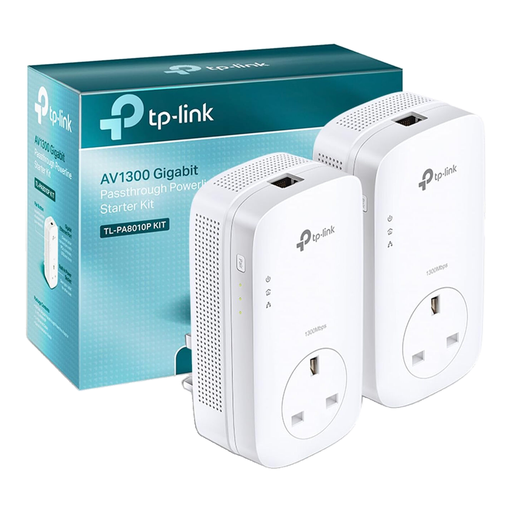 Image unavailable
TP-Link TL-PA8010P KIT AV1300 Gigabit Passthrough
Suited to a fixed garden-office workstation that needs a wired network connection.
This powerline kit has Gigabit Ethernet and a passthrough socket. AV1300 is a rated powerline figure, not a guaranteed project-file transfer speed.
Confirm that the router-side and office outlets are on the same electrical circuit and that suitable wall outlets are available.
View on Joybuy
Frequently asked questions
Will powerline work if the garden office is on a different electrical circuit?
No: TP-Link says its adapters on different electrical circuits will not communicate. Check the circuit arrangement for the intended router-side and office outlets before relying on powerline.
Can a powerline kit serve a desktop that shares large project files?
Yes, if the outlets can form a powerline link and the office adapter has a suitable Ethernet port. A Gigabit Ethernet port provides the local wired connection, but an advertised AV1300 or AV1000 powerline rating does not guarantee file-transfer speed; test with the intended files and computer.
Should I plug a powerline adapter into an extension lead?
Use a suitable wall outlet where possible. NETGEAR recommends direct wall-outlet connection rather than a power strip or surge protector, while Electrical Safety First advises against daisy-chaining extension leads.
Do I need an electrician to set up a plug-in powerline kit?
Ordinary plug-in setup does not call for fixed electrical work. If the garden office needs an additional fixed socket or wiring changes to provide a suitable outlet, use a registered electrician rather than adapting an unsafe extension arrangement.


