What matters when choosing?
Choose how the network will reach the workspace before deciding which equipment will provide Wi-Fi or extra wired ports there.
Ethernet and an access point
Consider when: A suitable Ethernet path can reach the detached workspace, particularly when the wireless gap is difficult to bridge.
Plan for: The cable route and an access point suited to its mounting location and power supply. Seek professional assessment if the project also involves fixed outbuilding electrical work.
Wireless mesh
Consider when: A node can be placed where it still receives a usable signal from the home network.
Allow for: Walls and placement affecting the wireless link between nodes. NETGEAR says selected Orbi systems can use Ethernet backhaul if a cable route becomes available later; check the exact model.
Powerline
Consider when: A new Ethernet route is impractical and the property's electrical wiring may provide a usable connection.
Allow for: A property-specific result rather than assuming the adapter's AV class describes the connection you will get in the workspace.
| Concern |
What to check |
Who this matters to |
| A stable work connection |
Check whether Ethernet can reach the workspace and whether an access point suits its intended indoor or outdoor position. |
If calls and cloud work cannot tolerate an unreliable connection, I need to know whether the difficult house-to-office gap can use a wired link. Around 39% of consumers put a stable work connection first. |
| Coverage without new cabling |
Check that a mesh node can receive a usable signal where it will be placed and that it works with the intended system. |
When a cable route is not practical, I need coverage that reaches towards the workspace without leaving the mesh node isolated. Coverage without new cabling comes first for around 23% of consumers. |
| Reusing equipment |
Check the new router's LAN ports and the exact operating modes and compatibility of existing equipment. |
With a router change ahead, I want to keep equipment that can still connect and operate in the required mode. For around 23% of consumers, reuse is the primary concern. |
| Using electrical wiring |
Check adapter compatibility, the electrical route and whether the remote unit needs to provide Ethernet, Wi-Fi or both. |
If I cannot run Ethernet, I may want to try the existing electrical wiring, but I need the connection to work in this property. Around 15% of consumers make this powerline route their first concern. |
Joybuy products for these routes
These products address two different parts of a detached-workspace network: a powerline kit to try where new Ethernet cabling is impractical, and a switch for a workspace that already has a network connection. The switch does not create the link between buildings or provide Wi-Fi on its own.
 No image available
TP-Link TL-WPA8631P KIT AV1300 Powerline Wi-Fi Extender
Consider this powerline Wi-Fi kit when a new Ethernet route is impractical and the property's wiring may provide a usable connection to the workspace.
The product name specifies an AV1300 class and Gigabit connectivity; neither establishes the speed you will get between buildings. Check compatibility with any adapters you intend to keep.
Joybuy
 No image available
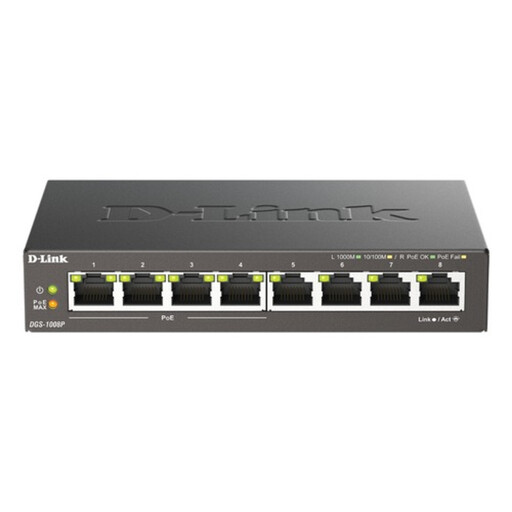
D-Link 8-Port Gigabit PoE Unmanaged Desktop Switch
Consider this switch when a network connection already reaches the workspace and several devices need wired ports.
Its name specifies eight Gigabit ports and PoE. Check an intended access point's PoE standard and power needs against the switch before connecting it; the switch does not provide Wi-Fi or bridge the gap from the house by itself.
Joybuy
Frequently asked questions
Will mesh fix a poor connection in a garden office?
Mesh may help if its nodes can maintain a usable connection across the gap. Ofcom notes that walls and materials including metal and glass can weaken Wi-Fi, and that Wi-Fi cannot outperform the broadband service. Check the connection near the router and test possible node positions before assuming a satellite in the office will work.
Can I keep my powerline adapters after changing router?
You may be able to keep them if the new router has an available Ethernet LAN port and the adapters can still form a compatible powerline network. Check the exact adapter models, then confirm whether the workspace unit supplies Ethernet or Wi-Fi as needed; the router's brand alone is not the compatibility test.
When should an installer assess work for an outbuilding?
Seek advice from a competent electrical professional or local Building Control before starting new or altered fixed electrical work supplying a detached workspace. In England, the Building Regulations 2010 apply Part P requirements to a qualifying small detached building receiving electricity from a source shared with or inside a dwelling; GOV.UK's Approved Document P explains electrical safety and when notification is required. Do not assume England's procedures apply unchanged elsewhere in the UK.
Can an indoor mesh satellite be mounted outside?
Only if the exact model's environmental rating and mounting instructions permit that location. An indoor product should not be treated as weather-rated merely because it provides Wi-Fi. For comparison, TP-Link specifies IP65 protection for its EAP225-Outdoor access point; check the rating and power requirements of whichever model you choose.


