Choose the house-to-office connection before choosing a faster router. An indoor mesh system can suit a nearby garden office if a node receives a usable signal; where Ethernet is feasible, a cabled outdoor access point provides another route, while a point-to-point bridge can connect more separated buildings when cabling is impractical. Check the connection at the presentation desk, along with any wired-device, mounting and power requirements.
Who each setup suits
Nearby-office mesh users
If the office is near the house, you may prefer to try an indoor mesh node before planning a cable route. Place it where it can maintain a usable connection to the house; TP-Link notes that building materials and other environmental conditions can affect network speed.
Reliability-first remote presenters
If screen sharing or video calls depend on a consistent office-side connection, consider whether Ethernet can reach the office or an outdoor-rated access point. TP-Link warns that indoor equipment can provide limited outdoor coverage because of range and signal attenuation.
Detached-building link planners
If an indoor mesh link is impractical but the buildings have a suitable outdoor path, a pair of aligned wireless bridge endpoints may carry the connection across the gap. TP-Link describes its CPE210 as equipment for point-to-point and point-to-multipoint outdoor links.
What matters when choosing
Indoor mesh
Choose when: A nearby office allows a mesh node to receive a consistently usable signal from the house.
Trade-off: A wireless backhaul still depends on placement and the conditions between buildings.
Cabled outdoor access point
Choose when: You can run Ethernet towards an office-side or exterior coverage point.
Trade-off: The installation needs a cable route, suitable mounting and compatible power.
Point-to-point bridge
Choose when: The office is more separated, cabling is impractical and two outdoor endpoints can be aligned.
Trade-off: The bridge carries the link between buildings; local office Wi-Fi may need separate equipment.
| Concern |
Buying checks |
Who this matters to |
| Presentation stability |
Check the connection at the intended desk and whether a presenting device can use Ethernet. |
If a screen share must stay connected throughout a meeting, I need a dependable office-side link rather than an advertised peak speed. Around 36% of consumers put presentation stability first. |
| House-to-office reach |
Assess mesh-node placement, a feasible Ethernet route or a clear path for two bridge endpoints. |
With a detached office, I need the connection to cross the gap between buildings before I can rely on it indoors; around 29% of consumers prioritise that link. |
| Outdoor installation |
For exterior-mounted equipment, check its weather rating, mounting conditions and power standard. |
If equipment will sit outside, I want its enclosure and installation to suit that location. Outdoor suitability comes first for around 21% of consumers. |
| Future capacity |
Match Wi-Fi features and Ethernet ports to your client devices, cabling and wider network. |
I may use the office for several connected devices as well as presentations, so I want capacity I can use across the whole setup; around 14% of consumers make that their primary concern. |
Installation mistakes to avoid
-
Replacing the router before checking the office signal
A faster indoor router does not by itself resolve a weak house-to-office link. TP-Link identifies range and signal attenuation as limits on outdoor coverage from indoor equipment.
Check reception at the presentation desk, then decide whether mesh placement, a cable route or a bridge addresses the gap.
-
Assuming an outdoor access point needs no other equipment
Power requirements differ by model: TP-Link specifies 802.3af or passive PoE for the EAP225-Outdoor, while Ubiquiti specifies PoE+ for the U7 Pro Outdoor.
Check the selected model’s power standard, cable route, mounting requirements and included accessories.
The installation may also require compatible PoE equipment, Ethernet cabling and mounting hardware.
-
Expecting a building-to-building bridge to cover every office device
TP-Link describes the CPE210 as a point-to-point or point-to-multipoint outdoor CPE. Carrying the connection to the office and distributing it to devices inside are separate tasks.
Plan compatible endpoints at both buildings, then decide whether office devices will connect by Ethernet or need a separate access point.
-
Assuming all outdoor 6 GHz modes have the same UK conditions
Ofcom distinguishes very-low-power outdoor use in the lower 6 GHz band from higher-power use under Automated Frequency Coordination control.
Before installing a 6 GHz device outdoors, check its intended UK operating mode and power class against the applicable Ofcom conditions.
Brands and product lines to consider
TP-Link
TP-Link offers distinct equipment types relevant to this decision: Deco mesh systems, outdoor access points and directional CPE devices.
- TP-Link specifies wireless and wired backhaul for Deco BE65, an IP65 enclosure and PoE options for EAP225-Outdoor, and point-to-point use for CPE210.
- These serve different routes. The CPE210’s specified 2.4 GHz, 300 Mbps wireless class should not be treated as equivalent to a Wi-Fi 7 mesh system.
Ubiquiti
Ubiquiti has access points for installations with suitable Ethernet and PoE infrastructure.
- Ubiquiti specifies the U6 Mesh as an indoor/outdoor Wi-Fi 6 access point and the U7 Pro Outdoor as an IP67 Wi-Fi 7 access point with a 2.5 GbE PoE+ uplink.
- Ubiquiti states that U6 Mesh weatherproofing depends on installation LED-side up with its included pole or wall mount; the U7 Pro Outdoor requires compatible PoE+ and wired networking.
NETGEAR
NETGEAR’s Orbi range is relevant to buyers considering indoor whole-property mesh rather than a dedicated outdoor bridge.
- NETGEAR specifies quad-band Wi-Fi 7, a dedicated backhaul and a 10 Gig internet port for its Orbi 970 system.
- Those Orbi 970 specifications do not establish whether a satellite will receive a usable signal in a particular garden office.
Joybuy mesh systems for a nearby office
These indoor mesh systems are options when the garden office is close enough for a unit to maintain a usable connection to the house. Check the signal path before choosing one for presentation sharing.
 No image available
TP-Link Deco BE22 BE3600 Wi-Fi 7 (3-pack)
Consider this three-unit indoor mesh system if a unit can receive a usable signal near the office. Its stated wireless class is BE3600; check the Ethernet-port configuration if a wired presenting device or future cable route matters.
Shop on Joybuy
 No image available
NETGEAR Orbi 370 RBE373 WiFi 7 (3-pack)
This dual-band BE3600 mesh system is a nearby-office option if a unit can maintain the link to the house. The product name states 2.5 Gbps Ethernet; check which unit has the port you need and how it connects to your existing network.
Shop on Joybuy
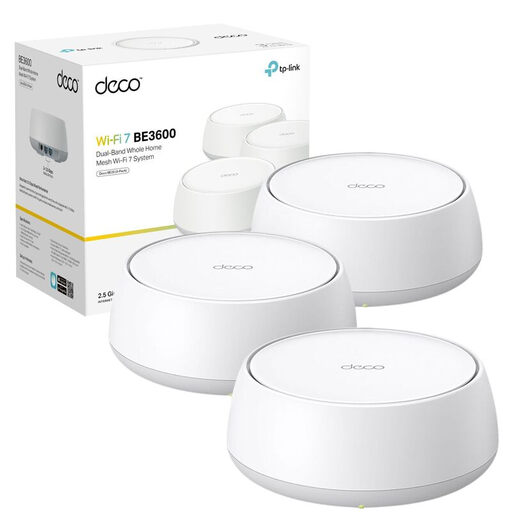 No image available
TP-Link Deco BE25 Wi-Fi 7 (3-pack)
This three-unit indoor mesh system may suit an office within reach of a usable mesh connection. If you plan to connect a presentation device by cable or add wired backhaul, confirm the relevant ports and configuration for this pack.
Shop on Joybuy
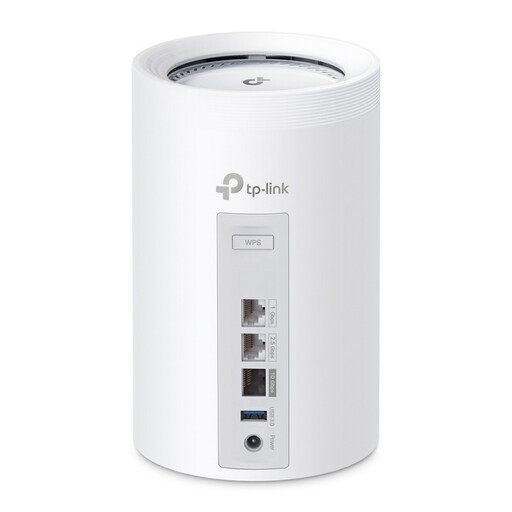 No image available
TP-Link Deco BE65 BE9300 Wi-Fi 7 (3-pack)
This tri-band indoor mesh system is worth considering where the house-to-office signal path is usable. TP-Link specifies wireless and wired backhaul for Deco BE65; confirm the ports needed for your planned cable route or presenting device.
Shop on Joybuy
Garden office Wi-Fi questions
Will a faster router fix presentation dropouts in a garden office?
Not if the weak point is the connection between the house and office. TP-Link notes that actual network speed can depend on ports, cabling and environmental conditions; check reception at the desk before deciding whether to change the router or the connection route.
When does mesh make more sense than an outdoor access point?
Indoor mesh is an option when you can place a unit with a usable house-to-office connection and want to avoid a new cable route. If Ethernet can reach a suitable coverage point, an outdoor-rated access point is another option; TP-Link specifies an IP65 enclosure and PoE support for its EAP225-Outdoor, so power and mounting still need planning.
What would a point-to-point bridge do for a detached office?
It carries the network connection between buildings using compatible outdoor endpoints. TP-Link describes its CPE210 as designed for point-to-point links; you would also need to plan alignment, power and how devices connect once the link reaches the office.
Can I install 6 GHz Wi-Fi equipment outdoors in the UK?
The applicable conditions depend on the device’s band, power and operating mode. Ofcom’s 2020 lower-6-GHz decision allows very-low-power outdoor use, while its July 2026 decision enables higher-power use under Automated Frequency Coordination control. Check the selected device’s UK-supported configuration before planning an outdoor installation.


