What matters when choosing?
Establish the required planning software before choosing a screen size or laptop format.
Browser-based planning
Choose this when: Your layout can be completed in a web tool, without desktop CAD software specified by your course.
Keep in mind: A browser workflow does not replace coursework that specifically requires desktop SketchUp Pro or its file workflow.
Desktop SketchUp Pro or AutoCAD
Choose this when: Your course or project requires the named desktop application, detailed 3D work or formal CAD outputs.
Keep in mind: Application requirements differ by version and workload; a compact laptop format alone does not establish graphics compatibility.
| Concern |
What to check |
Who this matters to |
| Software and modelling |
Confirm the required application, version and operating system; compare its memory and graphics requirements with the exact laptop configuration. |
If I need to submit work in a particular CAD application, I want to know it will run on the laptop I choose. Around 45% of consumers put software compatibility and modelling first. |
| Room and input space |
Compare the laptop footprint with your available desk space, including room for a mouse and any display connection you need. |
When my study surface is small, I need space to view a plan and control it comfortably. For around 33% of consumers, the working setup is the primary concern. |
| Software access |
Check whether your institution provides the tool and whether a student licence has eligibility or renewal conditions. |
I need access to the planning software throughout my coursework, not just when I begin a layout. Continuing access comes first for around 22% of consumers. |
Laptops for garden planning and study
These laptops offer different screen sizes and study setups for garden-planning work. Choose against your required software first, then decide how much desk space and input flexibility you need.
 No image available
HP OmniBook Ultra Flip 14-fh0006na 2-in-1 Copilot+, 16GB RAM, 1TB SSD
Consider the convertible format if you want flexible viewing positions for plans and study in a small workspace.
The listed configuration has Windows 11 Home. Confirm that your required planning application and its graphics requirements suit this exact configuration.
Joybuy
 No image available
ASUS Zenbook DUO UX8406CA-QL135W 14-inch dual OLED touch laptop, 16GB RAM, 1TB SSD
The dual-screen format is worth considering if you want separate viewing areas for a garden plan and study materials.
The title lists an Intel Core Ultra 7 255H processor and LPDDR5X memory. Confirm the selected configuration’s display resolution, which is described differently across the supplied product details, and check compatibility with your required software.
Joybuy
 No image available
ASUS Vivobook 14 X1407QA-LY003W Copilot+ PC, Snapdragon X, 16GB RAM, 512GB SSD, Quiet Blue
Its 14-inch laptop format may suit everyday study and a compact space for web-based planning.
Check that the exact garden-planning application, version and any course extensions work with this Snapdragon X configuration before choosing it for desktop coursework.
Joybuy
 No image available
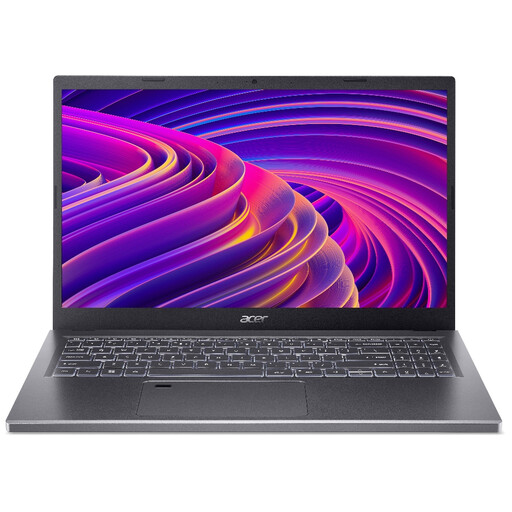
Acer Aspire 5 A515-48M 15.6-inch, Ryzen 5 7530U, 16GB RAM, 512GB SSD, Silver
Consider the larger display if viewing a layout on the laptop matters more to you than keeping the study footprint small.
The title specifies a Full HD 1920 × 1080 display. Measure your available desk space and check the graphics requirements of any desktop 3D software you need.
Joybuy
 No image available
HP 15-fd0064na 15.6-inch, Core i5-1334U, 8GB RAM, 256GB SSD
This configuration is relevant if you are comparing laptops for browser-based garden planning alongside everyday study.
The title lists Windows 11 Home. Its 8GB memory should be checked against your chosen application and multitasking needs; do not assume it suits every desktop CAD workflow.
Joybuy
Frequently asked questions
Is 8GB of RAM enough to plan a garden layout?
It meets SketchUp for Web’s published memory recommendation, but it is not a universal target for desktop CAD or heavier multitasking. SketchUp also recommends at least 8GB for its desktop application, while Autodesk lists 32GB as the recommended memory for AutoCAD 2026; check the requirements for the version and work you will use.
Do I need a dedicated graphics card?
Not every simple browser plan calls for the same graphics setup as desktop 3D work. SketchUp recommends a separate graphics card for its desktop application, so compare your intended software’s graphics requirements with the exact laptop configuration rather than deciding from the garden-planning label alone.
Can I use a MacBook Air for garden planning?
Yes, if the planning tool and your course workflow support macOS. SketchUp publishes Mac requirements, but a course may specify particular applications or file formats; confirm those details before choosing a MacBook Air for assessed work.
Would a mouse help with a 3D garden plan?
A three-button scroll-wheel mouse can make 3D navigation easier. SketchUp recommends one for orbiting, zooming and positioning, so allow it some desk space if those tasks form part of your work.
Does a student SketchUp subscription last permanently?
No, not if you choose the annual SketchUp Studio Student offer described by UK reseller Cadsoft Solutions: renewal is required to continue using that subscription. Check the current eligibility and renewal terms, and whether your institution already provides the software you need.


