What should you check before buying?
Start with the place and subject you want to film: a fixed feeder and an animal crossing a wider route call for different framing. Then check how the camera records at night, responds to movement and stays powered at that position.
| Priority |
What to check |
Your needs |
| Night capture |
Check the stated night-illumination mode and look for day-and-night image examples or relevant test results. A video-resolution figure alone does not show how useful footage will be after dark. |
I want to see which animals visit after dark, not just record that something moved. |
| Trigger response |
Check the exact model’s trigger speed and recovery time where stated. SPYPOINT defines trigger speed as the delay between detected heat movement and taking a photo; figures from different makers need a comparable testing basis. |
Birds may make brief visits, or an animal may cross the path quickly. I need the camera to respond while the subject is still in frame. |
| Framing and distance |
Check the camera’s focus range and the distance to your feeder or route. Test the mounted view against garden boundaries; the Information Commissioner's Office advises capturing only your own property where possible. |
I want a clear view of the wildlife spot without pointing the camera across a neighbour’s garden or shared path. |
| Connection |
Test home Wi-Fi at the intended position if you want remote viewing or alerts. Distinguish a home-network connection from direct local Wi-Fi, which may require you to be near the camera. |
Live viewing matters to me at the feeder, but only if it works from where I actually plan to mount the camera. |
| Power and access |
Check the stated battery arrangement, charging method and sunlight at the mounting point. Confirm any compatible backup-power and storage requirements for the exact model. |
If reaching the camera involves moving a ladder or disturbing its position, I would rather plan maintenance before installing it. |
Brands to consider
These brands illustrate different garden-camera approaches; individual models still need checking against your viewing position and connection requirements.
NatureSpy
NatureSpy offers garden-focused cameras, feeder cameras and solar trail cameras.
- Its WiFi WildCam 3 is described by NatureSpy as a garden wildlife camera with 2K video and a replaceable rechargeable battery.
- Its BirdCam Pro combines a bird feeder, Wi-Fi app controls and solar power, according to NatureSpy.
- Check whether the particular model needs home Wi-Fi for the viewing functions you want; a local camera connection serves a different purpose.
Browning Trail Cameras
Browning’s conventional trail cameras are relevant when recording movement on a route matters more than a feeder-mounted view.
- Browning states a 0.22-second trigger speed for its Strike Force Pro X 1080 and 0.3 seconds for its Command Ops Elite 40.
- Those are manufacturer specifications, not directly comparable independent UK test results. Check the exact model’s power, storage and UK supply details.
SPYPOINT
SPYPOINT’s connected trail-camera range is worth examining if wireless transmission or solar-assisted power is central to your setup.
- SPYPOINT says its FLEX-S has an integrated solar panel that charges an internal lithium battery.
- For a cellular model, confirm the precise camera’s UK network compatibility and plan conditions before choosing it.
Joybuy feeder-camera options
These two options are camera-equipped bird feeders for watching a fixed feeding point. If your main subject travels along a wider garden route, assess trail-camera framing and trigger requirements separately.
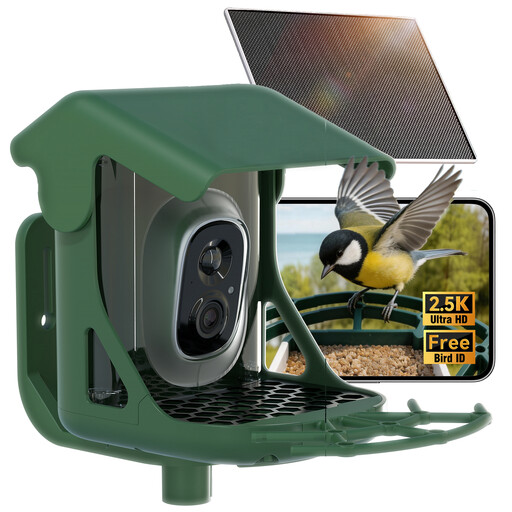 Image unavailable
CINMOORE 2.5K Bird Feeder with Camera
A camera-equipped feeder for watching birds at a fixed spot, with 2.5K capture, live view, 2.4G WiFi and solar power stated in its product name. Check Wi-Fi reach and the mounted field of view. An SD card is not included; check which identification functions require an optional subscription. If brief visits or after-dark viewing matter, confirm the trigger and night-mode details for this model.
View on Joybuy
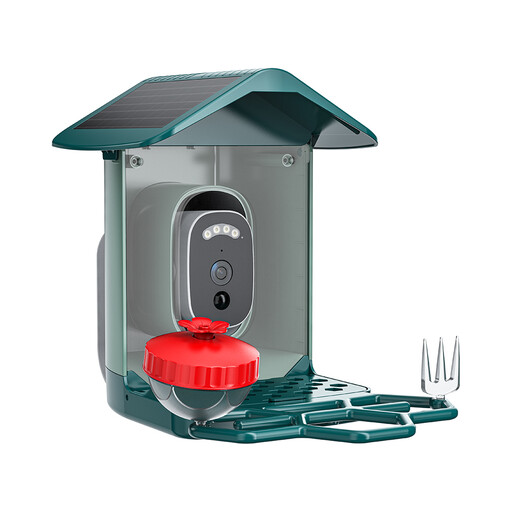 Image unavailable
JOOAN WiFi Solar-Powered Smart Bird Feeder, 2K
This fixed-feeder option states WiFi, solar power and 2K photo and video capture. Check connection and sunlight at the mounting point, along with the camera’s framing. Confirm its night-capture mode and trigger response if you want footage after dark or of short visits, and check the storage-card requirements.
View on Joybuy
Questions about garden wildlife cameras
Where should I point a garden wildlife camera?
Aim it at the feeder or wildlife route within your own garden and check the recorded frame from its final mounting position. The Information Commissioner's Office advises capturing only your own property where possible; if a domestic camera captures another person’s property, a public area or communal space, its guidance says UK data-protection law applies.
Should I turn off audio recording?
Review the setting before use, particularly if the camera could pick up neighbours or passers-by. The Information Commissioner's Office says surveillance systems should not normally record conversations between members of the public because doing so is highly intrusive and unlikely to be justified.
Will a Wi-Fi camera work at the end of my garden?
A camera that relies on your home router for live viewing or alerts needs a consistent connection at its mounting point. Test coverage there and check whether the model instead offers direct local Wi-Fi, which is different from viewing through an internet-connected home network.
Does a solar wildlife camera still need attention?
Yes. Solar charging depends on the light reaching the panel and the camera’s power use. Check the exact model’s backup and recharging options, and make sure you can reach it if the recording location is especially busy.
Which trigger figures matter for passing animals?
Check the exact model’s stated trigger speed and recovery time, where available, alongside its field of view and your planned camera-to-subject distance. SPYPOINT defines trigger speed as the delay from detecting heat movement to taking a photo; manufacturers’ figures should not be treated as independently comparable without a shared testing basis.


