For gardening shows in a home cinema, choose the projector layout after measuring the room: a colour-focused conventional model suits a darkened cinema, lens shift and optical zoom help with an awkward mounting position, and ultra-short throw is worth assessing when the projector must sit close to the wall. Check that the exact model can produce your intended image size, then compare its colour, source connections and brightness for the way you will watch.
Who is this for?
Colour-and-detail viewers
If foliage, flowers and fine garden textures are the reason for using a large screen, compare documented colour capabilities and the resolution of both the projector and your programme source. A room where you can control the light makes this choice easier to judge.
Viewers with a constrained mounting position
If a shelf or ceiling position is already fixed, the projector must produce the desired image size from that distance. Model-specific throw guidance, optical zoom and lens shift deserve attention before picture specifications.
Viewers short of projection space
If a projector cannot sit behind the seating, consider whether an ultra-short-throw model can fit on furniture near the wall. Its placement still needs to match the intended screen and a flat, level surface.
What matters when choosing?
Colour-focused conventional projection
Consider it when: You can darken the cinema and have room for the required throw distance.
Allow for: Careful positioning; a manufacturer's colour-coverage figures are not an independent picture-quality test.
Flexible conventional installation
Consider it when: The projector can sit behind viewers or on the ceiling, but cannot be perfectly centred.
Allow for: A suitable throw distance is still necessary, even with lens shift and optical zoom.
Ultra-short throw
Consider it when: Rear or ceiling placement is impractical and the projector needs to sit near the wall.
Allow for: Precise positioning and a flat projection surface; this layout does not establish superior picture quality.
| Concern |
What to check |
Who this matters to |
| Natural colour and fine detail |
Check displayed resolution, the source device's output and any model-specific colour-coverage or calibration information. |
If I am projecting close views of flowers and foliage, I want colour and texture to remain convincing at the size I plan to use. Around 33% of consumers put colour and detail first. |
| Room fit and image alignment |
Measure lens-to-screen distance and target image width; check the exact model's throw range and placement controls. |
With a fixed shelf or ceiling position, I need the intended picture to fit without depending on substantial digital correction. Room fit comes first for around 27% of consumers. |
| Viewing with some room light |
Decide whether daylight can be controlled, then compare stated brightness figures on a like-for-like measurement basis. |
When the cinema also serves as a living room, I need to know whether I can dim it enough for the picture I want. Around 20% of consumers prioritise mixed-light viewing. |
| Programme source and audio |
Check the HDMI connections your source needs and how the projector will connect to your sound system. |
If I watch through a set-top box or streaming device, I need it and my speakers to connect without complicating each viewing session. Source and audio connections lead for around 20% of consumers. |
Installation and buying pitfalls
-
Buying before measuring the projection position
ProjectorCentral explains that a lens's optics determine the relationship between throw distance and image size. A projector may not produce your intended picture from the position available.
Measure from the proposed lens position to the screen and check the chosen model's throw chart or calculator against your target image width.
If the positions do not match, changing the mount or rearranging furniture may be necessary.
-
Planning to fix a tilted image digitally
Digital keystone correction is not a substitute for aligning the projector with a flat screen. Sony notes that a non-parallel projector or uneven screen can leave one side of an image enlarged and blurry.
Plan a level, square installation first. Where the model provides them, use lens shift and optical zoom to accommodate the available position.
-
Reading brightness as a bright-room guarantee
A stated lumen figure alone does not tell you how a gardening programme will look with daylight or reflections in your room. Figures also need comparable measurement bases.
Decide how much light you can control before comparing model specifications; if possible, view a demonstration under similar lighting.
-
Assuming built-in streaming will always meet your needs
Apps, operating systems and software support are model-specific. A projector's video inputs and its built-in streaming features are separate things to check.
Confirm your preferred apps and the model's update commitment, as well as whether you can connect a compatible streaming device through HDMI.
Using a separate streaming device also means accommodating another device and its connections.
Relevant brands to consider
BenQ
The W2720i is a reference point for comparing documented colour features in a dedicated home-cinema model.
- BenQ UK claims 90% DCI-P3 and 98% Rec.709 coverage for the W2720i and describes factory calibration reporting.
- Those are BenQ's model-specific claims, not independent viewing results; check the required throw distance in your room.
Epson
The EH-TW7100 and EH-LS800W illustrate different home-cinema installation layouts.
- Epson United Kingdom lists lens shift and zoom for the EH-TW7100. For the ultra-short-throw EH-LS800W, Epson states an 80-inch image at 2.3 cm from the wall and an image size of up to 150 inches.
- Check the exact model's placement guidance: these features and image-size claims do not apply to every Epson projector.
Sony
The VPL-XW5000ES provides a native-4K laser model to consider for a dedicated cinema.
- Sony UK described the VPL-XW5000ES as a 2,000-lumen model in its April 2022 launch announcement.
- That announcement is not a current listing. Check the exact model generation, placement requirements and current purchase terms.
Projectors on Joybuy
These home-viewing projectors offer different stated resolution, connection and setup features to check against a gardening-show cinema. Measure your room for each model rather than assuming that a large advertised image size will fit your available position.
 No image available
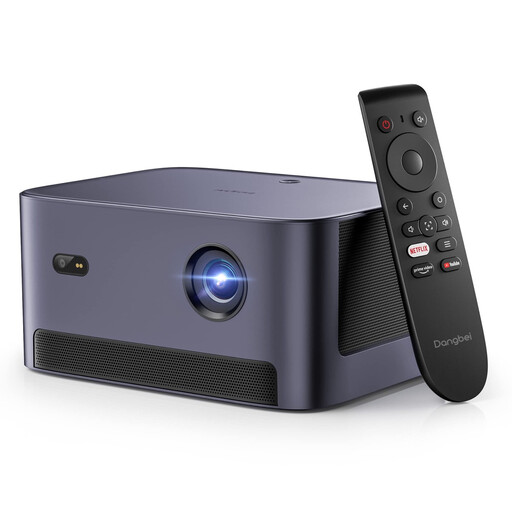
Dangbei Neo DLP Projector, Full HD 1080p
Consider this for home viewing if native 1080p and automatic setup features suit your plans. The title lists 540 ISO lumens, autofocus, keystone correction, Wi-Fi and Bluetooth. Check the operating system and your preferred app support before relying on built-in streaming, and confirm the throw distance for your intended image size.
View on Joybuy
 No image available
Wimius K1 Projector, Full HD 1080p, 4K Support
Consider this if you intend to connect a separate programme source. The title states native 1080p, 4K support and vertical and horizontal keystone correction; 4K support does not mean native 4K projection. Check source compatibility and the image size achievable at your measured projection distance.
View on Joybuy
 No image available
Magcubic HY350Max Projector, Native 1080p, 8K Support
Consider this where a native 1080p picture and flexible positioning matter. The title lists 180° rotation, automatic keystone correction, Android 14 and HDMI compatibility. Its 8K support describes supported video decoding, not native 8K resolution; confirm the image size at your available throw distance.
View on Joybuy
 No image available
XBJ 360° Portable Projector, Full HD 1080p, European Version
Consider this if you need to direct the picture towards different surfaces. The title lists 360° rotation, native 1080p, automatic keystone correction and HDMI. Check the achievable image size and throw distance in your intended position rather than relying on the display-size claim alone.
View on Joybuy
 No image available
XBJ A5Pro Grey Projector, Native 1080p, 4K Support
Consider this if automatic focus and keystone correction would help with setup. The title states native 1080p, 4K support and Wi-Fi 6; 4K support does not mean native 4K projection. Check the exact brightness specification, which differs across the product information, and confirm the throw distance and image size for your room.
View on Joybuy
Common questions
Should I choose the brightest projector for gardening shows?
Not automatically: brightness matters more when you cannot darken the room, but it does not remove the effect of daylight and reflections. Decide how you will control room light, then compare models' stated brightness on a comparable measurement basis alongside their other image features.
How can I tell whether a conventional projector fits my room?
Measure from the proposed projector lens position to the screen, then check the exact model's throw range for your intended image width. ProjectorCentral explains that throw distance and image size depend on the lens optics, so a general room-size description is not enough.
Can keystone correction compensate for an awkward mounting position?
Use keystone correction as an adjustment, not the basis of the installation. Aim for a level projector facing a flat screen; if the mounting position is constrained, check whether the model offers suitable lens shift and optical zoom.
What should I check on a projector listing for Great Britain?
Check the exact model, seller information, instructions and the conformity marking applicable to that product. GOV.UK guidance updated in August 2026 says CE marking continues to be recognised alongside or in place of UKCA marking for relevant Great Britain product requirements; a marking does not establish picture quality or, by itself, settle every question about a particular listing.


