
24/7 Customer Support

Free returns

Same-day & Next-day Delivery

Quality Guaranteed

Unlock Your Welcome Offers: FREE Delivery | Up to 80% OFF | Free 30-day JoyPlus trial
Download the APP
Navigating the world of mechanical keyboards can feel like a minefield of technical jargon and marketing hype. The term "gasket mechanical keyboard" is now everywhere, promising a superior typing experience. But what does it actually mean, and how can you be sure you're getting the real deal? Many buyers in the UK end up with a product that sounds great on paper but disappoints in practice.
As the Joybuy Product Recommendation Officer, my role is to help you see past the buzzwords. We'll break down the essential features of a quality gasket keyboard and highlight the common pitfalls that lead to buyer's remorse, ensuring your investment enhances your gaming, typing or professional workflow.
Before you add a keyboard to your basket, be aware of these frequent issues that can turn a promising purchase into a letdown.
To ensure you're getting a keyboard that delivers on its promises, focus on these non-negotiable technical specifications.
A genuine gasket mount involves placing soft, pliable material—typically silicone or Poron—between the keyboard's plate (which holds the switches) and the case. This isolates the plate, allowing it to flex slightly under pressure with each keystroke. This construction is what creates the signature soft, cushioned typing feel that reduces finger fatigue during long sessions. When checking specifications, look for mentions of Poron or silicone gaskets and a flex-cut plate (often made of polycarbonate/PC), as these are indicators of a well-executed design.
To achieve that sought-after refined sound, a keyboard needs a comprehensive acoustic treatment. A quality build will include several layers of foam, each with a specific purpose:
Together, these layers transform sharp, high-pitched noises into a deeper, more pleasant sound profile.
For anyone interested in personalisation, a hot swappable keyboard is essential. This feature means the switches are not soldered to the PCB, allowing you to remove and replace them easily with a simple tool. It gives you the freedom to experiment with different switch types (linear, tactile or clicky) to find your perfect feel and sound, turning your keyboard into a truly custom mechanical keyboard without needing any technical skills. Look for sockets that support both 3-pin and 5-pin switches for maximum compatibility.
Based on these criteria, here are a few models that align with different user needs and successfully avoid the common pitfalls.
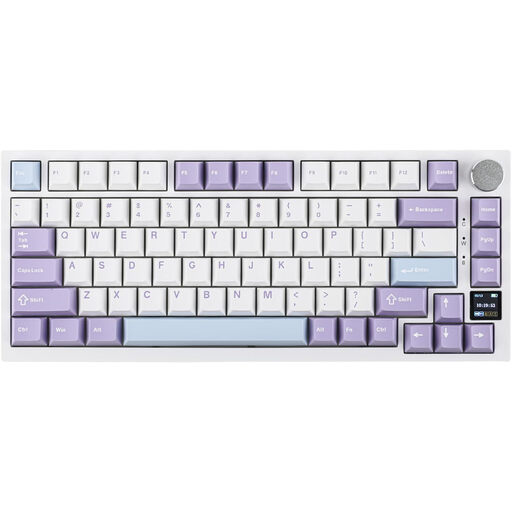
Why This Fits Their Persona: This user needs a versatile tool for both work and play. The compact 75% layout saves desk space for mouse movement during gaming, while the reliable tri-mode wireless connectivity keeps their workspace tidy. The TFT screen is a practical bonus for checking status at a glance.
It features a well-implemented gasket structure with a flex-cut PC plate and multiple sound-dampening foam layers, directly countering the "fake gasket" and hollow sound issues.
The combination of a functional TFT screen, a dedicated keyboard with volume knob and robust tri-mode connectivity makes it a feature-rich and practical choice.
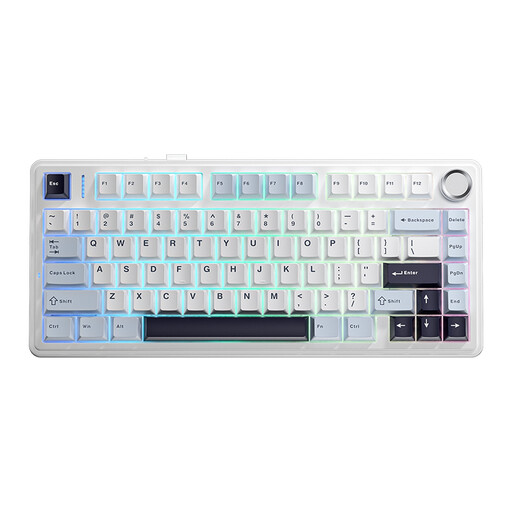
Why This Fits Their Persona: This user is chasing a specific sound and feel. The AULA F75 is an excellent platform for modification, known for its pleasant acoustics straight out of the box. Full-key hot-swap support is non-negotiable for them, allowing endless tinkering.
It is specifically engineered for a premium sound profile, using a five-layer padding system that completely avoids the hollow sound trap. Its gasket implementation provides a noticeable flex.
Delivers an impressive out-of-the-box creamy sounding keyboard experience and provides full-key hot-swap functionality, making it a strong foundation for further customisation.
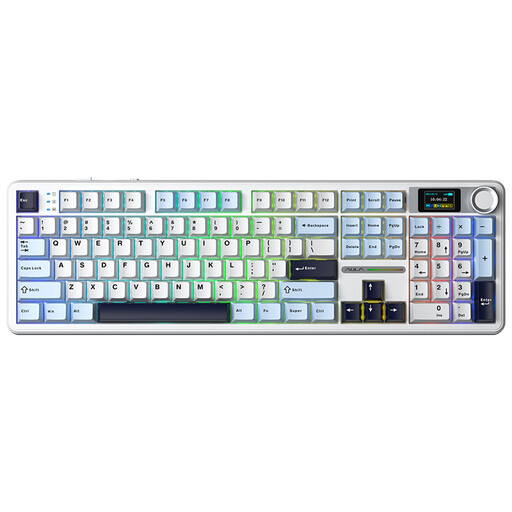
Why This Fits Their Persona: This user wants a full-size layout with a number pad for productivity but refuses to sacrifice modern gaming and enthusiast features. They need a single keyboard that excels at everything, from data entry to intense gaming sessions.
It integrates a proper gasket structure into a full-size frame, a combination not always found. This avoids the trap of having to choose between a good typing feel and a full layout.
Offers a rare blend of a full 108-key layout with enthusiast-grade features like a gasket mount, hot-swappable switches, an LCD screen and tri-mode connectivity.
We have compiled a complete, real-time list of products that fully satisfy these strict selection criteria and UK safety regulations.
Yes, for many people it is. The cushioned, flexible feel provided by the gasket structure can significantly reduce finger fatigue during long typing sessions. This makes it an excellent choice not just for gamers, but also for programmers, writers and anyone who spends hours at their keyboard each day.
The lifespan is determined by its overall build quality. Look for models with durable PBT keycaps, which resist shine and wear better than standard ABS plastic. The switches themselves are typically rated for 50 million keystrokes or more. A hot swappable keyboard can have an even longer functional life, as you can easily replace a faulty switch without having to replace the entire board.
Most keyboards with RGB gaming keyboard lighting come with several pre-set effects that you can cycle through using key combinations (e.g., Fn + a specific key). However, to unlock full customisation—such as per-key lighting, creating your own patterns or syncing with games—you will typically need to install the manufacturer's software. Always check for Windows and macOS compatibility if you use multiple systems.