What matters when choosing?
Decide whether detailed pages or comfortable hand-held reading matters more, then check your offline library and annotation setup. Screen size alone cannot tell you how long a tablet will last on a charge.
| Concern |
What to check |
Who this matters to |
| Map readability |
Compare screen size and resolution, then try a page from your actual ebook or PDF if possible. A larger panel offers more physical room for labels but takes more space in your bag. |
If I read atlases with fine labels, I want to inspect a page without constantly zooming; around 37% of consumers put full-page map readability first. |
| Carrying and holding |
Check the weight of the exact configuration, including the cover or stand you intend to carry. Apple lists its 11-inch and 13-inch iPad Air Wi-Fi models at 464 g and 616 g respectively. |
When I cannot use a tray table, I need a tablet I can hold through a reading session; roughly 27% of consumers prioritise that lighter carrying and holding burden. |
| Offline reading |
Check local storage and whether your particular book app permits downloads. Open the required books in flight mode before leaving; battery capacity is not a comparable reading-time measure across models. |
I do not want to depend on in-flight connectivity for illustrated books or study files; about 27% of consumers make an uninterrupted offline library their primary concern. |
| Map annotation |
Check pen compatibility, box contents and whether your PDF or note-taking app supports the marks you need. Samsung lists an S Pen in its cited UK Galaxy Tab S10 FE+ configuration; confirm the bundle you select. |
If I mark map features or add study notes, I need a workable pen-and-app setup; approximately 9% of consumers put annotation ahead of the other concerns. |
Joybuy tablets for this journey
These Joybuy tablets include larger formats for map-heavy pages and smaller options to consider when bag space matters more. Compare the exact display, accessories and offline reading setup you need rather than treating screen size as the whole decision.
 No image available
TECLAST ArtPad Pro 12.7-inch, 256GB, 2025 edition
Consider its larger screen if you read detailed geography pages or want to make notes while the tablet rests on a surface.
The product name specifies a 12.7-inch 2K display, 256GB storage and an included stylus. Check its carrying weight and test your chosen books offline before relying on it for the flight.
View on Joybuy
 No image available
Xiaomi Pad 8 Wi-Fi, 8GB RAM, 128GB, grey
Consider this smaller-format option if you expect to hold the tablet and mostly read one page at a time; fine atlas labels may require more zooming than on a larger screen.
The product name specifies Wi-Fi connectivity, 8GB RAM and 128GB storage. Check a sample map page and confirm your books open offline before departure.
View on Joybuy
 No image available
Apple iPad Pro 13-inch (M5) Wi-Fi, 256GB, standard glass, Space Black
Its listed 13-inch format is relevant if large map pages matter more to you than a compact hand-held setup.
The product name specifies Wi-Fi, 256GB storage and standard glass. Check the device’s weight, your intended pen and app compatibility, and how your downloaded books display before choosing it for travel.
View on Joybuy
 No image available
Apple iPad Air (2026, M4) Wi-Fi, 256GB, Space Grey
Consider the listed large-format iPad Air for fixed-layout maps, but confirm its screen size before comparing it with other tablets.
The product title says 13-inch while its accompanying description says 14-inch. The title specifies 256GB storage and Wi-Fi; also check the exact Pencil compatibility and whether the accessories you need are included.
View on Joybuy
 No image available
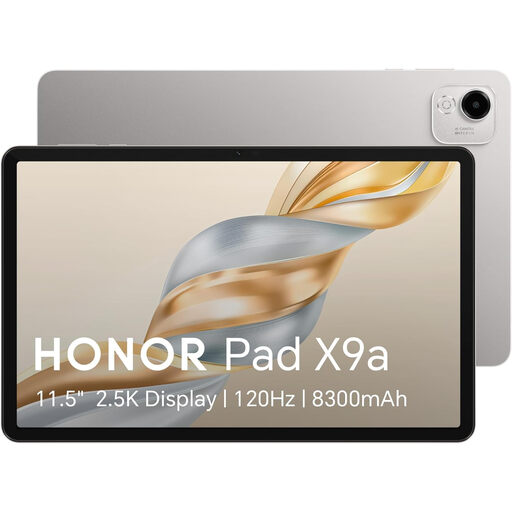
HONOR Pad X9a 11.45-inch Wi-Fi, 128GB, grey
Its listed size is worth considering for text-led books and single-page reading; inspect a sample atlas page if small map labels are important to you.
The product name specifies an 11.45-inch format, Wi-Fi and 128GB storage. Check the device’s carrying weight and test the books you need in flight mode.
View on Joybuy
Questions before you travel
Is a 13-inch tablet necessary for geography books?
No: a 13-inch format is most useful when you regularly inspect detailed, fixed-layout maps and can support the tablet while reading. If you mostly read text or hold the device, a smaller model may be easier to manage; Apple lists its 11-inch iPad Air Wi-Fi model at 464 g versus 616 g for the 13-inch Wi-Fi model.
How do I make sure my books work during the flight?
Download each required book before travelling and open it in flight mode using the app you intend to use onboard. Check the publisher’s offline-download rules and the tablet’s available storage, particularly for illustrated books and PDFs.
Can I bring a tablet and power bank on a UK departure flight?
You can normally carry a tablet in the cabin; check the operating airline’s instructions for your journey. The UK Civil Aviation Authority says power banks must travel in cabin baggage, limits passengers to two and prohibits recharging them onboard. It also says batteries from 100 Wh to 160 Wh require airline approval and those over 160 Wh are prohibited in passenger baggage.
Will a pen and travel charger come with the tablet?
That depends on the exact model and bundle. Samsung lists an S Pen and data cable, but no travel adaptor, for its cited UK Galaxy Tab S10 FE+ configuration. For an iPad Air, check which Pencil is compatible and whether it is included with the particular product you select.


