
24/7 Customer Support

Free returns

Same-day & Next-day Delivery

Quality Guaranteed

Unlock Your Welcome Offers: FREE Delivery | Up to 80% OFF | Free 30-day JoyPlus trial
Download the APP
Shaky, jarring video can instantly undermine the quality of your content, whether you're vlogging your latest adventure, creating a short film or capturing family memories. While modern smartphones and cameras have improved their built-in stabilisation, a dedicated gimbal stabiliser is the key to achieving that truly smooth, professional-looking footage.
A gimbal uses motors and intelligent sensors to counteract unwanted movement, keeping your camera steady as you walk, run or pan. However, the market is filled with options, from simple phone gimbals to advanced multi-device systems. This guide is designed to help you understand the essential features and find a model that fits your creative needs and budget.
Making the right choice comes down to a few key considerations. Focusing on these points will help you select a handheld video stabiliser that works for you, not against you.
The first step is to match the gimbal to your camera. A phone gimbal is designed specifically for the size and weight of a smartphone, while a GoPro gimbal will have a mount tailored for an action camera. Some versatile models offer interchangeable mounts to support multiple devices.
Pay close attention to the payload capacity—the maximum weight the gimbal's motors can handle. If you plan to use accessories like external microphones, lenses or filters, ensure the total weight of your setup is well within the gimbal's specified limit to ensure optimal performance.
For truly cinematic results, a 3-axis gimbal is the standard. It stabilises your footage across three axes of movement:
This comprehensive stabilisation is what separates a high-quality camera stabiliser from more basic models, delivering fluid motion that looks polished and intentional.
Today's gimbals are more than just stabilisers. Look for features that streamline your workflow. An AI tracking gimbal is invaluable for solo creators, as it can automatically keep a subject in the frame without a second camera operator. Other useful features include foldable designs for portability, long battery life (with some models doubling as power banks) and intuitive companion apps that unlock creative modes like time-lapses and motion-lapses.
Here are a few standout options that cater to different types of content creators, from smartphone enthusiasts to multi-device users.
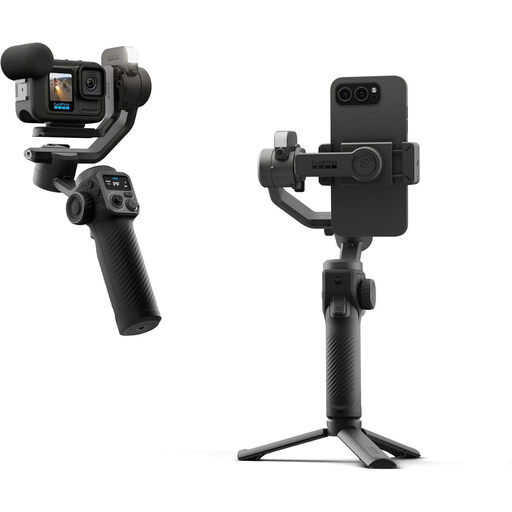
Why It Stands Out: The Fluid Pro AI is a versatile workhorse built for creators who switch between different cameras. Its key feature is the detachable AI tracking module, which works independently of your phone's app and includes a built-in fill light. With a robust build and high payload, it’s ready for more demanding setups.
Pros:
Who is it for? Content creators who use a mix of devices (phone, GoPro, compact camera) and need a single, powerful gimbal with reliable AI tracking for dynamic shots.
View Product Details on Joybuy
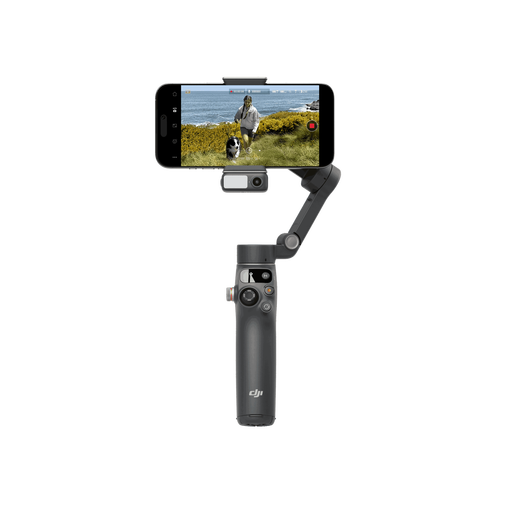
Why It Stands Out: The DJI Osmo Mobile 7P refines the smartphone gimbal experience with an emphasis on speed and convenience. The magnetic clamp and quick-launch feature get you filming in seconds. Its integration with the DJI Mimo app provides powerful, user-friendly tools for both shooting and editing.
Pros:
Who is it for? Smartphone videographers, vloggers and social media creators who value a fast, intuitive workflow and a compact, all-in-one design.
View Product Details on Joybuy
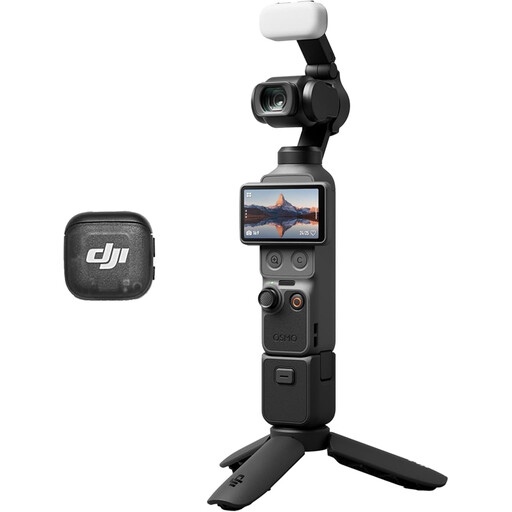
Why It Stands Out: The Osmo Pocket 4 is not just a gimbal; it's a complete, pocket-sized vlogging camera system. It combines a high-quality camera with a mechanical gimbal, eliminating the need to use your phone. This all-in-one design offers exceptional portability without sacrificing video quality.
Pros:
Who is it for? Vloggers, travellers and minimalist creators who want the smallest possible setup that delivers high-quality, stabilised 4K video.
View Product Details on Joybuy
Our recommendations cover a range of popular uses, but the world of video stabilisation is vast. If you're looking for a different set of features or a model designed for a specific professional camera, we have more to explore.
Discover our full collection of stabilisation gimbals and find the perfect match for your creative needs.
Explore All Stabilisation Gimbals on Joybuy
Do I really need a 3-axis gimbal for my phone? While modern phones have good electronic or optical image stabilisation, a 3-axis gimbal provides a superior level of smoothness. It excels at correcting the larger movements from walking or running and eliminates the micro-jitters and warped-looking backgrounds that digital stabilisation can sometimes produce, resulting in a more professional and watchable video.
What is the difference between a gimbal and a simple stabiliser? A simple stabiliser is often a mechanical device that uses weights and a handle to help reduce shaky movements. A gimbal stabiliser, on the other hand, is an electronic device that uses brushless motors and sensors to actively and intelligently counteract movement on multiple axes. This active correction provides a much higher degree of stabilisation, creating fluid, cinematic motion.
Can I use a phone gimbal for my GoPro? In most cases, no. A standard phone gimbal is designed with a clamp and motor strength specifically for the shape and weight distribution of a smartphone. Using it for a GoPro can lead to poor balance and motor strain. To use a GoPro, you need a dedicated GoPro gimbal or a versatile multi-device model, like the GoPro Fluid Pro AI, which comes with the correct mounting adapters.