Students making frame-ready keepsakes
If graduation portraits or family photos are destined for frames, albums or gifts, start with the intended display size. Canon UK lists 100 x 148 mm postcard prints for the SELPHY CP1500.


Choose a printer that supports postcard-size photos if graduation portraits are going into frames or albums; the Canon SELPHY CP1500, for example, supports 100 x 148 mm prints. If the photos are for a temporary wall display or journal, a portable sticker printer may suit you better, while an instax printer offers a different, instant-film-style format. Check the exact print size, compatible refills, device support and space needed to use the printer before buying.
If graduation portraits or family photos are destined for frames, albums or gifts, start with the intended display size. Canon UK lists 100 x 148 mm postcard prints for the SELPHY CP1500.
Small adhesive prints can suit a pinboard, wall arrangement or journal when conventional framed photos are not the aim. Canon UK describes the battery-powered SELPHY QX20 as a square and card-size sticker-print option.
If you want to print from a phone and prefer an instant-film-style display, consider the shape and look of the output. Fujifilm positions the instax Link WIDE around its wider instax film format.
Decide where the finished graduation photos will go before choosing a printer. Then check whether its placement, device connection and refill format work for your flat.
| Concern | What to check | Who this matters to |
|---|---|---|
| Print size and display | Match the stated output dimensions and finish to your frame, album, wall or journal. | If I want to frame a graduation portrait or give a group photo to family, I need a print that fits the intended display. Around 44% of consumers put display-ready size first. |
| Space and power | Check the printer’s footprint, room for handling prints and whether it needs a socket or has a battery. | When desk space is tight or I want to move the printer for a celebration, a fixed printing position is a drawback. Roughly 33% of consumers prioritise space and portability. |
| Phone printing and refills | Confirm device and app compatibility, then identify the exact paper or film needed. | If I plan to print and share photos from my phone, the output style matters, but I also need refills that fit my printer. About 23% of consumers put that phone-first, creative-display need first. |
Compact printers can produce different formats. Canon UK specifies 100 x 148 mm postcard output for the SELPHY CP1500, whereas the SELPHY QX20 uses square and card-size sticker media.
Choose the frame, album or display location first, then check the printer’s stated output dimensions.
Paper, ink sets and film are model-specific; similar printer names do not make their media interchangeable.
Note the full printer model and confirm the compatible refill reference before ordering.
Continuing to print after the initial pack is used requires further compatible media.
HP Support describes the Sprocket Select as printing through its phone app and lists it as incompatible with macOS. Canon UK describes a wider range of connection options for the SELPHY CP1500.
If you edit photos on a laptop, check support for that computer and operating system. For phone-only use, check the required app and phone compatibility instead.
The SELPHY range includes different routes for graduation keepsakes: the CP1500 for postcard prints and the battery-powered QX20 for smaller sticker prints.
The Sprocket Select is a compact, phone-app option for small ZINK photo prints.
The instax Link WIDE offers a phone-connected, instant-film-style format for group photos and displays.
These choices cover small, informal graduation keepsakes and a larger 4x6 photo format. Match the print format to your intended display before choosing between them.
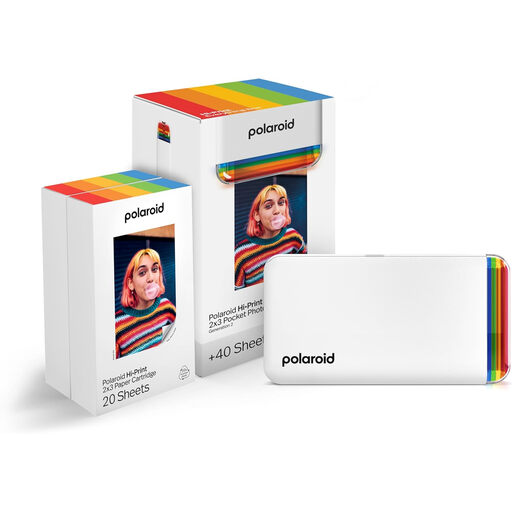 No image available
Consider the 2x3 format for small graduation keepsakes rather than a conventional framed portrait. The named bundle includes a 40-sheet paper cartridge; check the compatible refill before you need more prints.
 No image available
Consider this portable model for informal graduation-photo displays. Check its exact output dimensions and compatible paper against the space and display you have planned.
 No image available
The 4x6 format is worth considering for graduation portraits intended for an album or frame that accepts that size. Check the required cartridge and allow a stable place to use the printer.
Start with the frame’s dimensions and choose a printer that explicitly supports them. Canon UK lists 100 x 148 mm postcard prints for the SELPHY CP1500; the SELPHY QX20 instead uses smaller square and card-size sticker media.
Yes, if your phone meets the chosen printer’s app and connection requirements. Canon UK describes Wi-Fi printing for the SELPHY QX20 and CP1500, HP Support lists Bluetooth and Sprocket-app printing for the Sprocket Select, and Fujifilm describes Bluetooth printing through the Link WIDE app.
Match the refill’s stated compatibility to the printer’s complete model name before ordering. Canon UK Store describes XS-20L as a paper-and-ink set for the SELPHY SQUARE QX10, so do not assume that similarly named SELPHY printers use it.
Use an appropriate electrical-item recycling route rather than ordinary household waste. Recycle Now points UK households towards recycling centres, electrical-item bring banks and participating electrical retailers; check the arrangements available locally.