Command-heavy strategy players
If you repeatedly use commands, modifiers or menu actions, a thumb-button layout gives you more places to assign them. Check that you can distinguish and reach the buttons with your usual grip.


Choose a mouse with dense thumb controls if you regularly use many commands and can reach those buttons comfortably. If you need only a few extra bindings, a less crowded layout may be easier to manage; then decide whether wireless use is worth the charging routine or a wired connection suits your desk. Wearing headphones does not, by itself, change the mouse controls you need.
If you repeatedly use commands, modifiers or menu actions, a thumb-button layout gives you more places to assign them. Check that you can distinguish and reach the buttons with your usual grip.
If extended map navigation makes grip comfort your main concern, prioritise the mouse shape and reachable controls over its advertised button total. Corsair’s adjustable side-panel position is one example of a feature worth assessing for your own thumb reach.
If you move between games or PC setups, check how the mouse stores settings as well as how it connects. Logitech documents mouse-stored customisations through G HUB, while wireless operation brings a charging decision.
Start with the commands you want on the mouse, then assess thumb reach and grip. Connection and profile storage matter most once the control layout works for you; headphones are part of the desk setup, not a reason to choose a particular button count.
| Concern | What to check | Who this matters to |
|---|---|---|
| Command access | Count the shortcuts you will assign, then check the button arrangement and whether the controls can be remapped. | If I regularly use map and menu commands, I want to reach them without hunting across the keyboard. Around 42% of consumers put command access first. |
| Hand fit and reach | Check the shape with your usual grip and whether your thumb reaches the side controls without stretching. | During a long session, I need the controls to remain comfortable to reach, even if that means fewer bindings. Roughly 33% of consumers prioritise hand fit. |
| Connection and profiles | Check the wired or wireless modes, charging arrangement and whether settings can be stored on the mouse. | If I change games or PCs, I want a connection and profile routine that fits how I play. Around 25% of consumers place wireless use or profile persistence first. |
A programmable-button total says little about your thumb reach. Razer’s Naga V3 Pro uses swappable side plates, while Corsair’s Scimitar Elite Wireless SE has a repositionable 12-button side panel; neither arrangement guarantees a comfortable fit.
List the commands you repeat, then choose a layout that lets you reach those bindings with your normal grip.
Corsair states its maximum battery figures for the Scimitar Elite Wireless SE with RGB lighting off. Your chosen settings may differ from those conditions.
Check the claim’s settings, charging method and whether your preferred connection can be used while charging.
Charging can interrupt a long session if you have not planned when to do it.
Razer Support states that Synapse 3 stopped receiving updates and cloud services after 3 February 2026. That matters if you expect an older cloud-sync workflow to move settings between PCs.
For the exact mouse you are considering, check the current software, device support and how its profiles can be transferred or stored.
GOV.UK advises that electrical products and batteries should not go in household rubbish.
Use an appropriate electrical-waste or battery collection route when replacing a mouse.
The Naga V3 Pro illustrates a configurable, high-control wireless layout: Razer lists up to 23 programmable buttons and three swappable side plates.
The Scimitar Elite Wireless SE illustrates a fixed 12-button thumb panel that can be repositioned. Corsair lists 16 customisable buttons overall.
The G502 examples offer a less dense alternative to a 12-button thumb grid. Logitech G lists 13 programmable controls for G502 X LIGHTSPEED and 11 programmable buttons for G502 HERO.
These wired and wireless mice offer starting points for players considering recurring bindings and their preferred desk connection. Check each model’s reachable controls before treating it as a substitute for a dense MMO-style thumb panel.
 No image available
Consider this model if you want wireless play and a defined set of buttons for recurring commands.
Its product title lists 10 programmable buttons, macro support and a 53g weight. Check whether the button positions suit your grip.
The stated battery maximum depends on low-power mode enabled through the latest driver and a 1000Hz setting; check the settings you intend to use.
 No image available
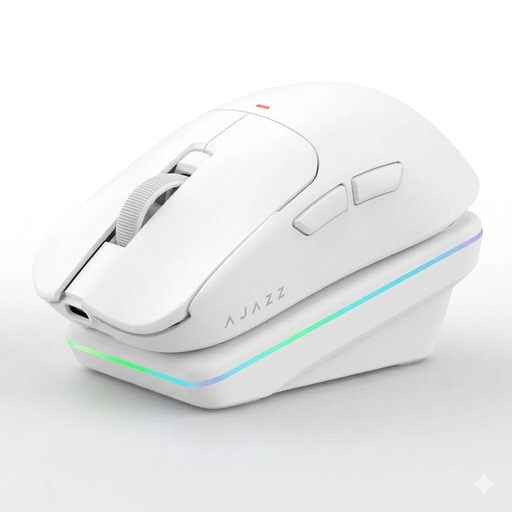
Consider this model if switching between a cable and wireless use matters more to you than a known thumb-button count.
The product title lists Bluetooth, 2.4G wireless and USB-C modes, plus a charging dock. Confirm how many buttons you can assign and where they sit.
Check the exact variant and hand fit before relying on a weight figure: the supplied product information gives differing weights.
 No image available
Consider this wired model if you want to avoid a charging routine and need only a modest set of mouse controls.
Its product title describes programmable buttons and RGB lighting. If custom bindings are essential, check which buttons can be reassigned and whether their positions suit your grip.
 No image available
Consider this wireless model if you want to explore custom controls without choosing a dense thumb grid solely for its button count.
Check how many controls you can reach and remap for your commands. If you switch PCs or play long wireless sessions, also confirm the profile-storage and charging arrangements you need.
 No image available
Consider this model if a wired connection suits your desk and you want some custom mouse controls for repeated actions.
Check the number and reach of its assignable buttons against your command list. If you move between PCs, confirm the profile workflow for this exact model rather than assuming it matches another Razer mouse.
Choose by the commands you will use repeatedly and can reach reliably. For context, Razer lists up to 23 programmable buttons for Naga V3 Pro and Corsair lists 16 for Scimitar Elite Wireless SE, while Logitech G lists 11 or 13 controls for the cited G502 models. Those totals describe available controls, not how easily your hand will use them.
Set up a small group of recurring bindings first, then try them during play and revise any awkward assignments. If you need settings on more than one PC, check storage for the exact mouse: Logitech Support says G HUB can write customisations to onboard memory, while Razer Support says Synapse 3 cloud services ended after 3 February 2026.
Check its connection modes, charging arrangement and the conditions behind any battery-life figure. Corsair states that Scimitar Elite Wireless SE supports 2.4 GHz wireless, Bluetooth and USB use while charging; its quoted maximum battery figures assume RGB lighting is off.
Take an old mouse to an appropriate electrical-waste collection route rather than putting it in household rubbish. GOV.UK advises the same for electrical products and batteries.