Who these choices suit

Shortcut-heavy grand strategy players

If you repeatedly use map controls, commands and menus, programmable thumb buttons may help you keep selected actions on the mouse. A dense layout is most useful when you are willing to plan and learn the bindings.

Players focused on long-session comfort

If campaigns keep you at the mouse for extended periods, consider your grip, hand size and the position of the controls before prioritising button count. Logitech G and Corsair both identify fit as a buying consideration; comfort still depends on your hand and grip.

Players using a bright desk

If you play beside a window or under strong room lighting, check how the mouse tracks on the surface you actually use. Logitech Support and SteelSeries Support advise checking the surface when troubleshooting optical tracking.

What matters when choosing

Dense thumb-button layout

Choose it when: you can name enough recurring commands to make a thumb grid worth learning. Corsair lists a repositionable 12-button side panel on the Scimitar Elite Wireless SE.

Bear in mind: the buttons must fit your thumb reach, and unused bindings add complexity.

Multi-button mouse with a flexible wheel

Choose it when: you want several bindings alongside different ways to scroll. Razer lists 10+1 programmable buttons and multiple wheel modes for the Basilisk V3.

Bear in mind: it does not offer the same dedicated 12-button side-panel layout.

Selected extra controls at a stated lower weight

Choose it when: you prefer a smaller set of additional controls. Logitech G lists the wired G502 X at 89 g, with an adjustable DPI-shift button and a dual-mode wheel.

Bear in mind: its weight does not establish whether its shape will be comfortable for your grip.

ConcernWhat to checkWho this matters to
Command access List the commands you would bind, then check thumb reach and the remapping software. If I repeatedly open maps and issue commands, I want those actions within comfortable reach without memorising unused buttons. Around 46% of consumers put command access first.
Comfort and scrolling Compare shape and stated weight with your current mouse; check the wheel modes you would use. During long campaigns, I need a grip and wheel behaviour I can live with through repeated menu navigation. Comfort and scrolling come first for around 36% of consumers.
Tracking and setup Try a matte, non-transparent surface; clean the sensor and check whether surface tuning is supported. At a bright desk, I want dependable movement on my usual surface before committing to a mouse. Around 18% of consumers make tracking and setup their primary concern.

Buying pitfalls

  • Choosing lighting instead of checking the surface

    Visible RGB lighting is not evidence of better optical tracking in a bright room. Logitech Support and SteelSeries Support point to surface choice when investigating tracking problems.

    Try the mouse on your usual pad or a matte, non-transparent surface, and clean the sensor if movement skips.

    If your current surface is unsuitable for optical tracking, you may need a separate mousepad and space for it on the desk.

  • Buying more buttons than you will bind

    A thumb grid only helps with commands you can reach and remember; a larger button count alone does not settle the choice.

    Write down the actions you genuinely want to move from the keyboard, then choose a layout that fits that list and your thumb reach.

  • Reading wireless runtime without its conditions

    Corsair quotes different Scimitar Elite Wireless SE runtimes for 2.4 GHz and Bluetooth, with RGB switched off. Those figures should not be assumed to apply with every setting enabled.

    Check the connection and lighting conditions behind a quoted runtime, as well as whether the mouse can be used over USB while charging.

    Your preferred lighting and connection settings may mean charging more often than the quoted maximum suggests.

  • Assuming a shape will fit from its specifications

    Hand size, grip and control placement affect whether a mouse feels manageable over a long session; stated weight cannot establish individual comfort.

    Compare dimensions and button placement with your current mouse, and check the seller's return terms if you cannot try the shape first.

Brands to consider for these control layouts

Corsair

Corsair's Scimitar Elite Wireless SE represents the dense-command route, with 16 programmable buttons and a repositionable 12-button side panel.

  • The movable panel gives buyers a way to adjust button placement to their thumb reach.
  • Corsair's quoted maximum runtimes—up to 150 hours over 2.4 GHz or 500 hours over Bluetooth—both specify RGB off.

Razer

The Basilisk V3 offers a multi-button layout without a dedicated 12-button thumb grid; Razer lists 10+1 programmable buttons.

  • Its wheel offers tactile, automatic and free-spin scrolling modes for buyers who use both deliberate steps and longer scrolls.
  • Its lighting and sensor specifications do not establish an advantage in direct sunlight.

Logitech G

The wired G502 X is an option for buyers considering selected auxiliary controls rather than a dense side panel; Logitech G lists its weight at 89 g.

  • Its DPI-shift button can be adjusted or removed, and its wheel offers two scrolling modes and tilt inputs.
  • The stated weight and controls do not establish a comfortable fit for every hand or grip.

Joybuy mice for this setup

These mice offer different ways to approach programmable grand strategy controls and desk setup. Compare their stated features with the commands you intend to bind, and assess tracking on your usual surface; their inclusion does not establish a direct-sunlight advantage.
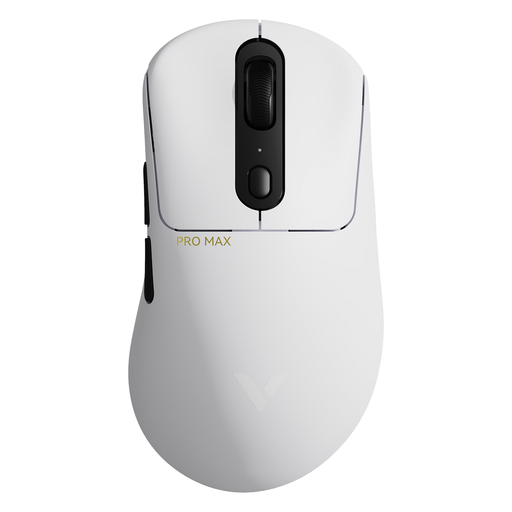
White RAPOO VT3PRO MAX mouse

RAPOO VT3PRO MAX, White

Consider this mouse if you want to set up recurring game shortcuts. Confirm the button count and sensor specifications for the exact variant before choosing it, and try it on your normal tracking surface.

View on Joybuy

White Rapoo VT7 MAX wireless gaming mouse

Rapoo VT7 MAX Wireless Gaming Mouse, White

For players who want to assign recurring commands to the mouse, its product title lists 10 programmable buttons and macro support.

The title also states a 53 g weight and wireless connection. Check grip fit rather than treating weight as a comfort guarantee; the advertised maximum battery runtime depends on particular driver and power settings.

View on Joybuy

White RAPOO VT2 MAX wireless gaming mouse

RAPOO VT2 MAX Wireless Gaming Mouse, White

If your binding plan calls for several mouse controls, the title lists 10 programmable buttons and macro support.

It also states a 53 g weight and wireless connection. Compare its shape with your preferred grip, and check the settings required for the advertised maximum battery runtime.

View on Joybuy

AJAZZ AJ200 AI MC wireless gaming mouse with charging dock

AJAZZ AJ200 AI MC Wireless Gaming Mouse with Charging Dock

Consider its listed wired, 2.4 GHz and Bluetooth connection modes if you want flexibility in how you connect the mouse while assigning game controls.

Confirm the weight of the exact variant before using it to judge long-session handling, and test tracking on your usual surface.

View on Joybuy

Common questions

Do I need RGB lighting to use a gaming mouse in a bright room?

No: RGB lighting is not a substitute for checking optical tracking on your desk surface. Logitech's mouse guidance and SteelSeries Support point to surface suitability, including a single-colour matte surface when troubleshooting, rather than decorative lighting.

What should I try if the cursor skips?

Clean the sensor and try a suitable alternative surface before judging the mouse on your current desk. Logitech Support also recommends surface tuning where the mouse supports it; for a wireless model, check receiver placement and nearby interference.

Will a wireless mouse reach its quoted battery life with RGB switched on?

Do not assume it will. Corsair quotes up to 150 hours over 2.4 GHz and up to 500 hours over Bluetooth for the Scimitar Elite Wireless SE with RGB off, so check the conditions behind any runtime figure you plan to rely on.

What if a new gaming mouse is faulty in the UK?

A consumer goods contract is subject to a satisfactory-quality requirement under section 9 of the Consumer Rights Act 2015. If your mouse is faulty, describe the problem to the seller and ask about the applicable statutory remedy; a shop's change-of-mind return policy is a separate matter.

How should I dispose of an old mouse in the UK?

Use an appropriate electrical-equipment collection route rather than assuming an old mouse belongs in general waste. GOV.UK describes the UK's waste electrical and electronic equipment rules as supporting recovery, reuse and recycling; check which retailer or local collection option is available to you.