Dark-room shortcut users
If you locate commands by looking at the keyboard, check whether its lighting makes the legends readable and whether you can turn the brightness down when it becomes distracting.


Choose lighting you can adjust and key legends you can read in the dark, then decide how much space and how many controls your strategy-game shortcuts need. A full-size layout keeps the number pad, while a compact board leaves more desk space; dedicated macro keys offer extra physical controls, but neither layout nor programmability guarantees readable legends.
If you locate commands by looking at the keyboard, check whether its lighting makes the legends readable and whether you can turn the brightness down when it becomes distracting.
If you repeatedly use the same commands, consider whether you need separate macro keys or would rather remap existing keys and save your configuration.
If you use the number pad or play at a crowded desk, weigh full-size key access against a narrower layout. Keyboard height, switch feel and wrist support may also influence which setup you prefer.
Check legend visibility before comparing extra lighting effects, then choose a layout and shortcut controls that suit the commands you actually use.
| Concern | What to check | Who this matters to |
|---|---|---|
| Readable, adjustable lighting | Check brightness controls and whether the supplied keycaps let light through their legends; RGB beneath a key does not establish that its lettering will be visible. | If I play without room lighting, I need to find commands without a glare-heavy keyboard. Around 33% of consumers put dark-room readability first. |
| Custom shortcuts | Distinguish extra physical macro keys from remapping existing keys, and check profile storage and compatibility with your intended game and operating system. | Repeated menus and commands make accessible shortcuts more important to me than elaborate lighting. For around 25% of consumers, command customisation is the primary concern. |
| Layout and long-session fit | Decide whether you need a number pad or more mouse space; confirm the exact UK layout, switch option and any included wrist support. | I want the keys I use within reach, without a keyboard that crowds my desk or feels awkward over a long session. Layout and comfort come first for around 25% of consumers. |
| Straightforward illumination | Check whether the lighting and basic controls meet your needs before adding specialist switches or extensive programmability to your shortlist. | I mainly need a lit keyboard for ordinary game controls and would leave advanced configurations unused. Around 17% of consumers prioritise that simpler setup. |
Lighting around the keys may leave their legends difficult to see. Keychron specifies non-shine-through keycaps for the fully assembled Q6 Max despite its RGB lighting.
Check the supplied keycaps and photographs of the exact variant if you need to read legends without room lighting.
A tenkeyless, or TKL, layout frees desk space by omitting the number pad. That trade-off matters if your preferred controls use those keys.
List your regular commands before choosing between TKL and full-size.
Dedicated macro keys provide extra physical buttons; remapping changes what existing keys do. The distinction affects both your layout and how you set up shortcuts.
Check the stated number of dedicated keys if you want separate controls. Otherwise, check the remapping software and where profiles can be stored.
Short actuation settings do not resolve preferences about switch sound, keyboard height or wrist support during a long strategy session.
Consider where you play and which switch feel you prefer, then confirm the chosen variant and any included support.
The BlackWidow V4 line is relevant if you want a full-size board with separate controls for repeated commands.
The Apex Pro TKL Gen 3 is relevant when a narrower keyboard and saved configurations matter more than a number pad.
The Q6 Max is relevant if you want a full-size UK-ISO option with remapping and macro configuration.
The G213 is relevant for adjustable lighting and built-in palm support; the G815 line offers a different, low-profile mechanical layout.
These keyboards cover compact layouts, number-pad access and full-size controls for the dark-room strategy-game setup. For each one, check the exact key layout and how visible its legends are under the supplied lighting before choosing.
 No image available
Consider this 75% wireless keyboard if you want a compact layout. Check that its exact key arrangement suits your strategy-game controls and that the supplied legends remain readable at the brightness you prefer.
 No image available
This 60% keyboard is a compact option if desk space takes priority. Check how you access arrow and other frequently used keys, as well as the supplied keycaps' visibility in a dark room.
 No image available
Consider the 96% layout if you want to compare a condensed keyboard with more compact options. Confirm the exact number-pad arrangement, whether the UK layout is UK-ISO, and how the legends look under its lighting.
 No image available
Consider this mechanical model if you are comparing physical shortcut controls. Check the controls on this V4 X Minecraft Edition specifically, along with its switch sound, exact layout and dark-room legend visibility; features listed for the BlackWidow V4 do not establish this variant's specification.
 No image available
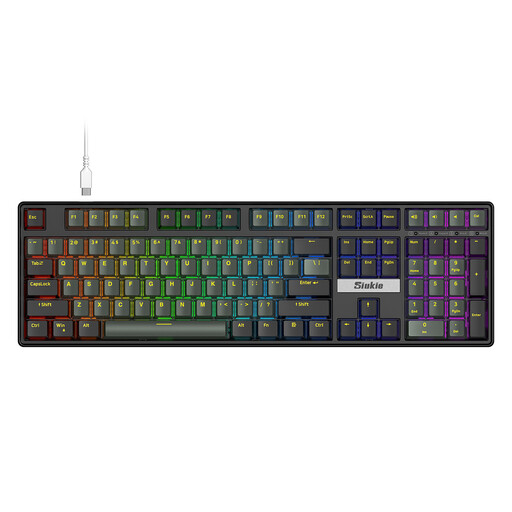
This wired, 108-key mechanical keyboard is worth checking if you want a wider key layout. Confirm the exact key arrangement, UK-ISO compatibility and legend visibility before relying on it for dark-room play.
No. Adjustable illumination and readable legends matter more than colour effects. Per-key RGB can help you distinguish command groups, but check how the actual keycaps look when lit.
No. They are useful if you want recurring commands on separate physical keys; remapping can suit a different setup if you are willing to configure existing keys. Check that your intended assignments work with the game and software you use.
Choose full-size if number-pad access matters to your controls; choose TKL if you would rather free desk space and can do without it. Check the exact UK key arrangement on the variant you select.
Set it bright enough to locate the keys comfortably without making the lighting distracting. Start low and adjust using the controls available on your particular keyboard; the adjustment method differs by model.