Deal with reflections on the screen before choosing keyboard lighting: the Health and Safety Executive advises arranging the desk and display to avoid glare, while illuminated keys address visibility at the keyboard. For long grant-writing sessions, choose the layout around your main task—extended typing, frequent number entry or working at a compact desk—and check that the exact key arrangement suits you.
Who this is for
Long-session grant writers
If drafting and revising keep you at the desk for extended periods, consider the keyboard alongside your chair, screen and typing position. The Health and Safety Executive advises arranging the workstation to avoid glare or bright reflections.
Writers working in changeable daylight
Light at the keys and reflections on the display are different problems. Logitech describes automatic backlighting on the MX Keys S, but keyboard illumination will not remove screen glare.
Compact-desk, multi-device writers
If you share limited desk space with a laptop or switch devices while writing, compare keyboard footprint, connection options and key layout. Keychron lists a compact K3 Version 3 with an ISO-layout option; Logitech says the MX Keys S can switch across up to three devices.
What matters when choosing
Illuminated productivity keyboard
Consider it when: Changing light makes key legends hard to see, or you regularly move between devices. Logitech lists automatic backlighting and switching across up to three devices for the MX Keys S.
Trade-off: Illumination does not fix reflections on the display; check the exact layout and desk space before choosing a larger board.
Keyboard with palm support
Consider it when: Your typing position is the main concern during long drafts. Logitech describes the Wave Keys as wave-shaped with a cushioned palm rest.
Trade-off: A shaped keyboard will not suit every hand or correct an awkward desk and screen arrangement.
Compact mechanical keyboard
Consider it when: Desk space and remappable keys matter more than a dedicated number pad. Keychron lists a 75% K3 Version 3 with an ISO-layout option and wired or Bluetooth use.
Trade-off: Its 75% layout has no dedicated number pad, so frequent budget entry may require a different layout or a separate keypad.
| Concern |
What to check |
Who this matters to |
| Daylight and screen glare |
Check whether you need illuminated legends; position the display to avoid bright reflections. |
If daylight changes while I write, I want to see the keys without fighting reflections on my screen. Around 29% of consumers put daylight and glare management first. |
| Long-session comfort |
Consider keyboard height, angle and palm support together with your desk and chair position. |
During a long draft, I need a typing position that feels workable over time, rather than relying on an ergonomic label alone. Sustained comfort comes first for around 36% of consumers. |
| Writing and number entry |
Check key placement, number-pad availability and whether you would use remappable shortcuts. |
When an application includes budgets and tables, I want the keys I use for figures and editing close at hand. Around 21% of consumers primarily value writing and number-entry workflow. |
| Desk space and devices |
Measure the available space and confirm the connection and layout of the exact variant. |
With limited room beside my screen, I need a keyboard that fits and connects to the devices I use. Compact placement or device switching is the leading concern for around 14% of consumers. |
Buying pitfalls
-
Expecting lit keys to solve screen glare
Backlighting affects the keys, not reflections on the display. The Health and Safety Executive advises arranging the desk and screen to avoid glare or bright reflections.
Try changing the screen position and controlling intrusive window light before deciding whether you also need illuminated keys.
-
Choosing a compact board before checking number entry
A 75% layout leaves out a dedicated number pad, which matters if you enter grant budgets or tables frequently.
Check the keys used in your usual documents before settling on a compact layout.
If number entry becomes awkward, you may need a separate numeric keypad.
-
Treating a palm rest as a comfort guarantee
Keyboard shape is only one part of a workstation; personal fit and the position of the desk, chair and display also matter.
Check whether the keyboard allows a comfortable typing position in your own setup, rather than choosing by its shape alone.
-
Assuming every variant has the same keys
Layout and switch choices can differ within a model range. Keychron lists an ISO-layout K3 Version 3, but the exact variant still matters.
Confirm the key layout, switch choice and connection options for the version you intend to buy.
Brands to consider for these keyboard styles
Logitech
The MX Keys S and Wave Keys illustrate two different approaches: illuminated productivity features and a shaped keyboard with palm support.
- Logitech lists automatic backlighting and switching across up to three devices for the MX Keys S.
- The Wave Keys' shape and cushioned palm rest do not establish that it will feel comfortable for every writer or address screen glare.
Keychron
The K3 Version 3 is a compact mechanical option for writers interested in an ISO layout, wired or Bluetooth use and remapping.
- Keychron lists a 75% layout and QMK-based remapping for the K3 Version 3.
- There is no dedicated number pad; confirm the layout and switch of the particular variant.
Microsoft
The Microsoft Ergonomic Keyboard represents a wired, split-keyboard approach.
- Microsoft describes the Ergonomic Keyboard as a USB keyboard with a split, naturally arched shape.
- Its shape does not establish personal comfort; check its key layout and fit with your workstation.
Keyboard choices on Joybuy
These illuminated mechanical keyboards offer different key counts and layouts for grant-writing desks. Some specify a US layout; check key placement before choosing one if you rely on UK keys. None should be chosen as a substitute for dealing with screen glare.
 No image available
Ticktype EVO75, Creamy Rye Switches, Spray-coated Nebula
Consider its 75% layout if keyboard space is limited, but check whether that layout suits frequent budget entry. The title specifies a US layout, RGB lighting, VIA compatibility and tri-mode connectivity.
View on Joybuy
 No image available
AULA F75 75% mechanical keyboard, US layout
Its 75% layout is worth considering where desk space is limited; check the key arrangement if you enter figures often. The title specifies RGB backlighting, PBT keycaps and wired, Bluetooth and 2.4G connections. It also specifies a US QWERTY layout.
View on Joybuy
 No image available
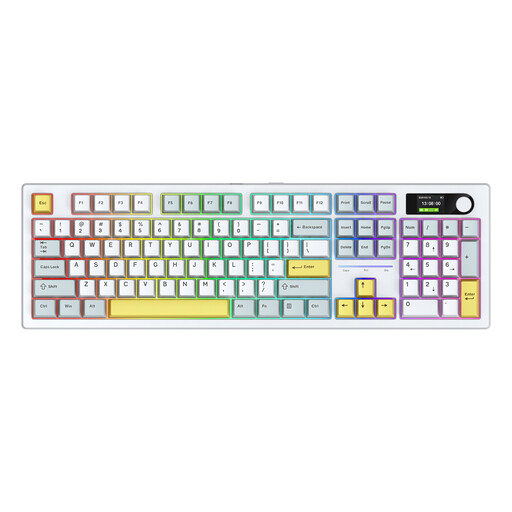
Siukie ACH105 104-key keyboard, Alice blue and white
Consider the Alice-style arrangement if you want to assess a different typing position for long drafts; its shape alone cannot establish comfort. The title specifies 104 keys, RGB lighting, a colour display and detachable switches. Check the exact key layout if UK placement matters to you.
View on Joybuy
 No image available
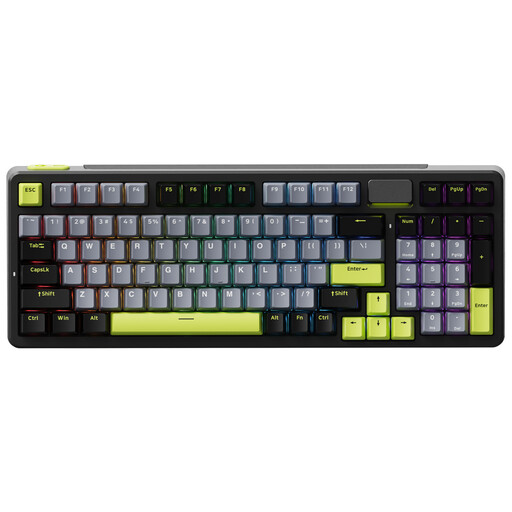
Rapoo V700DIY 96% mechanical keyboard, BG
Its 96% layout offers another arrangement to consider when desk space is limited; check the number-pad arrangement if you enter budgets frequently. The title specifies a US QWERTY layout, tri-mode connectivity and a gasket mount.
View on Joybuy
 No image available
Siukie PL108W 108-key mechanical keyboard, black
If you prefer a higher key count for writing and number entry, check whether this board has the exact key arrangement you need. The title specifies 108 keys, RGB lighting, detachable switches and tri-mode connectivity; confirm the layout if UK key placement matters.
View on Joybuy
Common questions
Will a backlit keyboard solve glare from a bright window?
No. Backlighting illuminates the keys, while reflections on the display need attention at the workstation. The Health and Safety Executive advises arranging the desk and screen to avoid glare or bright reflections; adjust the screen position and intrusive window light as needed.
Do I need a UK-ISO keyboard for grant writing?
Choose a layout whose key positions and symbols you can use accurately; UK-ISO is worth checking if those are the positions you expect. Keychron lists an ISO-layout K3 Version 3 option, but confirm the exact variant before buying.
Should I choose a 75% keyboard or a larger board?
A 75% board suits a tighter keyboard space if you can work without a dedicated number pad. If grant budgets require frequent figure entry, check the number-pad arrangement on the exact larger board you are considering rather than assuming its key count tells the whole story.


