Long-form grant writers
If you move between proposal guidance, PDFs, budgets and draft text, consider whether you need room for separate windows and a screen you can position comfortably for extended reading.


For a small desk where you regularly compare grant guidance, budgets and draft text, start with a height-adjustable 23.8–24-inch QHD monitor. A Full HD screen can suit mainly single-document writing, while a USB-C hub is useful only if its display and charging functions match your laptop. Whichever route you take, leave enough desk depth to position the screen comfortably.
If you move between proposal guidance, PDFs, budgets and draft text, consider whether you need room for separate windows and a screen you can position comfortably for extended reading.
If your laptop remains your main computer, a monitor may give you a larger working screen. Monitor-based docking is worth considering when your laptop supports the display and charging connections you intend to use.
If you usually work in one document at a time, a compact Full HD screen may meet your workspace needs. Check its stand, footprint and connection ports before deciding that screen size alone makes it fit.
Decide how much document space you need, then check whether the monitor and its stand fit your desk. Consider docking features after confirming what your laptop can use.
| Concern | What to check | Who this matters to |
|---|---|---|
| Document workspace | Compare 23.8–24-inch QHD and Full HD resolution; check whether display scaling makes text comfortable to read. | When guidance, a budget and a draft need to stay visible together, I put usable window space first. Around 39% of consumers primarily need that document-comparison space. |
| Desk fit and screen position | Measure desk depth and stand footprint, then check height adjustment and room for your keyboard and papers. | With limited desk depth, I need the screen in front of me without crowding my writing area. For around 38% of consumers, physical fit and positioning are the primary concern. |
| Laptop connections | Check the laptop’s USB-C display and charging support against the monitor’s functions and the cable you will use. | If my laptop moves between workspaces, I want fewer connections to manage at the desk. One-cable connectivity is the main need for around 23% of consumers. |
A 24-inch screen may still crowd a small desk if its stand takes up the space needed for a keyboard and working papers.
Measure the usable desk area and planned stand position. The Health and Safety Executive advises placing the screen directly in front of you, about an arm’s length away.
USB-C functions and power-delivery limits differ by model. Dell specifies up to 90W power delivery for the P2425DE and P2425E, while LG specifies up to 15W for the 24U421A-B; those figures alone do not establish laptop compatibility.
Check your laptop’s charging requirement and USB-C display support, the monitor’s stated functions and the cable specification before planning a single-cable setup.
A reader mode or flicker-related feature does not create desk space or place the screen at a suitable height.
Check screen height, central placement and viewing distance as part of the whole workstation. The Health and Safety Executive advises keeping the top of the screen at eye level.
Dell’s P2425D, P2425DE and P2425E illustrate different compact professional-monitor configurations, rather than one interchangeable set of specifications.
Lenovo’s ThinkVision P24h-30 is a 23.8-inch QHD option for a laptop-centred desk.
LG’s 24U421A-B illustrates a 24-inch Full HD USB-C option for a simpler writing setup.
These monitors are compact, single-screen options for a small writing desk. Compare their stated resolution with the space you need for documents, then check stand fit and computer connections for the model you choose.
 No image available
Consider this 24-inch monitor for a single-screen writing desk. Check that its resolution gives you enough room for the documents you want open together, and confirm the stand footprint and connection ports before buying.
 No image available
Consider this model if you mainly draft in one window rather than keeping several documents side by side. Its listed 24-inch IPS display has a 1920 × 1080 resolution; confirm the stand footprint and any USB-C functions you intend to use with your laptop.
No image available
This 24-inch Full HD model is worth considering for mainly single-document writing. Check whether its tilt adjustment lets you achieve a suitable screen position, and measure the available space for its stand.
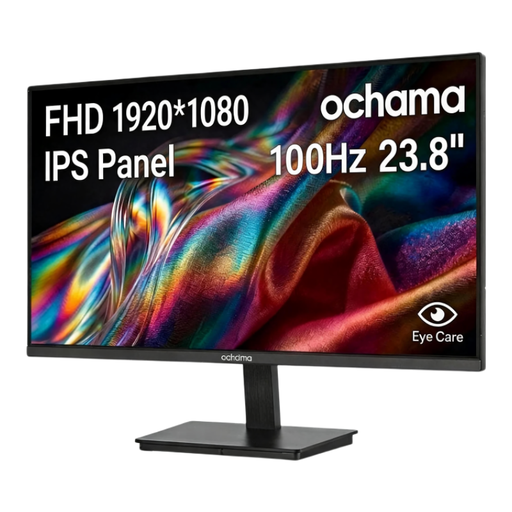 No image available
Consider this 23.8-inch 1080p screen if your writing setup centres on one document at a time. Check its stand adjustment, footprint and connection ports against your desk and computer before choosing it.
A 23.8–24-inch monitor is a compact route to consider, provided its stand leaves room for your keyboard and papers. Measure the desk and check that you can place the screen directly in front of you, about an arm’s length away, as the Health and Safety Executive advises.
Choose QHD when you regularly need guidance, budgets and draft text visible in separate windows; Full HD can suit work focused on one document. Dell and Lenovo list 2560 × 1440 for the cited QHD models, compared with 1920 × 1080 for the cited Full HD options. Check text size at your preferred display scaling before deciding.
Prioritise height adjustment if your desk and chair would otherwise leave the screen too high or low. The Health and Safety Executive advises positioning the top of the screen at eye level; a monitor’s diagonal size does not tell you whether its stand can achieve that position.
It can do both only when the laptop, monitor and cable support the required functions. Dell lists up to 90W power delivery for the P2425DE and P2425E, but you should check your laptop’s display output and charging requirements against the exact monitor connection before relying on one cable.