Offline-first RPG travellers
If you want to play through a delay without depending on airport Wi-Fi, focus on a game you can install and launch locally. PlayStation Remote Play, by contrast, requires a connection.


For an airport RPG session, start with a handheld that can run your chosen game locally: it leaves your play less dependent on airport connectivity. A Nintendo Switch model suits supported console games, while Steam Deck or a Windows handheld may suit an existing PC library if the individual titles work as intended; PlayStation Portal needs a PS5 and a suitable Remote Play connection. Check the exact game, offline setup, carrying weight and battery needs before choosing.
If you want to play through a delay without depending on airport Wi-Fi, focus on a game you can install and launch locally. PlayStation Remote Play, by contrast, requires a connection.
If your intended RPGs are in a Steam or other PC library, check access to that library and each game’s handheld compatibility. A PC handheld may also call for more setup than a dedicated console.
If you already own a PS5 and want to continue compatible games away from the television, PlayStation Portal is an option when you can arrange a suitable connection. PlayStation says Remote Play quality varies with network conditions.
Choose the game-access route before comparing screens or hardware: Nintendo, Steam, Windows and PS5 Remote Play place different conditions on what you can play during a wait.
Choose when: Your intended RPG is available for the Nintendo model you select and you want dedicated handheld or tabletop play.
Bear in mind: Game versions and storage-card formats differ between models; confirm downloads and offline requirements before travelling.
Choose when: Your RPG library is mainly on Steam and the particular games suit Steam Deck.
Bear in mind: Valve’s stated gameplay range is 3–12 hours depending on content, so plan around the games you will actually play.
Choose when: Access to PC storefronts and Xbox-related services matters more to you than console-style simplicity.
Bear in mind: Check game compatibility, setup and the exact model’s carrying weight rather than assuming every Windows handheld is alike.
Choose when: You own a PS5 and have a realistic connection plan for Remote Play at the airport.
Bear in mind: PlayStation requires at least 5 Mbps and recommends at least 15 Mbps for a better Remote Play experience; network conditions can still affect play.
| Concern | What to check | Who this matters to |
|---|---|---|
| Playing without airport connectivity | Can your exact RPG be installed and launched locally after any required updates or sign-in? | If I cannot count on airport Wi-Fi, I want my game ready to launch during a delay. Around 36% of consumers put connection-independent play first. |
| Access to your RPG library | Check each game’s platform, edition, compatibility and save-transfer requirements. | When I have RPGs I want to continue, access to those particular titles matters more than a longer feature list. Roughly 29% of consumers prioritise library access. |
| Comfort and portability | Compare in-use weight, screen size and whether tabletop play suits your wait. | For a long stretch of handheld play, I need a screen I can use comfortably and a device I am willing to carry. Around 21% of consumers place comfort and portability first. |
| PC gaming capability | Check the exact handheld model, your games’ requirements and expected battery behaviour at your chosen settings. | If I want to play PC RPGs that make greater demands on the hardware, I may accept more setup and carrying weight. Approximately 14% of consumers make PC gaming capability their primary concern. |
PlayStation says Remote Play needs at least 5 Mbps and recommends 15 Mbps for a better experience, while quality varies by network environment. An uncertain airport connection could interrupt the session.
If you choose PlayStation Portal, check your PS5 setup, intended game and connection route before leaving. Otherwise, consider a handheld that runs the game locally.
Using mobile data for Remote Play may consume your allowance and incur charges if you exceed it.
Hardware specifications do not tell you how comfortable a particular device will be to hold during a long wait. ASUS lists the specific ROG Xbox Ally X20 at 756 g; that figure does not describe every Windows handheld.
Compare the exact model’s weight, controls, storage and compatibility with the RPGs you plan to play.
Valve provides game-by-game Steam Deck compatibility ratings, so library access alone does not establish the experience for a particular title.
Check the intended game’s current compatibility information, then install, update and launch it before travelling if offline play matters to you.
The UK Civil Aviation Authority says power banks belong in cabin baggage, not checked luggage.
Check the power bank’s watt-hour marking and your airline’s current requirements before travel, and keep the power bank in your cabin bag.
Nintendo’s Switch family is a dedicated-console route for RPGs available on the chosen model.
Steam Deck OLED is a portable PC route for players with suitable games in their Steam library.
ROG Xbox Ally handhelds are Windows-based options for consumers interested in PC game access.
PlayStation Portal offers a Remote Play route for existing PS5 owners rather than a substitute for locally installed handheld games.
These handhelds represent Nintendo-console and Steam-library choices for an airport wait. Check the RPG you intend to play and its offline requirements before deciding between them.
 No image available
Consider this dedicated console if your intended RPG supports Switch 2 and can be prepared for offline play before travel.
Nintendo lists a 7.9-inch 1080p display and 256 GB of system storage. Check the game’s edition, downloads and account requirements before setting off.
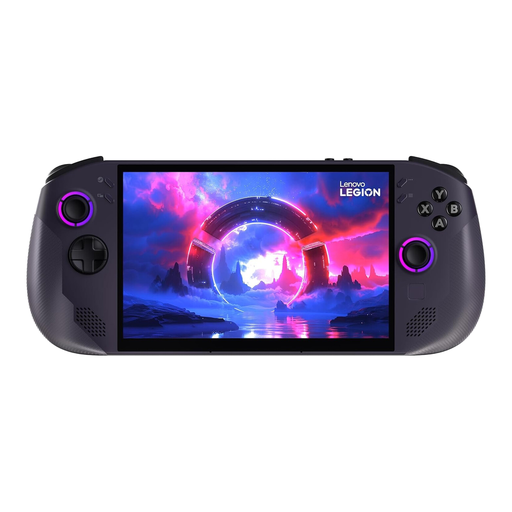 No image available
Consider this Steam-library route if your intended RPGs suit handheld play; check each title’s compatibility and offline launch requirements.
The product name identifies an AMD Ryzen Z2 Go processor and 1 TB storage. Confirm the device’s weight and expected runtime for your games when planning a longer wait.
It can suit an existing PS5 owner with a suitable Remote Play connection, but it does not remove the need for that connection. PlayStation requires at least 5 Mbps and recommends at least 15 Mbps for a better experience; check your PS5 setup and connection plan before travel.
Pack the power bank in cabin baggage, not checked luggage, as the UK Civil Aviation Authority advises. Check its watt-hour marking and your airline’s current requirements before flying.
Do not plan to recharge it on board: the UK Civil Aviation Authority advises against doing so. Check your airline’s rules and arrange any charging you need before boarding.
Faults are different from simply changing your mind. GOV.UK says a full refund must be offered for an item that is faulty, not as described or does not do what it is supposed to do; check the applicable cancellation terms separately if the device is fault-free but unsuitable.