Offline-first commuters
If a train or flight regularly takes you beyond dependable internet, locally running games matter more than access to a streamed catalogue. Check that the games you want can be installed and played on the device you choose.


For journeys without dependable internet, choose a handheld that runs your games locally, whether that means a dedicated console or a handheld PC. A handheld PC makes more sense when access to your existing PC games is the priority, provided you check individual titles; PlayStation Portal suits an existing PS5 setup, while remote play and cloud gaming both depend on a usable connection. Check game compatibility, account and membership requirements, and the networks you will use before buying.
Start with where your games will run: on the handheld, on a PS5 elsewhere, or through a cloud service. That choice determines how much an unreliable connection can interrupt a journey.
If a train or flight regularly takes you beyond dependable internet, locally running games matter more than access to a streamed catalogue. Check that the games you want can be installed and played on the device you choose.
An existing Steam or PC library can make a handheld PC appealing, but ownership does not establish handheld compatibility. Valve provides game-by-game Steam Deck ratings; check the titles you intend to take with you.
PlayStation Portal can give compatible games installed on a PS5 a dedicated handheld screen. It suits someone willing to set up Remote Play and rely on a connection, rather than someone seeking independent offline play.
Decide whether connection-free play is essential before comparing libraries and screen sizes. A dedicated console and a handheld PC can run compatible games locally; PS5 Remote Play and cloud streaming serve different purposes and require a connection.
| Concern | What to check | Who this matters to |
|---|---|---|
| Reliable local play | Confirm that your intended games run on the handheld itself, and check their download and storage requirements. | If I lose reception during a journey, I still want to play without a stream. Around 33% of consumers put dependable local play first. |
| Existing-game compatibility | Check each intended title: Valve's Steam Deck rating, Nintendo's Switch 2 compatibility information, or the relevant PC storefront requirements. | When I already own games, I want to know which purchases will work on the new handheld. Reusing a compatible library comes first for around 27% of consumers. |
| PS5 Remote Play | Confirm that you have a PS5, the required account and Remote Play setup, and a usable connection where you intend to play. | If the television is occupied, I want to continue a compatible game installed on my PS5. Around 20% of consumers chiefly want that PS5 continuity. |
| Cloud access | Check the service plan, account eligibility, supported device and controller, available games, and your usual connection. | I would rather stream an eligible game than depend on keeping it installed, and I can accept internet dependence. Cloud access is the primary concern for around 20% of consumers. |
PlayStation Portal Remote Play connects to a PS5 rather than running its installed games independently. PlayStation requires broadband for Remote Play, so an unreliable travel connection can prevent the use you bought it for.
Try Remote Play on the networks and in the locations where you expect to use it. If connection-free play is essential, choose a device that runs your intended games locally.
A game library is not a compatibility guarantee. Valve continues to assess Steam Deck titles, and Nintendo says some older Switch games may not be supported or fully compatible with Switch 2.
List the games that justify the purchase, then check each title against the specific handheld before choosing a platform.
Streamable titles depend on the service, account and plan. PlayStation Portal cloud streaming requires PlayStation Plus Premium and an eligible account; Xbox Cloud Gaming also requires a compatible setup and a high-speed connection.
Check the games and access conditions for the service you intend to use. Keep a local-play option in mind if parts of your journey have no reliable internet.
Power banks need particular attention when packing for a flight. UK Civil Aviation Authority guidance says to keep them in the cabin and to check the airline's rules.
Before flying, confirm the airline's current battery, power-bank and hand-luggage requirements for your equipment.
These brands illustrate different ways to play while travelling; their requirements apply to the named devices and services, not every product bearing the brand.
Nintendo Switch 2 is a dedicated handheld-console option for compatible games that run locally.
Steam Deck OLED is a portable PC route for travellers who want to assess games in their Steam library.
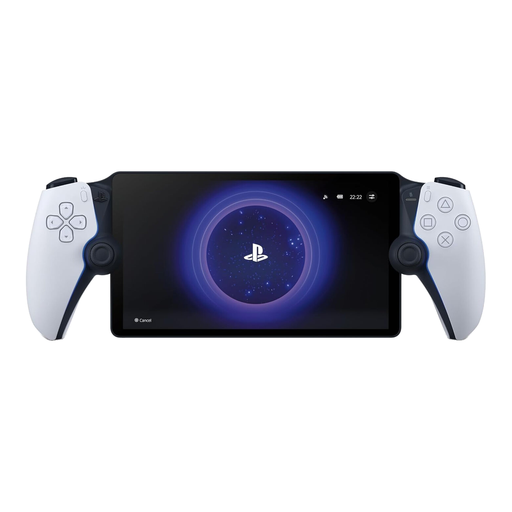
PlayStation Portal is a handheld screen for compatible games installed on a PS5, with separate cloud-streaming access for eligible users.
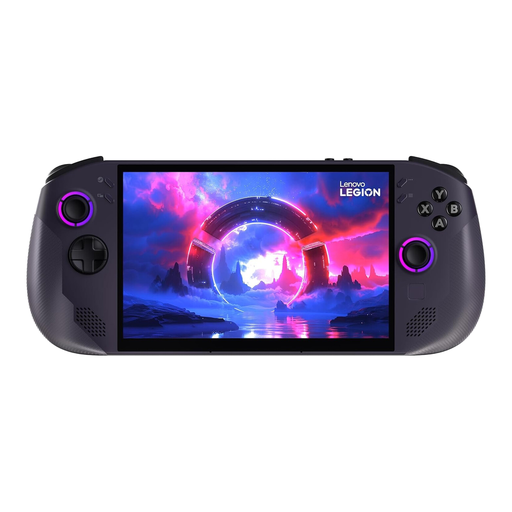
The ROG Xbox Ally X is a Windows handheld-PC example for buyers considering PC games alongside Xbox services.
These choices cover locally running console games, PS5 Remote Play and a handheld-PC option. Choose by the games you want to access and whether your journey can support connection-dependent play.
 No image available
Consider this for locally running games when your journey may have no dependable internet. Nintendo UK lists a 7.9-inch 1080p display and 256GB of internal storage for Switch 2; check the compatibility of any older Switch games you plan to bring across.
 No image available
Consider this if you own a PS5 and want a handheld screen for compatible installed games. PlayStation lists an 8-inch 1080p screen; Remote Play needs the PS5, account setup and a usable connection. Cloud streaming has separate PlayStation Plus Premium and game-eligibility requirements.
 No image available
Consider this handheld PC if taking PC games on your travels is your priority. The listed variant has an AMD Ryzen Z2 Go processor and 1TB of storage. Check your intended games for compatibility and the expected playtime for your journeys rather than relying on storage capacity alone.
Not for every locally played single-player game. Nintendo says its online services require a Nintendo Account and that Nintendo Switch Online membership applies to online play and other membership features; check the conditions for the particular game you want to play.
PlayStation Portal cannot use its standard PS5 Remote Play feature without a PS5 and the required account and connection setup. PlayStation also offers cloud streaming of eligible PS5 games in the UK with PlayStation Plus Premium, but that remains connection-dependent and subject to account and title eligibility.
For Remote Play, PlayStation specifies at least 5Mbps broadband and recommends at least 15Mbps. Its separate Portal cloud-streaming guidance specifies 5Mbps to establish a session, 7Mbps for 720p and 13Mbps for 1080p; meeting a stated speed does not remove the need for a stable connection where you play.
No: owning a Steam game does not establish how it will work on Steam Deck. Valve shows a compatibility rating for games in your library and continues testing titles, so check the games that matter to your purchase individually.
Check your airline's current battery and baggage rules before departure. UK Civil Aviation Authority passenger guidance says power banks belong in the cabin, not checked luggage, and advises passengers to check with their airline.