PS5 households sharing one TV
If your PS5 is available but its TV is occupied, PlayStation Portal can stream compatible games from the console to another room. You still need a suitable network connection.


Choose by the games you need to play and whether they must run on the handheld itself. Nintendo Switch 2 offers local play for supported Nintendo games; PlayStation Portal lets an existing PS5 household use Remote Play away from the TV, provided the connection is suitable. Steam Deck OLED and Windows handhelds offer other PC and Xbox-related routes, but game compatibility, console requirements and streaming subscriptions need checking before you buy.
If your PS5 is available but its TV is occupied, PlayStation Portal can stream compatible games from the console to another room. You still need a suitable network connection.
If you do not want play to depend on a home console or a streaming connection, look at devices that run supported games locally. Check the games you want before choosing a Nintendo or PC handheld.
If your games are on Steam, PC storefronts or Xbox services, start with those libraries rather than the screen specification. Valve provides title-specific Steam Deck compatibility ratings; Xbox Remote Play and cloud gaming have separate requirements.
When the main TV is often occupied, identify the games you want to keep playing, then decide whether a network-dependent device meets your needs. Screen and storage specifications matter only after those choices.
| Concern | What to check | Who this matters to |
|---|---|---|
| Existing game library | List your games and where you bought them. Check individual Steam Deck ratings or PC requirements rather than assuming a console purchase transfers to a handheld. | If my games are spread across PC or Xbox services, keeping access to them matters more than choosing a new console catalogue. Around 36% of consumers put existing-library access first. |
| Continuing PS5 games | For PlayStation Portal Remote Play, confirm that you have a PS5, that your games are compatible and that Wi-Fi works where you intend to sit. | I want to carry on with compatible games from my PS5 while someone else watches the TV. For around 29% of consumers, continuing PS5 games is the primary concern. |
| Local handheld play | Confirm that the device runs your intended games locally. For Switch 2 game-storage expansion, check for microSD Express rather than an ordinary microSD card. | When the household connection is busy, I would rather run a supported game on the handheld than stream it. Local play comes first for around 21% of consumers. |
| Network and service dependence | Check the console, connection, account and membership required by the particular Remote Play or cloud-streaming service you intend to use. | I want to know which connections and recurring services my chosen games depend on before committing to a streaming route. Around 14% of consumers make those dependencies their main concern. |
PlayStation Portal Remote Play streams from a PS5; it does not replace the console. PlayStation offers separate cloud streaming for eligible games, with PlayStation Plus Premium, account and connection conditions.
If you plan to use Remote Play, check your PS5 games and the connection in the room where you will play. Consider cloud streaming separately and confirm eligibility for your account and games.
Nintendo specifies microSD Express for expanded Switch 2 game storage. An ordinary microSD card is not interchangeable for storing and running Switch 2 games.
Check the card standard before selecting extra game storage.
If the console’s 256GB internal storage does not meet your needs, expansion requires a compatible microSD Express card.
Valve provides game-by-game Steam Deck compatibility ratings, while requirements and performance for a Windows handheld vary by title and settings. Ownership of a game alone does not establish how it will play on either device.
Check your must-play Steam titles against their Steam Deck ratings, or check PC requirements and relevant handheld performance information for a Windows device.
A display specification cannot remove the connection requirements of Remote Play or cloud gaming. PlayStation and Xbox describe network-dependent routes separately from games running locally on a handheld.
Decide whether you need local play or can rely on streaming, then compare displays and controls within the route you would actually use.
Switch 2 is a handheld choice for supported Nintendo games that run on the console, with the option to use a TV later.
PlayStation Portal is intended for households that want to play compatible PS5 games away from the TV used by their console.
Steam Deck OLED is a portable PC-gaming route for players whose intended games are in their Steam library.
ROG Xbox Ally X is a Windows handheld for players considering compatible PC games alongside Xbox services.
These options cover local Nintendo play, PS5 Remote Play and two retro handheld variants. The retro devices suit a different game-library question from Switch 2 or Portal: check their included titles before choosing one for games you already have in mind.
 No image available
Choose this route to play supported Nintendo games locally while the TV is occupied.
Nintendo specifies a 7.9-inch, 1920×1080 display and 256GB internal storage. Check your intended games; expanded Switch 2 game storage requires microSD Express.
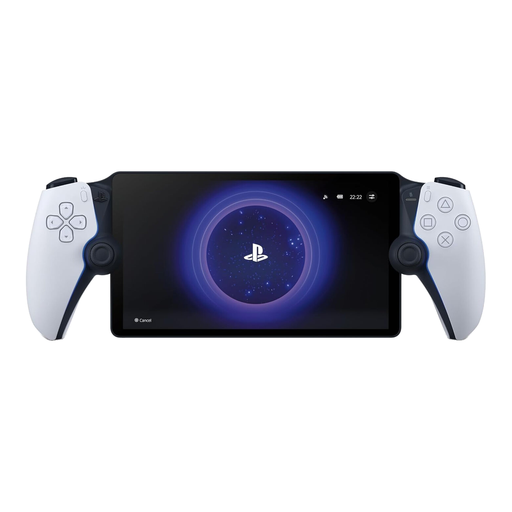 No image available
This suits an existing PS5 household wanting to play compatible games away from the occupied TV.
PlayStation specifies an 8-inch 1080p screen. Remote Play requires a PS5 and a suitable network; cloud streaming is separate and has membership, account and eligible-game conditions.
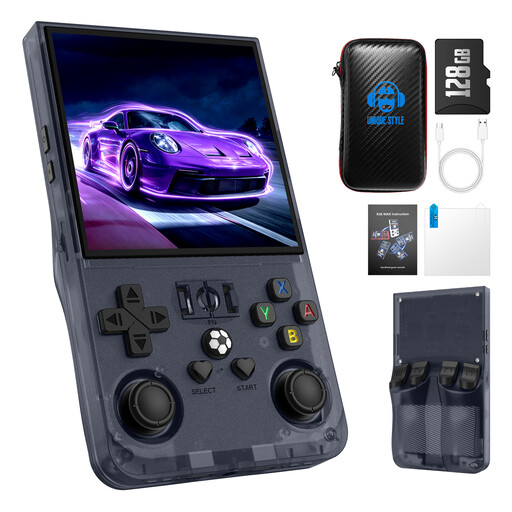 No image available
Consider this handheld for its retro-game focus rather than as a way to continue a PS5, Nintendo or PC library.
The product title specifies a 4-inch, 720×720 IPS display. Confirm the included games and the storage arrangement for this Gray variant before buying.
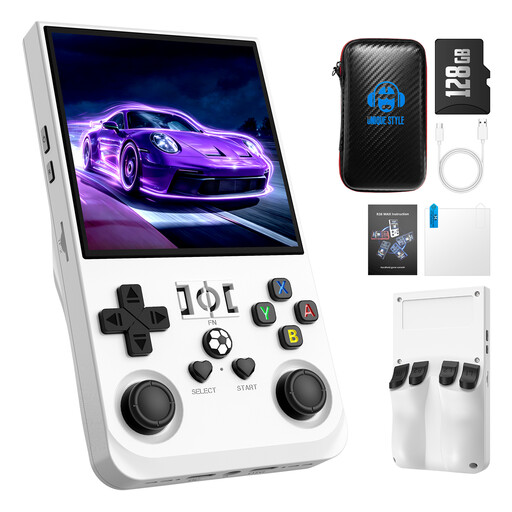 No image available
This White variant offers a retro handheld route for playing away from the main TV, subject to the games it actually includes.
The product title specifies a 4-inch, 720×720 IPS display. Check the included titles and storage arrangement for this variant rather than assuming they match another R36MAX listing.
Yes, PlayStation Portal can stream compatible games from your PS5 over Wi-Fi without using its TV. You still need the PS5 and a suitable connection where you intend to play; PlayStation recommends at least 15Mbps for a better Remote Play experience.
Portal Remote Play requires a PS5, but its separate cloud-streaming mode can work without streaming from your console for eligible games. In the UK, PlayStation says that mode requires PlayStation Plus Premium, a supported account and broadband; child accounts cannot use Portal cloud streaming.
No. Nintendo specifies microSD Express for expanded Switch 2 game storage. Check the card standard before buying an expansion card, rather than relying on its capacity alone.
Xbox Remote Play needs a compatible Xbox console with remote features enabled and a compatible device. Microsoft also lists a Microsoft account with an Xbox profile and a connection using 5GHz Wi-Fi or mobile data with 10Mbps download speed.