Offline-first Steam players
If your intended strategy games are already on Steam, a portable PC-gaming device is worth considering. Check each game’s handheld controls and offline requirements, then install and launch it before leaving home.


Choose a Steam Deck OLED if you already own the strategy games you want to take and can check each title’s controls and prepare it for offline play. Nintendo Switch 2 suits a trip that calls for handheld, tabletop and TV play, while a Windows-based ROG Xbox Ally suits access to PC and Xbox games. Whichever route you take, install and test your games before relying on a cottage connection.
If your intended strategy games are already on Steam, a portable PC-gaming device is worth considering. Check each game’s handheld controls and offline requirements, then install and launch it before leaving home.
Nintendo Switch 2 suits consumers who want to change play position during the stay. Nintendo supports all three modes, but TV play requires the compatible Switch 2 dock and power equipment.
A Windows handheld such as the ROG Xbox Ally suits consumers who prioritise access to PC and Xbox games. Plan around locally installed titles if you cannot depend on the cottage connection for cloud gaming or Remote Play.
Choose it when: Your intended strategy games are in your Steam library and you can assess each title on Steam Deck before the trip.
Allow for: Steam Offline Mode needs preparation while connected, and a game requiring an active connection may remain unusable offline.
Choose it when: Moving between handheld, tabletop and cottage-TV play matters more than taking an existing PC-game library.
Allow for: TV mode needs a Switch 2 dock, while a game-key card needs its game downloaded before play.
Choose it when: Access to Windows PC and Xbox games is your priority and you are comfortable with a PC-like setup.
Allow for: ASUS describes cloud gaming as connection-dependent and requiring Game Pass membership, so arrange locally installed games for an uncertain connection.
| Concern | What to check | Who this matters to |
|---|---|---|
| Offline game access | Check whether each game runs locally without a live connection and complete any required download or first launch before travel. | If the cottage connection fails, I still want my installed games to start. Around 36% of consumers put dependable offline access first. |
| Existing PC library | Check where you own each game, then assess its controls and text on the exact handheld; Valve provides title-level Steam Deck compatibility information. | I want to take the strategy games I already own, not choose a device before checking my library. For around 29% of consumers, that library fit is the primary concern. |
| Ways to play at the cottage | Check the supported play modes and whether you will have the correct dock, power equipment and TV connection. | Some evenings I may play at a table; on others, I may want the television. That flexibility comes first for around 21% of consumers. |
| Charging and accessories | Compare the manufacturer’s battery range for the exact device and check which charger and other accessories your planned setup needs. | I would rather plan a long session and pack the right equipment than discover a charging problem on arrival. Around 14% of consumers make that practical setup their main concern. |
Downloads, initial setup and cloud play depend on the connection available at the property. Ofcom’s checker shows broadband availability and mobile coverage by provider for a postcode; it cannot replace preparing games for offline use.
Check the cottage postcode, then install and test locally playable games before you leave.
Nintendo says a game-key card does not contain the full game data. The game must be downloaded before the card can be used to start it.
Check the format of each intended game, complete its download at home and make room for it in storage.
Nintendo states that the original Switch dock is not compatible with Switch 2; the original Switch AC adapter cannot power Switch 2 in TV mode either.
Pack compatible Switch 2 docking and power equipment if you intend to use the cottage television.
A game’s PC availability alone does not establish that its controls, text or launcher will suit a particular handheld or work offline.
Check your intended titles individually. For Steam Deck, use Valve’s title-level compatibility information and launch the games on the device before travelling.
Steam Deck OLED is a portable route for consumers with an existing Steam library.
Nintendo Switch 2 offers handheld, tabletop and TV modes within Nintendo’s console ecosystem.
ROG Xbox Ally is a Windows 11 handheld route for consumers interested in PC-platform and Xbox games.
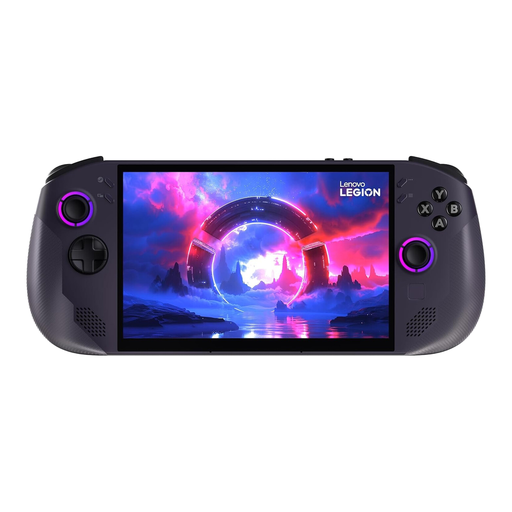
This Lenovo handheld is relevant if you want to take Steam strategy games to the cottage. Confirm your own titles’ controls and offline requirements before making them your travel plan.
 No image available
Consider this handheld if you want access to your Steam library while away; check how each intended strategy game handles its controls and offline play on this model.
The product name specifies an AMD Ryzen Z2 Go processor and 1TB of storage. Plan charging around your intended games rather than assuming a particular runtime.
Install, update and launch each intended game while you still have a connection, then check its offline requirements. Steam advises preparing game files for Offline Mode; a game that needs an active connection or external launcher may still not work offline.
No. Nintendo says the original Switch dock is not compatible with Switch 2. Use compatible Switch 2 docking equipment and power equipment for TV mode.
Not if it is a game-key card that has not yet had its game downloaded. Nintendo says game-key cards do not contain the full game data, so check the card format and complete any required download before travelling.
Do not rely on the Wi-Fi description alone. ASUS says its Xbox Cloud Gaming route requires Game Pass membership and a connection; Ofcom’s postcode checker can help you assess broadband availability and mobile coverage, while locally installed games give you a separate plan.