Choose the software platform before comparing handheld specifications. A SteamOS or Windows handheld is the route to investigate for PC strategy games, while Nintendo Switch 2 suits compatible Switch games and offers handheld, tabletop and docked play. For any route, check the exact game’s controls and text size, then plan for its storage needs, unplugged runtime and your hotel-room setup.
Who each route suits
Travellers with PC strategy libraries
If the games you intend to play are on PC, begin with their availability on the handheld’s operating system. Steam Deck provides per-game compatibility ratings, while a Windows handheld calls for checks of the game, launcher and controls.
Players who need readable maps and menus
Compare display size and resolution, but judge text scaling and controller navigation in the actual game. Hardware figures alone cannot tell you whether its tooltips or map labels will be comfortable to use.
Players who want a simpler hotel setup
A hybrid console may appeal if your chosen games have compatible Switch versions and you want handheld or tabletop play, with docked TV play where a suitable connection is available. It will not give you access to a PC game library.
What matters when choosing
Start with the games you want to take, then assess how their maps and controls work on a small screen. Battery planning and the room’s charging or TV arrangements matter once the game itself is a fit.
| Concern |
What to check |
Who this matters to |
| Game and library compatibility |
List your intended titles. Check Steam Deck ratings, Windows game and launcher requirements, or the Switch game platform and edition, as applicable. |
If my strategy games are already in a PC library, I need to know they will run and work with handheld controls before choosing a device; around 36% of consumers put game compatibility first. |
| Readable maps and menus |
Compare screen dimensions, then check the intended game’s text scaling and controller navigation. |
When maps are crowded with labels and tooltips, I need to read them without struggling through each turn; around 29% of consumers make readability their primary concern. |
| Unplugged play and charging |
Read runtime figures with their game-dependent conditions, and take a suitable genuine charger that can remain uncovered during use. |
If I plan to play away from a socket, I need an evening session that fits realistic battery expectations; roughly 21% of consumers prioritise unplugged play. |
| Hotel-room setup |
Confirm the device’s tabletop or external-display connection and whether the hotel TV has an accessible input if you intend to use it. |
When I want to settle in without managing a PC desktop, straightforward handheld or tabletop play matters most; approximately 14% of consumers put setup first. |
Mistakes to avoid
-
Treating the longest stated runtime as an all-evening promise
Valve gives Steam Deck OLED a content-dependent gameplay range of 3–12 hours. Nintendo also says Switch battery duration varies with the software and functions used. Neither figure guarantees the length of your particular strategy-game session.
Charge before travelling, bring the correct charger and plan around the lower end of the relevant manufacturer range until you know how your game runs.
-
Assuming a larger screen fixes every interface problem
Screen size and resolution do not establish whether a game offers useful text scaling or comfortable controller navigation. A dense map can remain awkward even when the hardware provides more display area.
Look at the exact title’s interface and control options, using gameplay footage or a demo where available, before choosing on screen specifications alone.
-
Overlooking the storage-card standard
Nintendo specifies microSD Express cards for Switch 2 storage expansion; an ordinary non-Express microSD card is not a substitute for storing games.
Check the space your intended downloads require and the supported card standard before selecting an expansion card.
A compatible microSD Express card for storage expansion is a separate item.
-
Charging on a covered surface
London Fire Brigade warns against covering chargers or charging devices, including using a power lead in bed. Damaged batteries and unsuitable chargers can also present a fire risk.
Use the supplied charger or a genuine compatible replacement from a trusted supplier, keep the device and charger uncovered and stop using a device if its battery swells.
Brands to consider
These product lines represent different software and setup routes. Choose by the games and controls you need, rather than by brand alone.
Valve
Steam Deck OLED is a SteamOS route for players assessing games in their Steam library.
- Valve says your Steam library appears after sign-in and displays compatibility ratings for individual games.
- Valve lists a 7.4-inch 90Hz display and a 50Whr battery for the OLED models, but its 3–12-hour gameplay range depends on content. Check each game’s controls, text and likely runtime.
Lenovo
Legion Go S offers a larger-screen SteamOS handheld route for players concerned about dense strategy-game interfaces.
- Lenovo lists an 8-inch, 1920 × 1200 touchscreen for the specified UK 32GB/1TB configuration.
- That display specification cannot establish whether a particular game’s text or controls will be comfortable. Confirm the configuration and the game before deciding.
ASUS
ROG Xbox Ally is a Windows handheld route for players whose intended PC games or services call for Windows.
- ASUS lists Windows 11 Home, a 7-inch 1080p touchscreen, 512GB SSD and external-display-capable USB-C connectivity for the specified UK model.
- Windows does not guarantee that every strategy game, launcher or interface will suit handheld controls. ASUS lists the model at 670g, which is worth considering for longer sessions.
Nintendo
Nintendo Switch 2 is a hybrid-console route when the intended games have compatible Switch versions.
- Nintendo lists a 7.9-inch, 1920 × 1080 screen, detachable Joy-Con 2 controllers and HDMI output through the dock.
- Confirm the game platform and edition rather than assuming access to PC titles. Storage expansion requires a compatible microSD Express card.
Joybuy handhelds for these routes
These two handhelds give you a Switch-console option and a Lenovo handheld to consider for Steam-library play. For either one, check the exact strategy game’s availability, text and controls before choosing it for a hotel stay.
 Image unavailable
Nintendo Switch 2 Console (UK Version)
Consider this console if your intended strategy game has a compatible Switch version and you want handheld or tabletop play in the room.
Nintendo lists a 7.9-inch, 1920 × 1080 screen for Switch 2. Check the exact game’s edition, text size and controls; docked play also depends on having a usable TV connection.
Storage expansion requires a compatible microSD Express card, sold separately. Check game-specific battery expectations before relying on a long unplugged session.
View on Joybuy
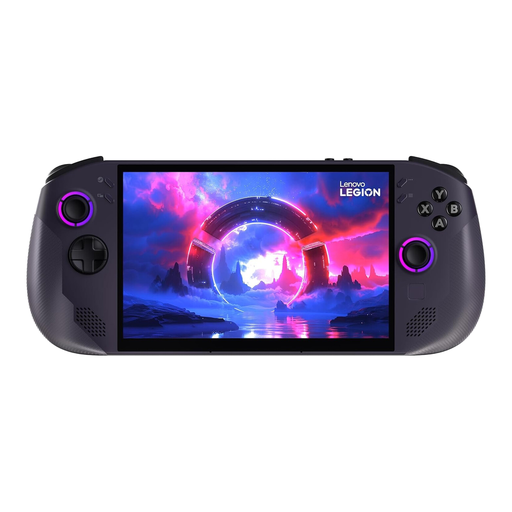 Image unavailable
Lenovo Legion Go S (AMD Ryzen Z2 Go, 1TB)
Consider this handheld for strategy games in your Steam library if the operating-system variant, exact titles and controls meet your needs.
Check how your intended game displays maps, menus and tooltips on this configuration, and whether the device will be comfortable to hold throughout your planned session.
Confirm game-specific runtime before counting on extended unplugged play, and take a suitable genuine charger for the hotel room.
View on Joybuy
Questions about hotel-room play
Should I choose a PC handheld or Nintendo Switch 2 for strategy games?
Choose the route that supports the specific games you intend to play. Valve provides per-game Steam Deck compatibility ratings, the specified ROG Xbox Ally uses Windows 11, and Nintendo Switch 2 accepts compatible Switch-format games; none of those platform distinctions proves that a particular title’s controls will feel comfortable on a handheld.
Will a bigger screen make strategy-game text easier to read?
Not necessarily: screen specifications cannot establish how a particular game scales its text or handles controller navigation. Lenovo lists an 8-inch, 1920 × 1200 display for its specified Legion Go S configuration, while Nintendo lists a 7.9-inch, 1920 × 1080 Switch 2 screen; inspect the intended game’s interface before choosing between them.
How should I plan battery use for an evening in a hotel?
Plan around a game-dependent range rather than the longest published figure. Valve lists 3–12 hours of gameplay for Steam Deck OLED depending on content; Nintendo’s approximately 4.5–9-hour figure applies to the specified Switch OLED model, not Switch 2, and varies with software and functions. Charge before travel and bring the appropriate genuine charger.
Can I leave a handheld charging on a hotel bed?
Keep the device and charger uncovered while charging rather than placing them on bedding. London Fire Brigade warns against covering charging devices or using a power lead in bed; use a suitable genuine charger and stop using the device if its battery swells.


