Choose a handheld around the strategy games you intend to play, then check each title’s compatibility and controls. Steam Deck OLED is worth considering for a suitable Steam library, a Windows handheld for games or launchers that require Windows, and Nintendo Switch 2 for confirmed Switch 2 or compatible Switch games. Plan charging around the exact device, and leave in-car play to passengers.
Who each route suits
Travellers with a Steam strategy-game library
If you already own the games you want to take, Steam Deck OLED offers trackpads for cursor-led interfaces. Check every intended title in Valve’s Deck Verified system: a Playable game may still need configuration or mouse or touchscreen navigation.
Players who need Windows
If a planned game or launcher requires Windows, consider a Windows handheld such as ASUS ROG Ally X or the Windows 11 Lenovo Legion Go S configuration described by Lenovo UK. Check the exact variant and each game’s controls; not every Legion Go S listing has the same operating system.
Console-first road-trip players
If you plan to play Switch 2 games or compatible Switch titles, Nintendo Switch 2 offers a dedicated-console route. Confirm individual game compatibility and any Joy-Con 2 mouse-control support before making either feature central to your choice.
What matters when choosing
Steam Deck OLED
Consider it when: Your intended Steam strategy games have acceptable Deck Verified results and you want trackpads for cursor-led play.
Trade-off: Valve says Playable games may require manual configuration, so an existing PC library does not settle handheld suitability.
Windows handheld
Consider it when: A game or launcher you intend to use specifically requires Windows.
Trade-off: Windows access alone does not establish that the game’s interface will feel comfortable on handheld controls.
Nintendo Switch 2
Consider it when: Your planned strategy games are Switch 2 titles or confirmed compatible Switch games, and you prefer a dedicated console.
Trade-off: Nintendo says some older Switch games have compatibility limitations; Joy-Con 2 mouse control needs supported software and a flat surface.
Start with the games you will take, then decide how you will control them and keep the handheld charged during passenger play or stops.
| Concern |
What to check |
Who this matters to |
| Game-library access |
List your intended titles and launchers. Check each Steam game’s Deck Verified category, or confirm whether its software requires Windows. |
I want to take games I already own, so platform access decides which handheld I can use. Around 36% of consumers put access to their intended library first. |
| Charging on the trip |
Check the charging specification for the exact variant and the suitability of any replacement or vehicle charger; battery capacity alone is not a play-time figure. |
If charging opportunities are limited, I need a workable plan for the journey rather than a battery figure alone. Around 29% of consumers prioritise road-trip power planning. |
| Console simplicity |
Confirm each planned game’s Switch 2 availability or Switch compatibility; check mouse-control support if you intend to use it. |
I would rather choose a dedicated console, provided the strategy games I want are compatible. For around 21% of consumers, that console-style choice comes first. |
| Interface comfort |
Check game-specific text legibility and support for controller, touch, trackpad or mouse input. |
Small menus and cursor-heavy controls could make my chosen game awkward to play. Around 14% of consumers put interface comfort ahead of the other concerns. |
Mistakes to avoid
-
Assuming a PC game is automatically comfortable on a PC handheld
Valve distinguishes Steam Deck Verified games from Playable games, which may need manual configuration. A Windows operating system likewise tells you little about how a particular strategy interface handles handheld controls.
Check the exact game in Valve’s Deck Verified system for Steam Deck, or check its Windows, launcher and control requirements for a Windows handheld.
-
Assuming every Switch game or mouse-style control works on Switch 2
Nintendo says some Switch games are unsupported or not fully compatible with Switch 2. Joy-Con 2 mouse controls work only in compatible software on a suitably flat surface.
Check each planned game’s compatibility and control options, and consider whether you will have a stable surface when you want to use mouse control.
-
Choosing a charger by connector shape alone
An unsuitable charger can create an overheating risk. Greater Manchester Fire and Rescue Service advises using the charger supplied with the battery.
Follow the manufacturer’s instructions for your exact handheld and check its charging requirements before using replacement or vehicle equipment.
-
Planning gameplay for the driver
Playing while driving creates a distraction. UK road-safety guidance from THINK! warns against handheld-device use while driving.
Keep in-car gameplay to passengers, or wait until the vehicle is parked.
Brands to consider for these handheld routes
Valve
Steam Deck OLED is a Steam-focused option for travellers whose intended strategy games suit its controls and Deck Verified status.
- Steam Deck OLED has trackpads. Valve says it has 30–50% more battery life than the LCD model; that comparison is not a play-time estimate for your game.
- Valve’s Playable category can still involve manual configuration, so check games individually.
Nintendo
Switch 2 is a dedicated-console option when the games you want are available for it or confirmed compatible from Switch.
- Nintendo specifies a 7.9-inch, 1920 × 1080 display and Joy-Con 2 mouse controls in compatible software.
- Some Switch games are not supported or fully compatible with Switch 2; mouse control also requires a suitable flat surface.
ASUS ROG
ROG Ally X (2024) is a Windows handheld to consider when an intended game or launcher requires Windows.
- ASUS ROG specifies Windows 11 Home, an 80Wh battery and USB-C Power Delivery for the ROG Ally X (2024) RC72LA.
- Those specifications do not establish a particular game’s control comfort or road-trip runtime.
Lenovo Legion
Lenovo’s Legion Go S configurations need to be compared by exact variant: the Windows model described by Lenovo UK is not interchangeable with the Legion Go S product listing below.
- Lenovo UK specifies Windows 11 Home, an 8-inch 1920 × 1200 touch display and 1TB storage for configuration 83L3001RUK.
- Check the part number before relying on those Windows-model specifications for another Legion Go S.
Joybuy product choices
These choices include a Lenovo Legion Go S handheld and a Nintendo Switch 2 console. Use your intended strategy games and preferred controls to decide which listing merits a closer look.
 No image available
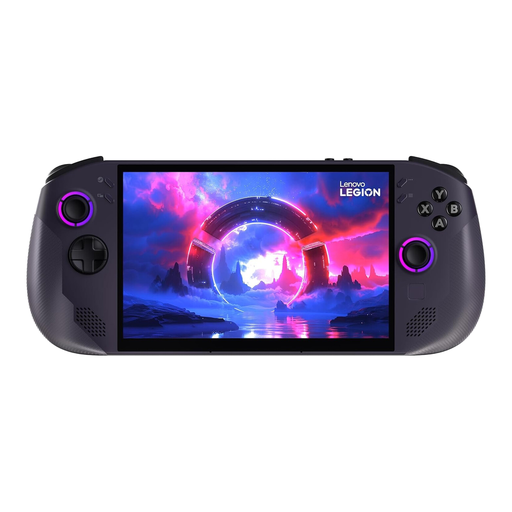
Lenovo Legion Go S – AMD Ryzen Z2 Go, 1TB
Consider this handheld if you want access to your Steam strategy games, but check each intended title and its control requirements for this exact configuration before buying.
The product name identifies an AMD Ryzen Z2 Go processor and 1TB storage. Do not apply the specifications of Lenovo’s separate Windows configuration to this listing.
View on Joybuy
 No image available
Nintendo Switch 2 Console (UK Version)
Choose this console route only after confirming that your planned strategy games are Switch 2 titles or compatible Switch games.
Nintendo specifies a 7.9-inch, 1920 × 1080 display. Joy-Con 2 mouse control requires compatible software and a suitably flat surface, so check support for the particular game.
View on Joybuy
Common questions
Will any Steam strategy game work well on Steam Deck?
No: compatibility and setup depend on the individual title. Valve says Deck Verified games work without modification, while Playable games may need manual configuration; check the status of every game you plan to take.
Can I use my Switch strategy games on Nintendo Switch 2?
Check each game before relying on an existing Switch library. Nintendo says some Switch games are not supported or are not fully compatible with Switch 2.
Can I use Joy-Con 2 mouse controls during a car journey?
Only if the game supports them and you have a suitably flat surface. Nintendo describes mouse control for compatible software on a table or similar surface, so do not rely on it working on a lap or uneven seat.
What should I check before using a vehicle charger?
Check the charging instructions and requirements for your exact handheld before connecting replacement or vehicle equipment. Greater Manchester Fire and Rescue Service advises using the charger supplied with the battery because an unsuitable charger can overheat it.
Can the driver play a handheld during the road trip?
No: plan gameplay for passengers or for stops when the vehicle is parked. THINK!, the UK road-safety campaign, warns that handheld-device use while driving is distracting and gives guidance on restrictions covering mobile phones and similar devices.


