Choose a portable HDD if the group mainly keeps a growing archive in one location; consider a portable SSD if volunteers regularly carry the backup or copy larger folders. If spreadsheets contain personal information, assess encryption and access controls whichever drive you choose. Keep another copy separately and test that someone can restore the files: the Information Commissioner’s Office emphasises the ability to restore access after an incident.
Who is choosing the drive?
Volunteer treasurers handling member records
Spreadsheets containing names, contact details or payment records call for controlled access as well as a recoverable backup. The Information Commissioner’s Office advises organisations to consider security measures in light of the risks to personal data.
Committee members carrying backups between venues
When the drive moves between homes, meeting rooms or events, its size, handling requirements and protection of the files if it is lost become important selection checks.
Archive-focused record keepers
Groups retaining spreadsheets alongside scans and meeting files may place more weight on capacity and a repeatable backup routine than on headline transfer speed. They should check the drive’s connection against the computers they use.
What matters when buying?
Decide how the group will protect and restore its records before choosing between an archive-oriented HDD and an SSD that will be carried regularly.
Portable HDD
Consider it when: the group keeps a growing archive mainly in one location; the cited Western Digital My Passport line offers capacities from 1TB to 6TB.
Allow for: a drive with moving parts that needs care during transport, and check security features on the exact variant.
Portable SSD
Consider it when: volunteers carry the backup regularly or also copy large folders.
Allow for: transfer speeds that depend on the computer and cable. Samsung says the T7 Shield’s quoted maximum speeds require a USB 3.2 Gen 2 host, compatible cable and UASP.
| Concern | What to check | Who this matters to |
|---|
| Security and recovery |
Check access controls and available encryption; assign responsibility for recovery information and test restoring a spreadsheet. |
If our records contain personal information, I need the group to protect a lost copy and still recover the files after an incident. Around 42% of consumers put security and recovery first. |
| Repeatable backups |
Confirm computer and cable compatibility, then check backup-software support for the exact drive and operating system. |
When volunteers take turns, I need a routine another person can carry out without relying on the original organiser’s computer. For around 33% of consumers, that repeatability is the primary concern. |
| Capacity and portability |
Check the size of the folders to be copied and the drive’s capacity; match its connector to the computers used. |
If we keep scans alongside spreadsheets or move the copy between venues, I need capacity and handling that suit those files and journeys. Those needs come first for around 25% of consumers. |
Backup mistakes to avoid
-
Treating one external drive as the whole backup plan
If that copy fails, disappears or cannot be opened, the group may be unable to restore its records. The Information Commissioner’s Office emphasises restoring access to personal data after an incident.
Keep another copy separately, document the backup routine and test restoring a spreadsheet.
-
Assuming a password feature is already protecting files
Password protection and encryption need to be set up and managed; losing the recovery information can also prevent the group from opening its backup.
Configure the chosen protection before copying records, agree who may access the drive and keep recovery information in a separate controlled location.
-
Choosing an SSD for its quoted speed alone
Samsung says the T7 Shield’s maximum transfer speeds require a USB 3.2 Gen 2 host, compatible cable and UASP. That figure should not determine a purchase without checking the computers used for backup.
Check their ports and the supplied cable; give security and a workable restore routine priority when the backup consists mainly of spreadsheets.
A different compatible cable or adapter may be needed for the group’s computers.
-
Treating a rugged rating as protection from every accident
Samsung’s T7 Shield IP65 and drop-resistance claims have test conditions. Samsung says liquid, dust and drop damage are not covered under its warranty.
Carry the drive with care and retain another backup copy even if choosing a rugged model.
Relevant brands for reference
Western Digital
The My Passport USB-C portable HDD line is relevant to groups considering a higher-capacity archive drive.
- Western Digital lists 1TB to 6TB capacities, password protection and hardware encryption for the cited line.
- Check the exact variant’s connector, software and compatibility rather than applying the line’s features to every My Passport drive.
Samsung
The T7 Shield portable SSD line is relevant when a backup is carried regularly.
- Samsung specifies password protection and IP65 and drop testing for the T7 Shield.
- Its quoted maximum speed requires compatible host hardware, cable and UASP; the physical-protection claims are conditional, not a guarantee against damage.
Seagate
The One Touch with Password portable HDD line is another reference for a scheduled-backup workflow.
- Seagate states that the line offers password protection, AES-256 hardware encryption and automatic backup schedules.
- Confirm the exact variant, its availability and how its security and backup features are set up before choosing it.
Joybuy drives for these needs
These portable HDDs and SSDs offer different capacities and connections for a community group’s spreadsheet backup. Check each exact drive against the group’s computers and backup routine.
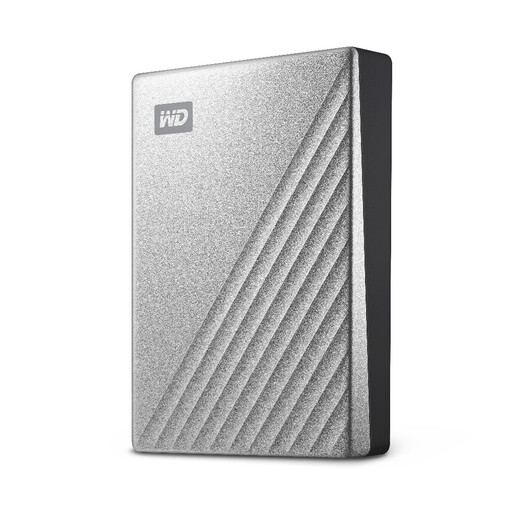 No image available
Western Digital My Passport Ultra 4TB hard drive, Silver
Consider this 4TB portable hard drive for an archive of spreadsheets and supporting files. Before sharing the backup between computers, check the connection and file-system requirements, and agree how the group will protect and restore its records.
View on Joybuy
 No image available
Samsung MU-PE1T0S 1TB USB-C portable SSD, Black
Consider this 1TB portable SSD if volunteers carry the backup between locations. Its name specifies a USB Type-C 3.2 Gen 2 connection; check the computers and cable, and set up access protection before storing personal information.
View on Joybuy
 No image available
Western Digital My Passport Ultra 5TB hard drive, Blue
The 5TB capacity makes this portable hard drive worth considering if scans and other records will add to the spreadsheet archive. Check its connection and file-system setup on the group’s computers, and handle the drive carefully while moving it.
View on Joybuy
 No image available
Samsung Portable SSD T7 2TB, Blue
Consider this 2TB portable SSD when the backup travels and includes more than spreadsheets. Its name specifies a USB Type-C 3.2 Gen 2 connection; check cable compatibility, configure any chosen password protection and retain a separate copy.
View on Joybuy
 No image available
Western Digital My Passport 4TB hard drive, Black
This 4TB portable hard drive is an option for keeping spreadsheet backups with a larger archive. Check compatibility with the group’s computers and make sure someone other than the usual volunteer can restore a file.
View on Joybuy
Questions about spreadsheet backups
Should our community group encrypt its spreadsheet backup?
Assess encryption particularly if the spreadsheets contain personal information and the drive may be carried or shared. The Information Commissioner’s Office describes encryption as a security measure whose suitability depends on the nature and risks of the processing; agree who controls access and recovery information before using it.
Is one external drive enough to back up the spreadsheets?
Do not rely on one portable drive as the group’s only copy. Keep another copy separately and test that a spreadsheet can be restored; the Information Commissioner’s Office emphasises restoring access and availability to personal data after an incident.
Will a USB-C drive work with both Windows and Mac?
It can, but check the exact drive’s file format, cable and operating-system requirements. Western Digital states that its cited My Passport USB-C line is formatted in exFAT for Windows and Mac use, while noting that compatibility can vary with the computer’s configuration; that does not establish the setup of every My Passport variant.


