People keeping their current TV
If the picture still suits the room, check for a free HDMI input, space and power for a player, and a usable network connection before deciding to replace the screen.


If your current TV has a free HDMI input and its screen still meets your needs, a streaming stick or box lets you add an app platform without replacing the screen. Choose a new smart TV when you also want a different screen or TV features; consider a provider box when its service arrangement suits you. Whichever route you take, check your required UK apps and the connection available at the TV.
If the picture still suits the room, check for a free HDMI input, space and power for a player, and a usable network connection before deciding to replace the screen.
Check each service against the exact TV or player model and its software. ITV Help lists device- and model-specific requirements for ITVX, illustrating why a general ‘smart TV’ label is not enough.
Remote layout, voice controls and accessible navigation can matter as much as getting an app onto the screen. Check the device controls and the access features offered by the services you watch.
Decide whether the screen itself needs replacing, then check your required apps and how the chosen device will connect and be used.
Choose it when: Your existing HDMI-equipped TV still suits you, but you want another way to access streaming apps.
Accept: You will need to set up another device and select its TV input; check its power arrangement and exact app support.
Choose it when: You also want a different screen size, picture capability or integrated TV interface.
Accept: Apps still vary by model and software generation, so replacing the TV alone does not establish support for every service.
Choose it when: You specifically want a provider's TV interface or account arrangement.
Accept: Check the package, device and return terms rather than treating the box as an ordinary retail player.
| Concern | What to check | Who this matters to |
|---|---|---|
| Required UK apps | Check each must-have service's supported devices against the exact model and software requirements. | If a particular catch-up or live-TV app is essential, a generic app catalogue is not enough to settle the choice. About 27% of consumers put access to their required apps first. |
| Keeping the existing TV | Check free HDMI inputs, physical space, device power and the TV's display capabilities. | When the current picture is satisfactory, I would rather add streaming than replace the whole screen. Keeping a usable TV is the primary need for about 27% of consumers. |
| Connection at the TV | Test Wi-Fi at the TV position and check whether your chosen device offers Ethernet. | Streaming is harder to use if the connection falters in the TV room, even when the broadband line is adequate. A reliable connection comes first for about 20% of consumers. |
| Controls and accessibility | Inspect the remote and navigation features; check access services in the apps and programmes you use. | If navigating menus or following programmes requires particular controls or access services, those features shape the purchase. About 13% of consumers prioritise everyday control and accessibility. |
| Provider arrangement | Read the provider's current package, multi-room and device-return terms. | Some households want their TV setup tied to a particular provider's interface or account. That provider arrangement is the main priority for about 13% of consumers. |
Support can depend on the platform, model, region and software. ITV Help, for example, lists different ITVX requirements for different TVs and players.
Write down your required services and check each one against the exact UK device before ordering.
Apple Support says 4K and HDR streaming on Apple TV 4K requires a compatible TV. The player, display and HDMI connection must suit the picture mode you intend to use.
Check your TV's resolution and HDR capability, along with the player's HDMI and cable requirements.
The intended setup may also require a suitable HDMI cable or space for an extender behind the TV.
Reception at the TV can be affected by router position, walls and interference. A different player does not by itself address poor coverage in that room.
Test the connection where the TV sits. Consider router placement or Ethernet where practical; Ofcom identifies mesh equipment as an option for improving Wi-Fi coverage.
A Sky Stream puck connects by HDMI, but Sky's service also has package and device conditions that differ from buying a retail streaming player.
Read the current provider terms, including any multi-room requirements and what happens to loaned equipment when you leave or change the service.
A provider arrangement can involve continuing package commitments, set-up requirements and an obligation to return loaned equipment.
An HDMI player route for adding streaming to an existing TV.
An HDMI box route for households interested in Apple account integration and its stated accessibility features.
A Google TV and Chromecast route for an existing HDMI-equipped screen.
An integrated app route when replacing the television.
A webOS smart-TV route for households replacing their screen.
A provider set-top-box route for households considering Sky Stream as part of their TV service.
These products cover two ways to set up living-room streaming: replacing the screen with a smart TV or adding a streaming stick to an existing HDMI-equipped TV. Check the exact model against your required apps before choosing either route.
 Image unavailable
Consider this model if you are replacing the living-room screen as well as adding an integrated streaming interface.
The product name specifies a 65-inch Direct LED display, 4K HDR and Google TV. Check the space available for the screen and support for your required UK apps on this exact model.
 Image unavailable
This is a screen-replacement option if a 43-inch TV suits the room and you want streaming integrated into the television.
The product name specifies Direct LED, 4K HDR and Google TV. Confirm the screen dimensions and each required UK app for the exact model.
 Image unavailable
Consider a stick when you want to keep your current TV and have an available HDMI input.
This is the 4K variant named in the listing, not Roku's HD Streaming Stick. Check your TV and HDMI setup for the picture mode you want, and confirm the stick's power requirements and support for your UK apps.
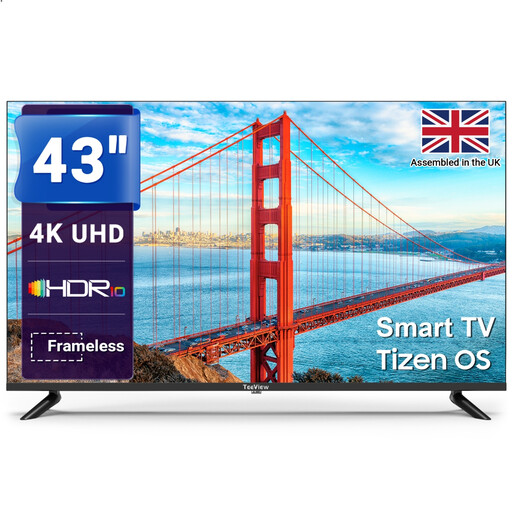 Image unavailable
This model is another screen-replacement route for a room where a 43-inch television fits.
The product name identifies a 4K UHD smart TV powered by Tizen OS. Check the exact model's UK app support and its intended position before purchase.
 Image unavailable
Consider this screen-replacement route only after checking that a 70-inch TV fits the room and your planned placement.
The product name specifies QLED, 4K HDR and Web OS. Confirm support for each required UK app on TV70UUW rather than assuming it from the operating-system name.
Yes, if the TV has a usable HDMI input and you choose a compatible player. Check how the player is powered, whether it supports your required apps and whether the network reaches the TV; a player will not fix a screen that needs replacing.
Not necessarily: check every required service against the exact TV model and software. ITV Help lists ITVX for LG Smart TVs from 2016 onward and Samsung Smart TVs from 2017 onward, while other platforms can have firmware requirements.
Use a connection that works reliably at the TV position. If wireless coverage there is inconsistent and your selected device supports Ethernet, a wired connection is an option; first check router position and other causes of weak Wi-Fi. Ofcom identifies mesh equipment as another way to improve wireless coverage.
Check both the device's controls and the services you watch. Ofcom identifies subtitling, audio description and signing as television access services; remote layout, voice control and screen-reader or keyboard support vary by device, and a device feature does not establish that every programme offers the same access service.
Check the current package and device terms as well as HDMI and network connections. For Sky Stream, Sky describes conditions concerning additional pucks, set-up and the return of loaned equipment, so its arrangement should be assessed as a service rather than a standalone hardware purchase.