
24/7 Customer Support

Free returns

Same-day & Next-day Delivery

Quality Guaranteed

Unlock Your Welcome Offers: FREE Delivery | Up to 80% OFF | Free 30-day JoyPlus trial
Download the APP
Finding the right headphones with a microphone can feel like navigating a minefield of technical jargon and exaggerated marketing claims. Whether you need crystal-clear audio for work calls, an immersive experience for gaming or a reliable set for your daily commute, making the wrong choice can lead to frustration and wasted money. As a Joybuy Product Recommendation Officer, my role is to help you understand the key factors that truly matter, so you can choose a device that fits your needs perfectly.
Before you add anything to your basket, let's look at the common pitfalls that many UK buyers fall into.
office headset with noise cancelling mic.To avoid these traps, focus on a few core parameters. This will help you filter out the noise and find a product that delivers genuine value.
The microphone is just as important as the speakers. For clear communication, look for a unidirectional or cardioid microphone. These patterns are designed to capture sound primarily from the front (your mouth) while rejecting noise from the sides and rear. This is a non-negotiable feature for anyone working in a noisy environment, from a busy open-plan office to a home with children. In contrast, an omnidirectional microphone picks up sound from all directions, which is less ideal for calls. This is a key differentiator for a quality gaming headset or streaming mic.
Your choice of connection depends entirely on your primary use case.
USB headset for PC is a plug-and-play solution for office work, while a 3.5mm jack offers universal compatibility with a wide range of devices, including some mobile phones and consoles.TWS earbuds (True Wireless Stereo) offer the ultimate portability for those on the move.The physical design impacts comfort, portability and sound isolation.
Bluetooth over-ear headphones, enclose your entire ear. They typically provide the most comfort for long sessions and offer the best passive noise isolation.Wired earphones for mobile and wireless earbuds with mic fall into this category, offering excellent noise isolation and convenience for travel and exercise.Here are a few options that align with specific user needs, chosen because they successfully navigate the common pitfalls.

Why This Fits Their Persona: This headset is built for the professional who spends their day on video calls. It prioritises call clarity and reliability over flashy features, making it a dependable tool for remote work in the UK.
It avoids the connectivity tangle with a simple plug-and-play USB-A connector. Its noise-cancelling microphone is specifically designed for voice clarity, directly addressing the "noise-cancelling" misconception.
The adjustable, rotating microphone boom ensures optimal voice capture and can be moved aside when not in use. In-line controls allow for quick volume and mute adjustments without interrupting workflow.

Why This Fits Their Persona: For podcasters, streamers or YouTubers starting out, this dedicated microphone offers a significant audio quality upgrade over a standard headset mic. It's designed for clear, rich vocal recording.
This is a purpose-built dynamic cardioid microphone, not an afterthought on a pair of headphones. The dual USB/XLR connectivity provides both immediate usability and a future upgrade path to a professional audio interface, avoiding the trap of buying a dead-end product.
Features on-mic controls for mute and gain, plus a headphone jack for zero-latency monitoring (in USB mode). This gives creators real-time control over their audio without needing to tab out of their recording software.
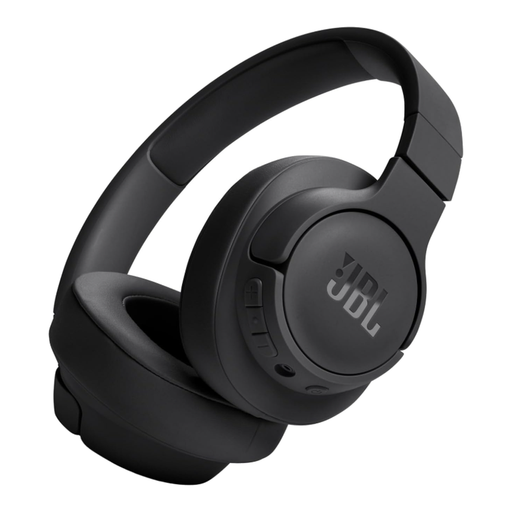
Why This Fits Their Persona: Ideal for the UK commuter, student or traveller who needs a single device for music, podcasts and calls. Its long battery life and foldable design make it a practical companion for a busy, mobile lifestyle.
It directly counters the "all-day comfort" myth with a lightweight build and soft, padded earcups. The multi-point connectivity feature also solves a major wireless pain point by allowing seamless switching between two devices, like a laptop and a phone.
An impressive battery life of up to 76 hours means you can go for days without charging. The VoiceAware feature for calls allows you to control how much of your own voice you hear, making conversations feel more natural.
We have compiled a complete, real-time list of products that fully satisfy these strict selection criteria and UK safety regulations.
Yes, it is highly recommended. A noise-cancelling microphone makes a significant difference to the person on the other end of the call. It actively filters out distracting background sounds like keyboard typing, household appliances or ambient office chatter. This results in more professional, focused and clear communication, reducing the need to repeat yourself.
The lifespan of your device depends on its build quality, connection type and how you care for it. A well-made pair of wired headphones can last for many years, with the cable usually being the first point of failure. Wireless models, including TWS earbuds, are limited by their internal rechargeable batteries, which typically begin to show reduced capacity after 2-3 years of regular use.
For the vast majority of modern USB headset for PC models, no special software is required. They are designed to be "plug-and-play," meaning they will be automatically recognised and configured by your operating system (like Windows, macOS or ChromeOS) as soon as you plug them in. Some brands offer optional software for customising EQ settings or other advanced features, but this is not necessary for core functionality.