For calls in a noisy shared office, check the microphone and meeting-platform controls before choosing active noise cancellation (ANC). A boom microphone with documented background-noise handling addresses what callers may hear, while ANC primarily affects what you hear. On a managed laptop, confirm the exact headset variant, connection method and app support; Bluetooth or USB connectivity alone does not establish that every call button will work.
Who these headsets are for
Shared-desk callers who need to be heard
If nearby conversations or office equipment may reach your calls, concentrate on microphone placement, model-specific noise handling and a mute control you can use quickly. Listening-side ANC does not, by itself, establish how clearly others will hear you.
Teams or Zoom users with managed laptops
If your employer controls pairing, USB access or installed software, check the headset variant, receiver, operating system and meeting app with IT. Microsoft Support and Zoom Support describe call-control conditions that differ by device and connection method.
Hybrid workers moving between calls
If you alternate between a desk, other work locations and mobile calls, consider wearing comfort alongside the connection and charging routine. Check that the particular bundle supports the devices you intend to use.
What matters when choosing
For a noisy-office call headset, establish what the microphone sends to callers and what your work setup permits; then weigh listening comfort against movement and charging needs.
| Concern |
What to check |
Who this matters to |
| Voice clarity near other talkers |
Look for an exact-model boom microphone and documented microphone-noise handling. Check how mute works on your intended connection. |
When colleagues speak nearby, I want callers to follow my voice without relying on what ANC does for me. Around 36% of consumers put outbound voice clarity first. |
| Work-device and app compatibility |
Confirm the headset variant, receiver or port, operating system and meeting-app controls with your IT team. Zoom Support notes that native-Bluetooth controls have different support conditions on Windows and macOS. |
If my laptop is managed, an audio connection is not enough: I need the call buttons to behave as expected in the app I use. Managed-device compatibility comes first for around 29% of consumers. |
| Listening focus and comfort |
Consider wearing style, fit and any ANC modes separately from microphone features, particularly for long call blocks. |
Nearby office sound distracts me even when I am listening rather than speaking, and the headset needs to remain comfortable through meetings. Around 21% of consumers prioritise focus and comfort. |
| Movement and charging |
For wireless models, check stated talk-time conditions, device switching and whether the exact bundle includes the connection and charging accessories you need. |
Moving between a work computer and mobile calls makes pairing and charging part of my daily routine. Mobility and charging are the primary concern for around 14% of consumers. |
Buying pitfalls
-
Choosing ANC instead of checking the microphone
ANC can change what you hear without establishing whether nearby conversation reaches the person on your call. Listening-side noise control and outbound microphone handling are separate features.
Check the exact model’s microphone design and noise-handling information first; consider ANC separately if office sound also disrupts your concentration.
-
Assuming Bluetooth guarantees meeting controls
A headset may carry call audio without providing the answer, end or mute synchronisation you expect. Zoom Support describes different native-Bluetooth control support for its Windows and macOS desktop apps.
Confirm platform certification, operating system and connection method for the exact variant, particularly on an IT-managed laptop.
-
Comparing wireless runtime without its conditions
Manufacturers’ stated talk times can depend on settings such as ANC or call indicators, so figures stated under different conditions are not directly interchangeable.
Compare the conditions you expect to use and check whether the headset can carry USB audio while charging if calls run back to back.
-
Assuming every variant includes the same accessories
A headset family can have different receivers, USB connectors and charging-stand bundles. A family photograph does not identify the contents of the SKU you are ordering.
Read the exact variant name, connector description and box contents before choosing it.
If the intended setup requires an accessory outside that bundle, you will need to obtain it separately.
Brands to consider
These business-headset ranges illustrate features to compare; suitability depends on the exact variant and connection you choose.
Jabra
The Evolve2 range includes office and hybrid-work headsets with UC- and Teams-oriented variants.
- Jabra lists Bluetooth and USB-A or USB-C Bluetooth-adapter options for Evolve2 65; Evolve2 65 Flex has different portability and ANC features.
- Check the chosen SKU for its adapter, charging stand and platform variant. Manufacturer microphone claims are not a comparison of call quality across brands.
Logitech
The Zone business-headset range includes configurations aimed at work-platform compatibility.
- Logitech lists platform certifications for specified Zone Wireless 2 versions and connection methods.
- Check the precise version, operating system and whether the stated feature requires its receiver rather than native Bluetooth.
Poly
Voyager Focus 2 is an on-ear stereo Bluetooth option for work calls, with adjustable ANC.
- HP/Poly specifies microphone-noise handling, a BT700 adapter and USB use while charging for Voyager Focus 2.
- Its stated runtime has usage conditions; comfort and microphone results will depend on the wearer and call environment.
EPOS
The IMPACT 1000 business-headset series includes on-ear mono and stereo variants with call controls.
- EPOS lists Teams-oriented options, native-Bluetooth conditions, dongle options and variant-dependent charging features.
- Check the exact variant and bundle; the brand’s speech-processing claims do not establish performance in every shared office.
Joybuy headset choices
These options cover wireless headsets with listening-side ANC, wired USB headsets for desk calls and a Bluetooth headset for callers who move between locations. Check each listing against your work device and meeting app before ordering.
 No image available
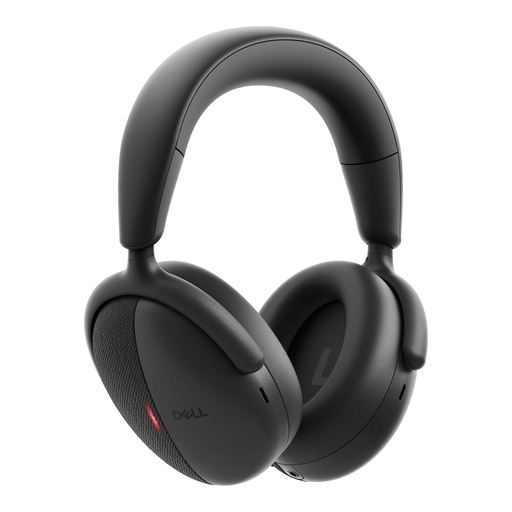
DELL Premier Wireless ANC Headset WL7024
A wireless ANC option for office callers who also want listening-side noise control. Confirm the exact WL7024 variant and accessories before ordering: the listing title and description use different product names. Check meeting-app controls with your work setup.
View on Joybuy
 No image available
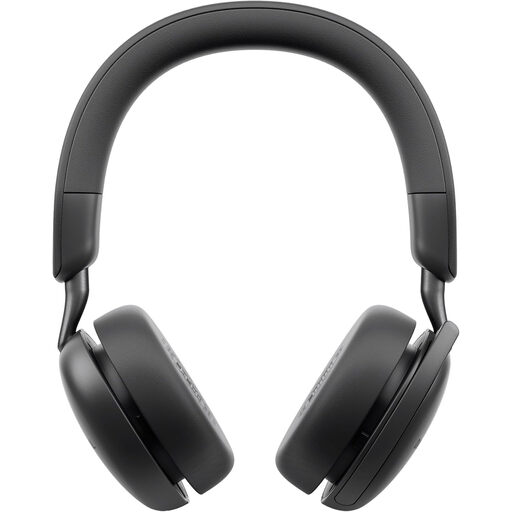
DELL Pro Wireless ANC Headset WL5024
Consider this wireless ANC model if listening-side noise control matters alongside calls. Assess the microphone separately, and confirm that your managed laptop permits the intended connection and supports the controls you need in your meeting app.
View on Joybuy
 No image available
Poly Blackwire 3220 Stereo USB-C Headset with USB-C/A Adapter
A wired stereo option for calls from a compatible desk computer; the named bundle includes a USB-C/A adapter. The cable limits movement, and mute or call-control behaviour should be checked against your conferencing app.
View on Joybuy
 No image available
Logitech 960 Wired USB Headset with Inline Remote
A wired desk-call option with an inline remote; the listing also describes a noise-cancelling microphone. Confirm the USB connection your computer accepts and whether the remote’s call controls work with your meeting app.
View on Joybuy
 No image available
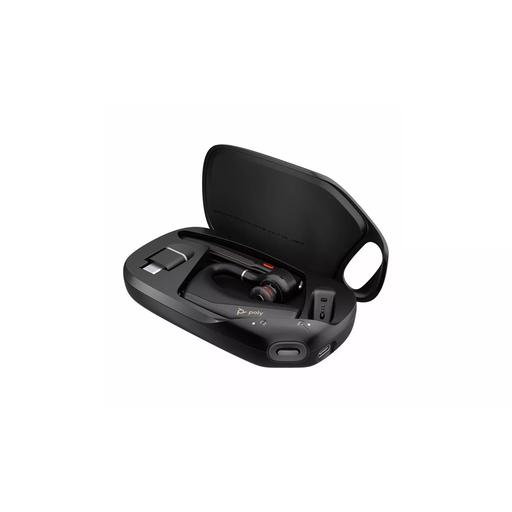
HP Poly Voyager Legend 50-M UC Bluetooth Headset
A Bluetooth option to consider when calls move beyond one desk. Check whether the bundle includes the receiver your work computer needs, and confirm pairing and call-control behaviour with your managed laptop and meeting app.
View on Joybuy
Common questions
Will ANC make my voice clearer to callers?
Not necessarily: ANC primarily addresses what you hear. For outbound voice clarity, examine the exact headset’s microphone design and documented noise handling separately; a manufacturer’s feature claim is not an independent call-quality comparison.
Will Bluetooth headset buttons work in Teams and Zoom?
Not on every setup. Call controls depend on the headset, connection method, operating system and installed app. Microsoft Support describes physical controls for supported USB devices in Teams, while Zoom Support states that native-Bluetooth controls supported on its Windows desktop app are not currently supported on its macOS desktop app.
What should I ask IT before buying for a managed laptop?
Ask whether Bluetooth pairing, the required USB receiver and headset-management software are permitted, and which meeting-app version is installed. Match those answers to the exact headset variant and its included accessories rather than relying on the product-family name.
Can an office-call headset replace workplace hearing protection?
No. Choose an office-call headset for communication, not as a substitute for hearing-protection personal protective equipment. The Health and Safety Executive sets out separate employer duties for managing workplace noise risks.


