For email dictation at a fixed desk, choose a boom-microphone headset whose connection matches your computer; a wired USB model avoids charging, while a wireless boom headset makes more sense if you move around or switch devices. If other voices or household sounds reach your workspace, check the microphone’s stated noise-handling features rather than relying on listening-focused noise cancellation. Your dictation software must also recognise the headset microphone and have permission to use it.
Who this suits
Dictation users in a noisy home studio
If keyboard taps, ventilation or other people may be audible, look for a boom microphone with stated microphone noise reduction. Try it in the room where you will dictate; a feature claim alone cannot tell you how your email software will transcribe speech.
Fixed-desk email drafters
If you usually speak at one computer, a wired USB boom headset keeps the microphone in a repeatable position without a charging routine. Check that the exact connector fits your computer.
Mobile, multi-device voice users
If you move around the studio or alternate between a computer and phone, a wireless boom headset may suit that pattern. Check pairing, microphone selection and charging for each device you intend to use.
What matters when choosing
Decide whether you need to leave your desk before choosing between wired and wireless; then check the microphone, connection and dictation setup against your usual room conditions.
Wired USB boom headset
Consider it when: You dictate mainly at one desk and your computer has the USB connection required by the exact model.
Trade-off: There is no headset battery to manage, but the cable limits movement.
Wireless Bluetooth boom headset
Consider it when: You move around while working or want to use the headset with more than one device.
Trade-off: You need to manage pairing and charging, and check whether the particular model offers a usable wired fallback.
| Concern |
What to check |
Who this matters to |
| Voice capture around background sound |
Look for a positionable boom and a stated microphone noise-reduction feature. Try voice input in your usual room. |
If other voices or keyboard sounds reach my workspace, I need my microphone to pick up my speech without treating a feature claim as an accuracy guarantee. Around 42% of consumers would put voice capture first. |
| Connection and speech-to-text setup |
Match the exact connector to your device, then check that your intended software can access the selected microphone. |
When I draft in a particular email app, I need the headset to connect and voice input to work there before other features matter. Roughly 33% of consumers would make setup certainty their primary concern. |
| Comfort and movement |
Check the wearing style and cable arrangement, or the wireless charging routine and stated talk-time conditions. |
For longer spoken drafts or movement around the studio, I need a headset I can keep wearing and using throughout the session. About 25% of consumers would prioritise comfort and freedom of movement. |
Buying pitfalls
-
Choosing active noise cancellation alone
Active noise cancellation mainly changes what you hear. For dictation, the microphone system and its handling of surrounding sound are the features to examine; neither feature guarantees accurate text.
Look for a positionable boom and stated microphone noise reduction, then try a dictated email in your usual room before relying on the setup.
-
Assuming every USB headset fits your computer
USB-A, USB-C and 3.5 mm connections are not interchangeable. Headsets within a product family can also have different connector or adapter arrangements.
Check your device’s ports against the exact variant and its included cable or adapter.
A mismatch may mean arranging a suitable adapter or choosing a different headset.
-
Expecting the headset to set up dictation for you
Microsoft and Google both describe voice input as depending on a working microphone and the relevant software setup. A connected headset will not help if the intended app cannot use its microphone.
Select the headset as the input device, allow microphone access, dictate a short email with punctuation and review the text before sending it.
-
Choosing wireless without planning for charging
A Bluetooth headset’s mobility depends on its battery and connection. Stated talk times apply under the manufacturer’s conditions, not necessarily every dictation setup.
Check those conditions and whether the exact model supports the wired fallback you would need during a long session.
Brands to consider
These product lines offer different desk-work and wireless configurations; check the specification of the exact variant rather than treating a brand name as a microphone-performance guarantee.
Jabra
Jabra’s Evolve office-headset line is relevant to desk-based voice work where a boom microphone and a work-platform variant are priorities.
- Jabra describes a two-microphone system on the Evolve2 30 SE that captures voice while analysing surrounding noise.
- That manufacturer description is not a dictation-accuracy result. Confirm the exact USB connection and platform variant for your computer.
Logitech
Logitech offers USB desk headsets including the H390 and Zone Wired, covering straightforward connection and models with more emphasis on microphone noise handling.
- Logitech describes the H390 as a USB headset with a noise-cancelling microphone and Zone Wired as using microphone noise-cancelling technology.
- Neither description establishes a transcription error rate for your room or email software; check the connector and test the intended workflow.
Poly
Poly’s Blackwire wired and Voyager Focus 2 Bluetooth lines are relevant when connection choices or wireless movement shape the decision.
- HP lists USB-C, USB-A and 3.5 mm connections for a Blackwire 5220 bundle and describes microphone noise cancellation on the Voyager Focus 2.
- Connections, supplied accessories and wireless operating conditions depend on the exact model and bundle. Do not transfer those specifications to another Poly headset.
Joybuy headset choices
These headsets cover a Bluetooth boom option and several wired choices for voice input at a home-studio desk, including gaming headsets that warrant particular attention to computer connections. Check each model in the email-dictation software you plan to use.
 No image available
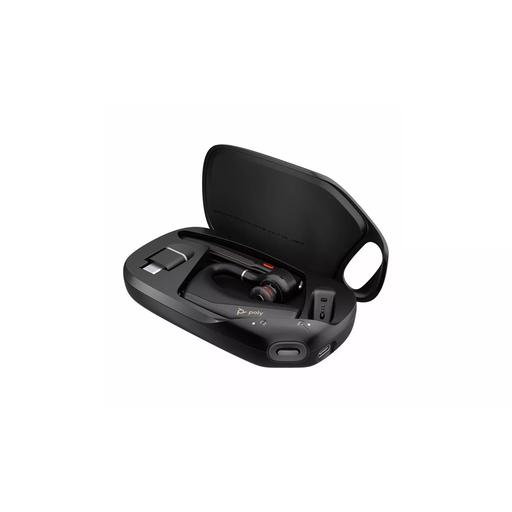
HP Poly Voyager Legend 50-M UC Bluetooth Headset, Black
Consider this Bluetooth option if you want to move around while drafting rather than remain at one desk.
Check its charging routine against the length of your sessions, and confirm that your dictation software selects the headset microphone.
View on Joybuy
 No image available
Logitech 960 Wired USB Headset with Inline Remote, Black
Its wired USB design suits a fixed desk when you prefer not to manage a headset battery.
Check that your computer has the connector required by this variant. Try the microphone with background sound in your room rather than assuming a stated noise-handling feature will produce accurate dictated text.
View on Joybuy
 No image available
ONIKUMA K8 Wired RGB Gaming Headset with Flexible Mic
This wired headset offers a flexible microphone for a desk setup. Its gaming designation does not establish how well it will handle email dictation.
Confirm that your computer has the audio and microphone connections needed by the exact variant, then test speech input in your chosen software.
View on Joybuy
 No image available
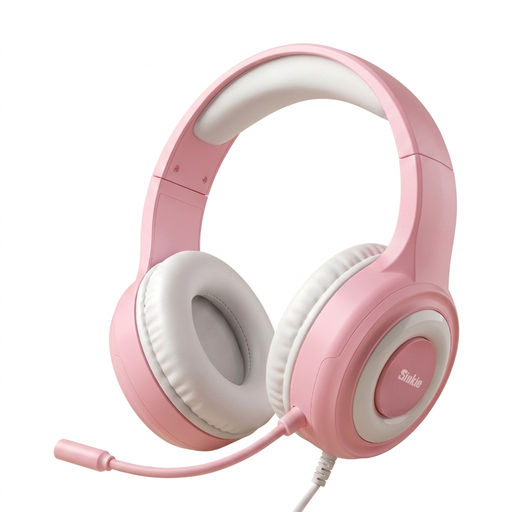
Siukie CH25 Wired Gaming Headset with Blue LED Lighting
This wired over-ear gaming headset is an option for stationary voice input if its microphone and connections suit your computer.
Its title lists USB and 3.5 mm connections; confirm which connection carries the microphone signal rather than assuming the USB plug does so. Test any stated microphone noise reduction in your room.
View on Joybuy
 No image available
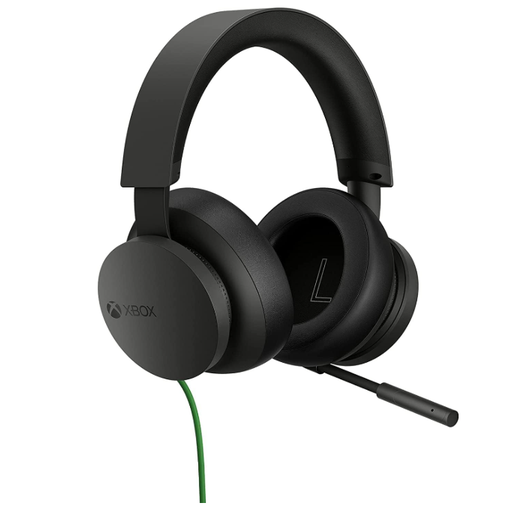
Official Xbox Stereo Wired Gaming Headset, Black
Consider this wired headset for desk-based voice input only after checking its connection against your computer.
If room noise is a concern, assess the microphone in your usual dictation setup rather than assuming a gaming headset will reduce it.
View on Joybuy
Common questions
Can I draft an email entirely by voice on Windows?
Yes, Windows Voice Access can be used to dictate and author email on a supported Windows 11 setup, according to Microsoft Support. Select the headset as your input microphone and allow the required microphone access; review the draft before sending it.
Can I dictate in Google Docs and then paste the text into an email?
Yes, if Google Docs voice typing works with your computer microphone and browser. Google Accessibility Help says the microphone must be on and working; check the supported browser and language settings for the voice commands you intend to use.
Do I need a wireless headset to reduce room noise?
No. Wireless connectivity determines how the headset connects, while microphone noise handling is a separate feature available on some wired headsets too. Choose the connection for your desk and movement needs, then examine the exact model’s microphone claims and test it in your room.
What should I check if a new headset will not dictate in a Windows app?
Start by checking that Windows has selected the headset microphone and that the intended app can access it. Microsoft Support advises checking Microphone access and app microphone permissions; a desktop app may need its separate desktop-app permission enabled.


