Choose the microphone and connection for the room and computer where you dictate, rather than judging a headset by listening features alone. A wired USB headset avoids wireless pairing and charging at a fixed desk; a wireless headset offers more freedom to move, but its exact connection options need checking. For Windows voice typing, Microsoft Support says you also need internet access, a working microphone and your cursor in a text field.
Who needs which features?
People dictating in noisy rooms
If colleagues, family or other sounds interrupt your speech, look at the microphone’s stated outgoing-noise controls, not just how quiet the headphones make the room sound to you. Jabra, Poly and Logitech describe such features on the business-headset lines discussed below; none establishes how accurately your own dictation app will transcribe.
Desk-based Windows users
If you dictate mainly at one computer, prioritise a connection that fits its ports and a microphone you can select in Windows. Microsoft Support says Windows voice typing requires a working microphone, internet access and a text field.
People working between locations
If you draft emails at home, in the office and elsewhere, consider carrying comfort alongside wireless connection options. Check the exact variant’s receiver and cable-audio capabilities rather than assuming every version of a product line connects in the same way.
What matters when choosing?
Choose a connection that works with your computer and routine, then assess microphone noise handling and wearing comfort in the places where you dictate.
Wired USB headset
Consider it when: You draft mainly at one desk and want to avoid wireless pairing and charging.
Trade-off: The cable restricts movement, and a wired connection alone does not establish transcription accuracy.
Wireless business headset
Consider it when: You move while dictating or switch between work locations and devices.
Trade-off: Charging and connection setup matter; receiver and USB-audio options depend on the exact variant.
| Concern | What to check | Who this matters to |
|---|
| Background noise |
Look for a positioned boom microphone and stated outgoing-microphone noise controls. Assess listening ANC separately. |
In a shared room, I need my spoken words to remain usable despite nearby activity; around 36% of consumers put noise control first. |
| Speech-input connection |
Check your computer’s ports, the exact variant’s receiver or Bluetooth options, and which microphone Windows selects. |
If I rely on dictation for regular emails, I need the headset to connect and appear as the intended input device; roughly 29% of consumers prioritise that reliable workflow. |
| Comfort and mobility |
Consider fit and carrying design; for wireless use, check stated talk-time conditions against your expected settings. |
When I dictate across locations or for extended periods, I need a headset I can wear and carry comfortably; about 21% of consumers place that need first. |
| Simple desk setup |
Confirm a suitable connection and a working microphone before paying attention to additional listening features. |
For occasional emails in a quieter room, I want voice input without a complicated setup; around 14% of consumers chiefly value that simplicity. |
What should you avoid overlooking?
-
Confusing listening ANC with microphone noise control
Active noise cancellation can change what you hear without establishing what background sound the microphone sends to your speech-input app.
Compare the microphone’s stated noise-control features separately, then try dictation in your usual room.
-
Assuming every wireless variant connects the same way
Receiver, Bluetooth and cable-audio options can differ within a headset line, which matters if your work computer restricts certain connections.
Check the exact variant’s included adapter, your available ports and whether it supports the connection mode you intend to use.
-
Expecting the headset to fix a Windows setup problem
Microsoft Support says voice typing needs internet access, a working microphone and a text field. Voice Access has separate Windows version and setup requirements.
Set up your intended feature, select the headset as the input device and test it in your usual email application while you can still assess whether the purchase suits you.
Relevant brands to consider
Jabra
The Evolve2 65 Flex line is relevant to people considering a portable over-head headset with a boom microphone.
- Jabra describes a fold-flat design, listening ANC and ClearVoice microphone technology intended to reduce background sound.
- Check the exact UC or Teams variant and supplied connection; those features do not establish dictation accuracy in your room.
Poly
The Voyager Focus 2 line is relevant to people considering an on-ear wireless business headset with a boom microphone.
- HP/Poly describes Acoustic Fence microphone technology, adjustable listening ANC and corded use when needed.
- Connection equipment and operating conditions depend on the exact model; confirm the supplied adapter and intended working mode.
Logitech
The Zone Wireless 2 line is relevant to people comparing Bluetooth, receiver and cable-audio connection options.
- Logitech describes microphone noise suppression and USB-audio use through the charging cable; receiver availability depends on the variant.
- Its stated battery duration varies with settings, so check the operating mode you expect to use.
Headsets for voice-drafted emails on Joybuy
These wired and wireless headsets offer different connection choices for drafting emails at a desk or between locations. Check the exact connector and microphone setup against your computer and speech-input app.
 No image available
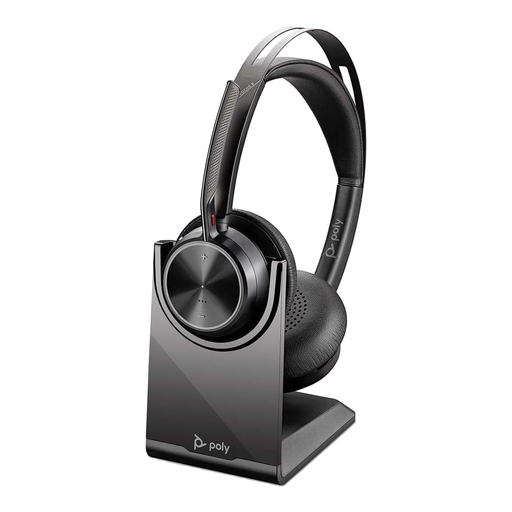
Poly Voyager Focus 2-M USB-C-C Headset with USB-C/A Adapter and Charging Stand
Consider this wireless-business-headset option if you move between work locations. Confirm the supplied adapter and receiver configuration, and check that its microphone works with your dictation setup.
View on Joybuy
 No image available
Poly Blackwire 3220 Stereo USB-C Headset with USB-C/A Adapter
Consider this wired option for dictation at a fixed desk. Check that its USB-C connection or named adapter fits your computer, then select and test its microphone in Windows.
View on Joybuy
 No image available
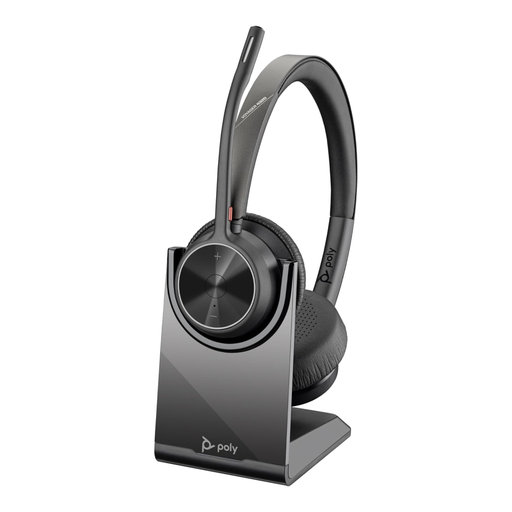
Poly Voyager 4320-M Wireless USB-A Bluetooth Headset with Charging Stand
Consider this wireless option if you need to move while drafting. Check its microphone design and whether the exact variant supports USB audio by cable before relying on either feature.
View on Joybuy
 No image available
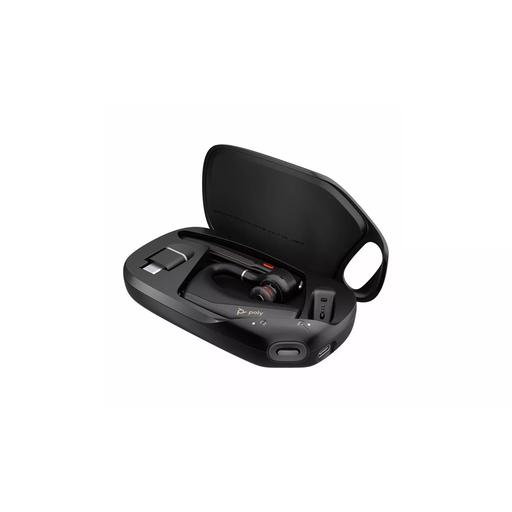
HP Poly Voyager Legend 50-M UC Bluetooth Headset
Consider this Bluetooth headset if a wireless connection suits where you dictate. Confirm that your computer and intended speech-input app can use it as a microphone before choosing it for email drafting.
View on Joybuy
 No image available
Edifier G2II USB Wired Gaming Headset with 50 mm Drivers
Consider this wired PC or Mac headset for a fixed desk rather than assuming gaming features improve dictation. Its name specifies a noise-cancelling microphone; check microphone positioning and recognition by your intended Windows voice-input app.
View on Joybuy
Frequently asked questions
Do I need a specialist headset to dictate emails in Windows?
No specialist headset is required for Windows voice typing: Microsoft Support says you need internet access, a working microphone and your cursor in a text field. A headset can keep the microphone near your mouth, but test it as the selected Windows input device before relying on it.
Should I use Voice Typing or Voice Access for email?
Use Windows Voice Typing to dictate into a text field; consider Voice Access if you also want to control Windows and edit text by voice. Microsoft Support says Voice Access is available on Windows 11 version 22H2 and later and needs internet access for its initial setup.
Will listening ANC make dictated words clearer?
Not by itself: listening active noise cancellation concerns what you hear, while microphone noise controls concern the outgoing sound. Poly and Logitech describe those as separate headset features; try the microphone with your own dictation app and background noise.
How do I test a new headset for email dictation?
Connect the headset, select it as the microphone in Windows and dictate into the email text field you normally use. For Windows voice typing, Microsoft Support says to place the cursor in a text field; also check that you have internet access and a working microphone.


