Noisy-office discussion hosts
If you lead a book discussion near colleagues or other office noise, your priority is helping remote participants hear your voice without nearby sounds competing with it.


For a book discussion in a noisy office, prioritise a headset with a boom microphone and documented microphone noise rejection before choosing active noise cancellation (ANC). Microphone processing is intended to reduce background sound reaching remote participants; ANC mainly changes what you hear. Then check the exact connection and meeting-platform requirements before weighing portability or comfort for longer sessions.
If you lead a book discussion near colleagues or other office noise, your priority is helping remote participants hear your voice without nearby sounds competing with it.
If you host from different rooms or work locations, microphone pickup still matters, but carrying the headset and connecting it to your laptop also affect the choice. Jabra and EPOS offer product lines with portability or connection options worth checking by variant.
If discussions run for extended periods or meetings follow one another, consider wearing comfort and how you would continue a session if the battery ran low. HP describes corded operation for the Poly Voyager Focus 2.
Start with what remote participants need to hear, then consider your own listening environment, the discussion laptop and the length of the session.
| Concern | What to check | Who this matters to |
|---|---|---|
| Outgoing voice clarity | Look for a boom microphone and a documented microphone noise-rejection feature. Consider trying the headset where you will host. | When colleagues are talking nearby, I need participants to follow my voice without competing office sound. Around 36% of consumers put outgoing voice clarity first. |
| Listening focus | Check ANC controls and whether the wearing style lets you remain aware of colleagues when necessary. | I need to follow contributions despite steady office noise, but I may still need to notice someone beside me. Roughly 29% of consumers prioritise their own listening focus. |
| Connection and controls | Match the exact variant, supplied adapter and computer ports to your meeting service; check any claimed certification by connection method. | A connection problem could interrupt the discussion I am hosting. About 21% of consumers place laptop and meeting-platform fit first. |
| Long-session practicality | Consider wearing style, charging and whether the exact headset can be used with a cable or carried between locations. | If I lead lengthy sessions or move between rooms, I need the headset to remain practical throughout the day. Around 14% of consumers make that their primary concern. |
ANC addresses the sound reaching your ears; it does not, by itself, show how much office noise remote participants will hear.
Assess the boom microphone and its documented voice-pickup features separately, then decide whether ANC would help you concentrate.
Headsets in one product family may differ in their adapters or stated meeting-platform certification. Logitech, for example, specifies different connection paths for different Zone Wireless 2 certifications.
Check the exact variant, included connection accessories, laptop ports and meeting service before ordering.
Nearby voices, microphone position and the room can affect a call, so a manufacturer demonstration cannot establish the result in your office.
Use the published features to narrow your choices, check the seller's applicable return terms and, if possible, try the headset in the place where you host.
Zone Wireless 2 is a business-headset option for hosts considering microphone pickup, ANC and meeting-platform connections.
Evolve2 65 Flex is aimed at hosts who carry a headset between work locations.
The IMPACT 1000 range offers business-headset variants centred on voice pickup and connection choices.
Voyager Focus 2 is an option to examine when sessions are long and a corded fallback matters.
These wired and wireless headset choices relate to hosting calls in an office. Compare their stated microphone features with your laptop connection and the meeting service you use; the descriptions do not establish how they will sound in your room.
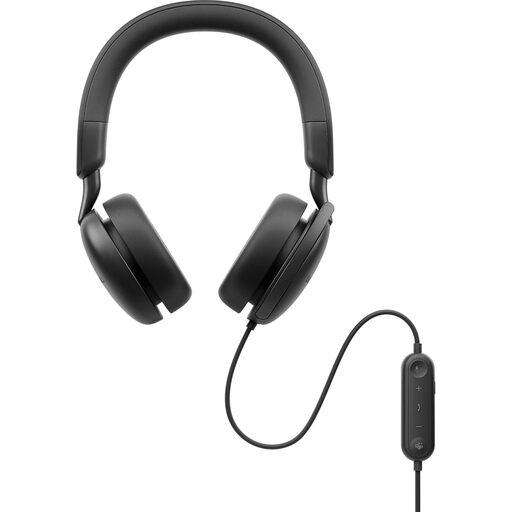 No image available
Consider this wired option if you want to assess microphone pickup and ANC separately for a desk-based discussion. Confirm that its connection and the exact package suit your laptop and meeting service.
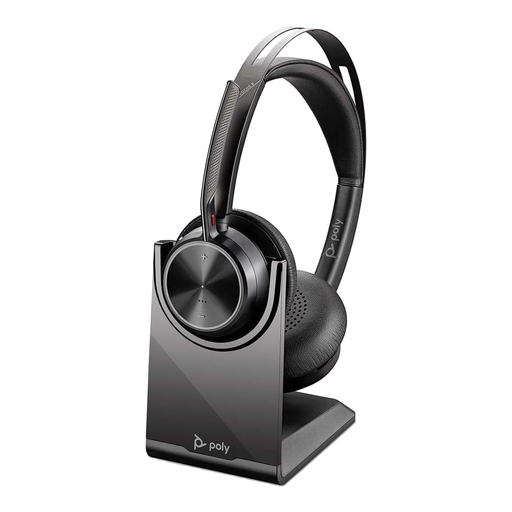 No image available
Consider this package for discussions that call for a headset with a charging stand. Check the exact Focus 2-M variant, what the USB-C/A adapter connects to and its stated meeting-platform support.
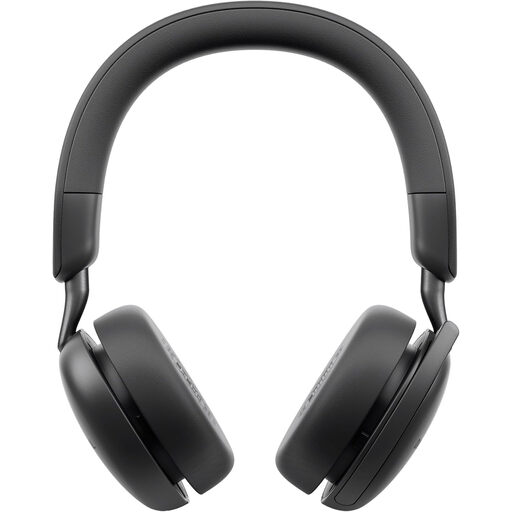 No image available
This wireless ANC headset may suit a host who does not want to remain at one desk. Check its microphone description, computer connection and compatibility with the meeting service you plan to use.
 No image available
Consider this wired stereo headset if your discussion laptop can use USB-C or the specified USB-C/A adapter. Check its microphone placement and the exact platform requirements for your calls.
 No image available
This wired option is worth considering if an in-line remote suits the way you moderate calls. Check the computer connection, cable reach and whether its meeting controls work with your service.
Not by itself: ANC mainly reduces what you hear, while the microphone system determines the outgoing sound. For a noisy-office discussion, check the boom and documented microphone noise rejection; Logitech describes four noise-cancelling microphones for Zone Wireless 2, and HP describes Acoustic Fence processing for Voyager Focus 2.
Use the connection method specified for your exact variant and meeting service. Logitech states native-Bluetooth Teams certification for Zone Wireless 2, while its stated Zoom, Google Meet and Google Voice certifications use the plug-and-play receiver; check your laptop ports and package before buying.
A faulty, unusable or misdescribed headset may give you legal remedies rather than only a voluntary retailer return. Citizens Advice advises that the appropriate remedy depends on the circumstances; contact the seller with the fault and purchase details, and check the guidance applicable where you bought it.
Use an appropriate electronics-recycling route where one is available. The UK Office for Product Safety and Standards and Department for Environment, Food & Rural Affairs describe the WEEE framework for electrical equipment; ask your workplace or local collection service which route to use for the headset.