Choose a wired USB headset if you stay near the computer and want to avoid charging and pairing; choose a wireless headset if you need to move around the standing desk while speaking. In either case, check the microphone’s noise-reduction features separately from any noise cancellation for the wearer, then confirm that the connection and call controls suit your computer and quiz platform.
Who needs which setup?
Hosts who move while speaking
If you reach for notes, turn to another screen or step away from the keyboard during a round, consider how far you need to move. A wireless connection avoids a headset cable, but its receiver, connection method and charging routine need to fit your setup.
Hosts in noisy or shared homes
If nearby voices or household sounds may reach the call, look for a boom microphone with an explicit microphone noise-reduction feature. Active noise cancellation for your ears addresses a different part of the listening experience.
Occasional hosts who want a simple setup
A wired USB headset avoids Bluetooth pairing and battery charging. Before choosing one, check that its connector fits your computer and that its cable reaches your speaking position with room to move naturally.
What matters when choosing?
Decide how much movement the quiz requires before choosing a connection. Then consider which need would take priority if you had to trade one feature against another.
Wired USB headset
Choose it when: You host near a fixed computer and want to avoid pairing or charging.
Trade-off: The cable limits where you can stand and needs a clear route across the desk.
Wireless headset
Choose it when: You regularly change position or step away from the keyboard while hosting.
Trade-off: You need to manage charging and confirm whether the exact version connects by Bluetooth, a USB receiver or both.
| Concern | What to check | Who this matters to |
|---|
| Clear speech |
Look for a positionable boom microphone and a stated microphone noise-reduction feature; do not use active noise cancellation for the wearer as a substitute. |
If I am reading out questions in a shared home, I want players to hear my voice rather than nearby conversation. Around 36% of consumers would put speech clarity first. |
| Movement at the desk |
For wireless models, check the exact connection version and receiver. For wired models, measure the cable path at standing height. |
Reaching for notes or turning to another screen should not pull a cable taut. Around 29% of consumers would make freedom to move their primary concern. |
| Session comfort |
Consider the headset’s shape, cushions and fit with glasses, and allow for preparation and follow-up as well as the quiz itself. |
If I wear the headset through setup, hosting and discussion afterwards, pressure from the headband or earcups matters to me. Around 21% of consumers would prioritise comfort. |
| Simple setup |
Match the connector to your computer; if you use Microsoft Teams, check certification and controls for the precise headset variant. |
Before a live round, I would rather avoid pairing problems and uncertainty over the mute control. Around 14% of consumers would put straightforward setup first. |
What is easy to overlook?
-
Confusing earcup noise cancellation with microphone noise reduction
Active noise cancellation mainly affects what the host hears. It does not, by itself, establish how much room sound reaches remote players.
Read the microphone description separately. If household noise is a concern, check for a boom microphone and an explicit voice-isolation or microphone-noise-reduction feature.
-
Assuming every wireless version connects the same way
A headset’s Bluetooth and USB-receiver options can vary by version. Microsoft also notes that a computer’s Bluetooth radio can affect headset use.
Check the exact model code, what receiver is included, your computer’s ports and the requirements of the platform used for the quiz.
-
Checking cable length only while seated
Raising the desk changes the path between computer and headset. A cable that reaches while seated may pull or snag at standing height.
Measure the route in your normal standing position, leaving enough slack for the movements you make while hosting. Logitech lists a 1.9 m cable for its H390, but reach still depends on the desk layout.
-
Treating the headset as the whole workstation setup
A headset does not address screen position, input devices, furniture or the way work is organised. These remain relevant when a standing desk is used regularly for work.
Review the complete workstation as well as the headset. The Health and Safety Executive provides guidance on assessing workstations used for display-screen work.
Brands to consider
Logitech
Logitech has a wired H390 option and wireless Zone Vibe Wireless versions relevant to different quiz-hosting setups.
- Logitech lists a USB-A connection, inline controls and a 1.9 m cable for H390, giving hosts specific points to check against their desk layout.
- For Zone Vibe Wireless, check the precise version before relying on a particular receiver, connection method or Microsoft Teams feature.
HP Poly
The Voyager Focus 2 is a wireless business-headset option for hosts considering movement and call-oriented noise features.
- HP describes multiple-microphone noise cancellation with Acoustic Fence technology and hybrid active noise cancellation as separate Voyager Focus 2 features.
- Those manufacturer features do not establish how the microphone will perform with every room noise or conferencing setup.
Jabra
Jabra’s Evolve2 range includes wireless business headsets with different microphone, listening and call-control features.
- Jabra lists voice-isolating microphone technology, hybrid active noise cancellation and a lift-to-mute boom for Evolve2 65 Flex.
- Check the exact Evolve2 model and variant rather than assuming the same noise-cancellation or platform features apply across the range.
Joybuy headset choices
These wired and wireless headsets offer different ways to host a remote quiz at a standing desk. Use the connection details in each product name as a starting point, then check the exact package and your computer before choosing.
 No image available
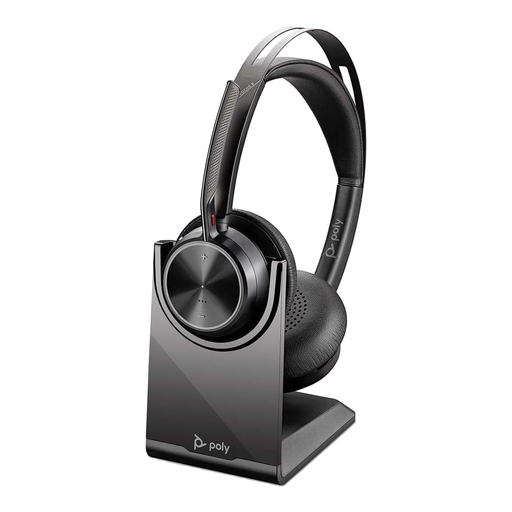
Poly Voyager Focus 2-M USB-C-C Headset with USB-C/A Adapter and Charging Stand
Consider this variant if you want to move while hosting, but confirm its exact connection method, supplied components and compatibility with your quiz computer and platform.
View on Joybuy
 No image available
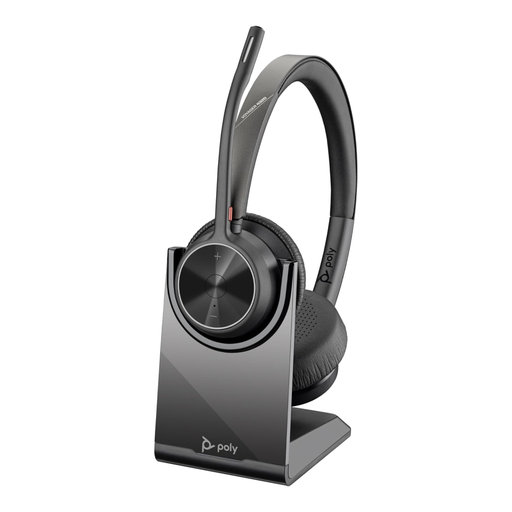
Poly Voyager 4320-M Wireless Headset, USB Type-A, Bluetooth, Charging Stand, Black
For a host who changes position during a round, this wireless model is worth considering. Confirm the exact USB receiver supplied and whether its connection suits your computer; plan for charging and pairing before the event.
View on Joybuy
 No image available
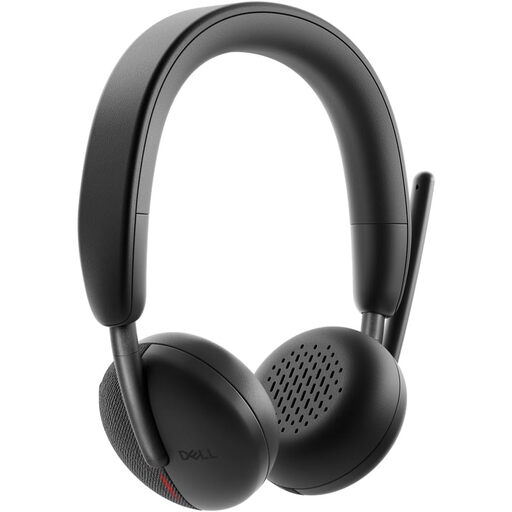
Dell Pro WL3024 Headset
If you need to speak while moving around the standing desk, check this model’s connection options against your computer. Confirm the exact package and receiver before relying on a particular wireless setup.
View on Joybuy
 No image available
Logitech 960 Wired USB Headset with Inline Controls and Noise-Cancelling Microphone, Black
For a host who stays near the computer, the wired connection avoids a charging routine. Measure the cable route at standing height and confirm that the USB connection fits your computer.
View on Joybuy
 No image available
Poly Blackwire 3220 Stereo USB-C Headset with USB-C/A Adapter
This wired option suits hosting close to the computer without Bluetooth pairing. Check that the adapter fits your setup, and confirm the cable will reach your standing position comfortably.
View on Joybuy
Common questions
Should I use a wired or wireless headset for a standing-desk quiz?
Use a wired USB headset if you remain near the computer and its cable reaches your standing position comfortably; choose wireless if you need to move beyond that reach. Check the exact wireless version’s connection and receiver before buying.
Will active noise cancellation make my voice clearer to players?
Not by itself: active noise cancellation mainly changes what you hear, whereas players hear the sound captured by your microphone. Check separately for a positionable boom and a stated microphone noise-reduction feature.
Do I need a Microsoft Teams-certified headset?
Prioritise Teams certification if you host in Microsoft Teams and want the controls associated with its certified devices. Microsoft says certified personal peripherals work without extra configuration and provide Teams call control; check the precise headset variant rather than assuming the same behaviour in another platform.
What should I test before the quiz starts?
Select the headset as both microphone and speaker in your quiz platform, then make a short test call from your normal standing position. Check mute and volume controls, cable slack or wireless connection, and the headset’s charge if applicable.


