Who needs which setup?
Start with who participates in each call and whether anyone nearby should hear it. Ofcom’s research on UK small businesses covers online voice and video calling, while the equipment choice depends on each desk and call environment.
Frequent private-call workers
Owners and staff handling recurring one-to-one calls may need personal listening privacy and accessible mute or answer controls. For Microsoft Teams, check whether the particular headset and computer setup support the physical controls you intend to use.
Shared-desk small teams
Colleagues joining a call around one laptop may prefer a speakerphone if everyone can hear the room audio. Their seating distance and the room’s acoustics matter more than loudspeaker volume alone.
Client-facing video presenters
Staff regularly speaking on camera may need to address framing, desk lighting or camera privacy. Compare those needs with the existing laptop camera before adding a separate webcam.
What matters when buying?
Choose the audio arrangement for each call first, then assess video and desk connections separately. A webcam, light or dock can complement an audio device, but it does not replace the need to choose a suitable way to hear and be heard.
| Concern |
What to check |
Who this matters to |
| Private individual audio |
Choose a personal listening route; check the connector or wireless method and the controls supported by the calling app. |
If I handle recurring one-to-one calls near other people, I need to hear privately and control my microphone promptly. About 33% of consumers put private, intelligible audio first. |
| Shared-call pickup |
Compare the speakerphone’s stated pickup range with the farthest seat, then test it in the intended room. |
When several colleagues join through one laptop, we need people at each seat to be heard, and open audio must be acceptable. Shared-call pickup is the primary need for about 27% of consumers. |
| Camera presentation |
Check mounting position and the exact webcam model’s framing, lighting features and physical shutter, if needed. |
For regular client-facing video calls, I may need steadier framing or a camera-off control, without expecting a webcam to fix the sound. Around 20% of consumers prioritise camera presentation. |
| Compatibility and setup |
Check the exact model against the computer, connector and meeting app; confirm any required dock ports or supported call controls. |
Across different computers and calling apps, I need a setup colleagues can connect and operate without relying on assumed button compatibility. Compatibility is the leading concern for about 20% of consumers. |
Microsoft, Zoom and Google publish device-support information for their respective meeting products. Basic audio or video operation should not be confused with support for a headset’s answer, mute or end-call buttons on a particular operating system and app.
Joybuy options for individual and shared calls
These headsets address individual calling, while the speakerphones are options for a small group sharing open audio. Match the connection and any needed call controls to the actual computer and meeting app.
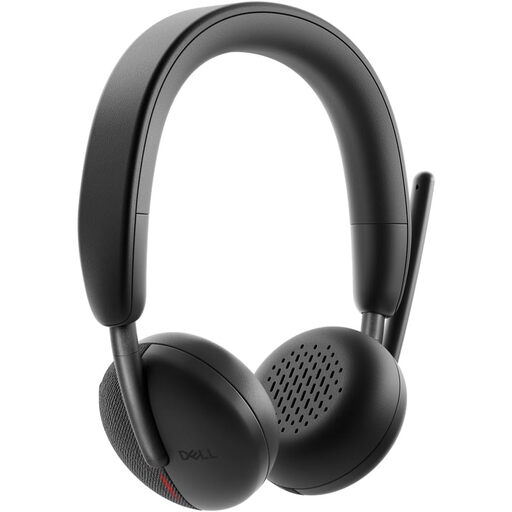 Image unavailable
DELL Pro Headset WL3024
Consider this for individual calls where moving without a desk cable matters. Confirm how it connects to each computer and whether its call controls work in the intended meeting app.
View on Joybuy
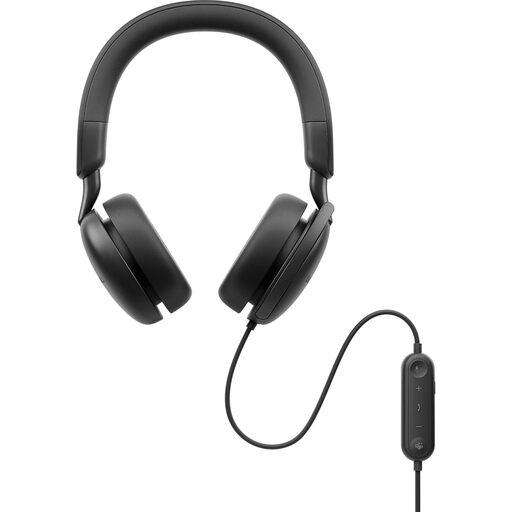 Image unavailable
DELL Pro Plus Wired ANC Headset WH5024
A wired personal-listening option for a fixed desk. ANC is part of the model’s stated configuration; check the connection and meeting-app controls, and do not assume its noise-management features will suit every room.
View on Joybuy
 Image unavailable
Poly Blackwire 3220 Stereo USB-C Headset with USB-C/A adapter
For a desk-based individual caller considering a wired connection. The product name specifies USB-C and a USB-C/A adapter; check the required port and whether physical call controls work with the chosen app.
View on Joybuy
 Image unavailable
DELL Pro Wired Speakerphone SP325
A wired, open-audio option when several people share a computer. Check the intended seating distance against the model’s stated pickup range and test it in the room; use personal headsets instead when conversations need private listening.
View on Joybuy
 Image unavailable
EMEET LunaPlus 8-Mic Bluetooth Conference Speaker
Consider this open-audio option for colleagues around one desk. Its product name lists eight microphones, 360° pickup and a 5 W speaker; confirm the usable seating distance and precisely how its stated dual connection works before relying on it for a shared call.
View on Joybuy
Common questions
Does a headset need certification for Teams, Zoom or Google Meet?
Certification is worth checking when documented interoperability or hardware call controls matter; do not assume it is necessary for every basic microphone or speaker function. Microsoft describes supported physical controls for Teams, Zoom publishes a supported USB-device list, and Google describes testing of peripherals for Meet.
How can we reduce the risk of echo on a shared call?
Select and test the intended microphone and speaker together in the meeting app before the call. Google Meet warns that mismatched microphones and external speakers can cause echo, so test any combination of separate devices in the actual room.
Should colleagues share a speakerphone or use individual headsets?
Choose individual headsets when private listening or separate one-to-one calls are the priority. A speakerphone is an option when a small group shares one computer and open audio is acceptable; compare its stated pickup range with where everyone sits.
What if a disabled worker needs a different call setup?
Discuss the barrier and the worker’s circumstances rather than assuming one device feature will meet every need. GOV.UK states that employers must make reasonable adjustments so disabled workers are not substantially disadvantaged; the appropriate communication setup depends on the worker and the job.
What should we check on a webcam used for privacy-sensitive work?
Check whether the exact model has a physical shutter if that is part of the workplace’s camera-off practice, as well as how it connects and mounts. A shutter does not replace meeting-app permissions, account security or workplace procedures.


