Who needs a separate accessory?
The useful addition depends on what prevents you from taking part in your actual sessions, not simply on whether you study online.
Students in shared study spaces
If you join seminars from shared accommodation or a busy campus area, assess your audio first. City St George’s, University of London recommends a headset to improve audio quality and reduce background noise; a headset with microphone may be more relevant than a new camera when conversation is the difficulty.
Students without suitable built-in video
A desktop without a camera, or a built-in camera that does not meet the needs of your sessions, gives you a reason to consider an external webcam. The University of Kent allows either a built-in or an additional webcam for online study, so owning a laptop does not by itself mean you need another camera.
Students with assessment equipment rules
Check the instructions for your own module and assessments before choosing wireless audio. The Open University’s online-invigilation guidance does not allow Bluetooth or wireless headsets and earphones in that setting; this is a condition of that assessment guidance, not a rule for every university session.
What should you check before choosing?
Test your existing setup in the platform your course uses, then address audio and video as separate decisions. Check connection and assessment requirements before settling on a model.
| Priority |
What to check |
Your needs |
| Conversation audio |
Try your microphone and speakers in a seminar or test call. If you need a headset, check that it has a microphone and a connection your computer accepts; do not assume a maker’s noise-cancellation claim guarantees clear speech in your room. |
I need to follow teaching and be understood when I contribute to tutorials or group work. University College London says a headset can improve what students hear and how they sound to others. |
| Shared-space use |
Consider headset fit for repeated calls and whether a cable would restrict where you sit. Distinguish features affecting what you hear from those intended to reduce noise picked up by the microphone. |
Other people may be nearby during my sessions, so I want audio equipment that is practical to wear and use regularly. City St George’s, University of London identifies a headset as a way to improve audio quality and reduce background noise. |
| Camera need |
Check whether your present camera works for your sessions before adding a USB webcam. If it does not, consider mounting position and whether a physical shutter or light-adjustment feature addresses a specific need; confirm the model’s stated resolution. |
My laptop camera may already do what I need. If I use a desktop without one, or cannot get a suitable view from my current camera, I have a reason to assess an external webcam. |
| Connection and rules |
Match USB-A, USB-C or 3.5 mm connections to your computer, including any adapter or microphone-input requirement. For wireless equipment, check pairing, any required receiver and the rules for assessed sessions. |
I want the accessory to work with my computer and be permitted when I need it. The Open University’s online-invigilation guidance excludes Bluetooth and wireless headsets and earphones in that assessment setting. |
Relevant brand references
These examples show features to compare on particular product lines; a brand’s inclusion does not mean every model has the same connections or controls.
Logitech
Logitech’s H390 headset and Brio 100 webcam illustrate separate audio and video choices for computer calls.
- Logitech describes the H390 as a USB headset with a noise-cancelling microphone, inline controls and padded headband and earcups.
- Logitech lists Full HD video, automatic light balance, a built-in microphone and an integrated privacy shutter for the Brio 100.
- Neither model description establishes how well its microphone will handle the noise in your particular study space.
HP Poly
The Poly Blackwire models are wired, call-focused headsets worth checking when connection options or microphone controls matter.
- HP lists USB-C, USB-A and 3.5 mm connection options for the Blackwire 5220, alongside a noise-cancelling microphone.
- HP describes Acoustic Fence microphone technology on the Blackwire 8225.
- These manufacturer features do not establish the same result in every shared room; check the exact model and connection required.
Microsoft
The Modern Wireless Headset is an example to assess if your sessions use Microsoft Teams and you want wireless computer audio.
- Microsoft states that the headset is Teams-certified when used with the included Microsoft USB Link on a Windows 10/11 PC or Mac.
- Microsoft also describes Bluetooth pairing with a mobile phone.
- That stated Teams setup does not establish compatibility with every learning platform or permission for an invigilated assessment.
Joybuy headset and webcam options
These options cover wired headsets for study audio and external webcams for setups that need another camera. Check your existing equipment and connections before deciding whether either type of accessory is useful.
 No image available
Targus 2K Webcam with Auto Focus
Consider this external webcam if your current camera is unsuitable or you need a different position for online sessions. Its name specifies auto focus, but the 2K name conflicts with a 1080p specification cited for this listing; confirm the actual video resolution before ordering. A webcam alone does not address difficult audio in a shared room.
View on Joybuy
 No image available
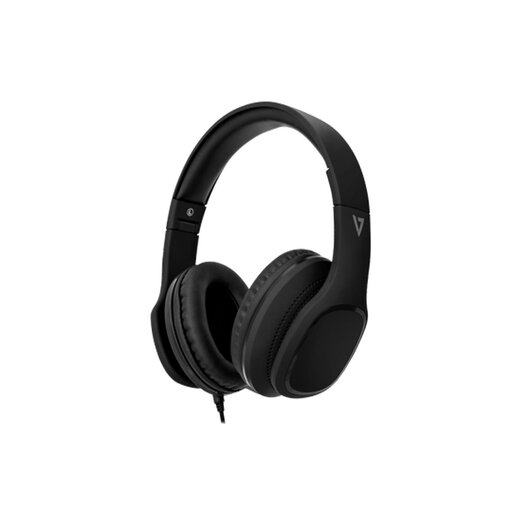
V7 HA701-3EP wired over-ear headphones with inline MEMS microphone
This wired audio option combines headphones and a microphone for seminars and group calls. The product name specifies 40mm drivers and passive noise isolation; passive isolation does not establish that its microphone suppresses room noise. Check that your computer’s 3.5 mm connection supports microphone input.
View on Joybuy
 No image available
LOGITECH ASTRO A10 Gen 2 wired headset, white
A wired headset is worth assessing if you need one accessory for listening and speaking during online sessions. Before choosing this gaming-oriented model for study, check its 3.5 mm connection against your computer and whether your setup needs a splitter cable; do not assume microphone clarity from the product category.
View on Joybuy
 No image available
EMEET All-in-One 4K Webcam with Sony sensor
This camera-and-audio option is relevant to a small-group setup that needs an external webcam, rather than automatically to an individual laptop desk. Its name specifies fixed focus, an adjustable 98° field of view, a four-microphone array and dual speakers. Check whether its framing, placement and privacy controls suit your intended sessions; those features do not establish how it will sound in your room.
View on Joybuy
 No image available
j5create JVU250 HD Webcam with auto and manual focus switch, black
Assess this external camera if your desktop or laptop lacks suitable built-in video. Its name identifies an auto/manual focus switch. Check whether the listed video resolution meets your course’s needs and whether your computer has USB-A or an appropriate adapter; its built-in microphone should not be assumed to solve shared-room noise.
View on Joybuy
Frequently asked questions
Do I need both a headset and an external webcam for online study?
Not necessarily: check your course’s session requirements and whether your existing camera and audio let you participate. The University of Kent permits built-in or additional webcams, microphones and speakers, or a headset with microphone. Add a headset if conversation audio is the problem; consider another camera if your current video setup is unsuitable.
Should I choose a wired or wireless headset?
Choose a wired headset if you want to avoid charging and pairing or need to meet a wired-equipment rule; check its connector against your computer. Wireless may suit a setup where movement or phone use matters, provided your devices and course rules allow it. The Open University excludes Bluetooth and wireless headsets and earphones from its cited online-invigilation setting.
What should I check before buying a headset?
Check your computer’s audio connection and microphone input, then compare them with the headset’s stated connector and any adapter requirements. Read your module and assessment instructions too: The Open University advises students to check module technical requirements before buying equipment.
Is a webcam privacy shutter worth considering?
A physical shutter is worth checking if you want a visible way to cover the camera when it is not in use. It is a feature of particular models—Logitech, for example, lists an integrated shutter on the Brio 100—not a reason by itself to replace a camera that otherwise meets your study needs.


