
24/7 Customer Support

Free returns

Same-day & Next-day Delivery

Quality Guaranteed

Unlock Your Welcome Offers: FREE Delivery | Up to 80% OFF | Free 30-day JoyPlus trial
Download the APP
Buying high-performance gaming laptops and desktop PCs involves more than choosing the largest processor number or the latest graphics label. Serious gamers, esports players, video editors and AI developers need a balanced system that can sustain demanding workloads without compromising storage, cooling, display quality or upgrade potential.
Marketing can make almost any machine sound powerful. The practical approach is to compare the complete specification and identify where a product may fall short of your actual setup.
An RTX graphics card can support advanced ray tracing and AI-assisted upscaling, but performance varies between desktop and laptop versions. Laptop GPUs are affected by power limits, cooling design and chassis size. An RTX 4060 gaming laptop, for example, should not automatically be compared with a desktop RTX 4060 without checking the full configuration.
Also look at graphics memory, display resolution and the games or software you use. A system aimed at 1080p esports does not have the same requirements as a machine for 4K gaming, 3D rendering or local AI workloads.
A 240Hz panel can display up to 240 frames per second, but the computer must generate those frames first. A high refresh rate is most useful when paired with a suitable CPU, GPU and game setting. It may be less valuable than a brighter, higher-resolution or more colour-accurate display for video editing and design work.
Check whether the panel is Full HD, QHD+, WQXGA or 4K, and look for useful details such as 100% sRGB, 100% DCI-P3, OLED technology, HDR support and adaptive synchronisation.
High-performance hardware consumes more power and produces more heat. Gaming laptops often become heavier and louder under sustained load, while desktop PCs may require substantial desk or floor space.
Before buying, check the supplied power adapter, cooling design, ventilation clearance and weight. A 24kg tower is not convenient to move regularly, and a 2.9kg laptop may be less suitable for daily commuting than its product photos suggest.
For modern gaming and multitasking, compare core count, thread count and boost frequency, rather than relying only on a processor family name. More cores can help with streaming, video exports, software development and 3D applications, while high single-core performance remains important in many games.
Memory capacity also affects how comfortably a system handles multiple applications:
Check whether memory is upgradeable. Some laptops use soldered memory, while desktop PCs generally offer more flexibility.
For RTX gaming laptops and RTX gaming PCs, compare the GPU model, dedicated graphics memory and intended resolution. A higher-tier graphics card is more appropriate for ray-traced games, high-refresh QHD play and 4K projects, but the rest of the system must support it.
For 4K gaming PCs, check:
For competitive gaming, a 144Hz or 240Hz display can improve motion clarity when the system produces sufficiently high frame rates. For creative work, resolution and colour coverage may be more important than refresh rate.
A 1TB NVMe SSD offers quick boot times and space for applications and several large games. A 2TB or 4TB SSD is more practical for users storing video footage, 3D assets, game libraries or AI models.
Desktop buyers should also check the motherboard, spare M.2 slots, memory limit, power supply and case dimensions. Laptop buyers should confirm the number of SSD slots, external display support, USB4 or Thunderbolt connectivity, card readers and network standards such as Wi-Fi 6E or Wi-Fi 7.

Why This Fits Their Persona: A practical UK-layout laptop for players who want a capable everyday gaming machine without moving to a larger premium configuration.
Its RTX 5050 Laptop GPU, 16GB DDR5 memory and 144Hz Full HD display provide clearly stated specifications rather than relying on refresh rate claims alone.
1TB PCIe 4.0 NVMe SSD, 100% sRGB display coverage and HDMI 2.1 connectivity.
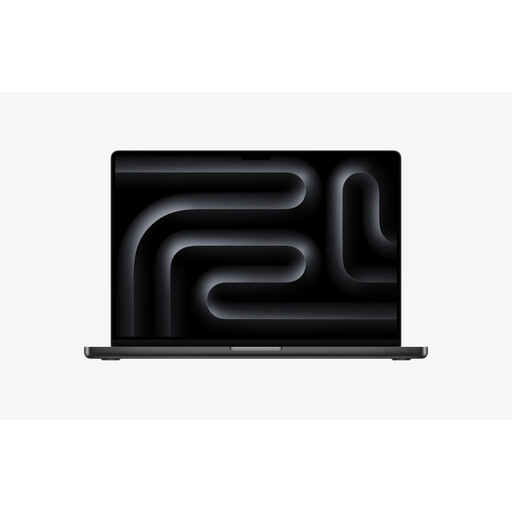
Why This Fits Their Persona: Suitable for professionals who prioritise a high-resolution display, macOS workflows, substantial memory and portable creative performance.
The specification identifies 48GB unified memory, a 2TB SSD and a 40-core integrated GPU, making the configuration easier to assess for demanding workflows.
Liquid Retina XDR display, three Thunderbolt 5 ports, HDMI and SDXC card slot.
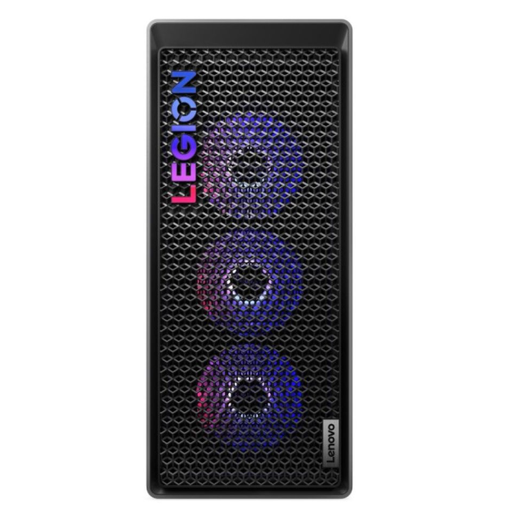
Why This Fits Their Persona: Designed for users who need desktop graphics power for gaming, streaming, editing and longer-term component upgrades.
The 34-litre tower includes an 850W power supply, tool-less access and support for up to 128GB of DDR5 memory.
RTX 5070 Ti with 16GB GDDR7, Intel Core Ultra 7 265K and 32GB DDR5 memory.

Why This Fits Their Persona: A strong match for video editors, 3D designers and AI-focused users who need a detailed touchscreen and dedicated graphics.
Its 4K OLED resolution, 64GB memory and RTX 5080 Laptop GPU are specified alongside the processor and storage, reducing the risk of judging the device by one headline feature.
16-inch 3840 × 2400 OLED touchscreen, 2TB SSD and Wi-Fi 7 connectivity.
We have compiled a complete, real-time list of products that fully satisfy these strict selection criteria and UK safety regulations.
After delivery, update Windows, firmware and graphics drivers before installing large games or professional software. Place desktop PCs where front and rear airflow remain unobstructed. Gaming laptops should sit on a hard, flat surface rather than bedding or thick fabric.
Use a surge-protected UK socket for desktop equipment, retain packaging until the system has been checked and confirm the warranty process before making hardware changes. For sustained workloads, monitor temperatures and fan behaviour rather than assuming a performance mode is suitable for every task.
Yes, provided the laptop has enough memory, SSD capacity and GPU acceleration for your software. A configuration with 32GB or 64GB RAM, a high-resolution colour-accurate display and a dedicated GPU is more suitable for demanding timelines, 3D work and local AI applications than an entry-level gaming laptop.
Useful service life depends on software demands, resolution and upgrade options. A desktop with replaceable memory, spare storage slots and a capable power supply can be refreshed more easily than a sealed laptop. Keeping drivers, cooling filters and operating-system updates current can also support stable long-term use.
They can use more electricity than office-focused systems, especially during gaming or rendering. Actual running cost depends on power draw, usage hours and your electricity tariff. Check the supplied adapter or desktop power supply, use balanced modes for lighter work and shut the system down when it is not required.